ssis , dynamics-crm , microsoft , tips , C#
[Dataverse] Kingswaysoft - The HTTP request is unauthorized with client authentication scheme 'Anonymous'

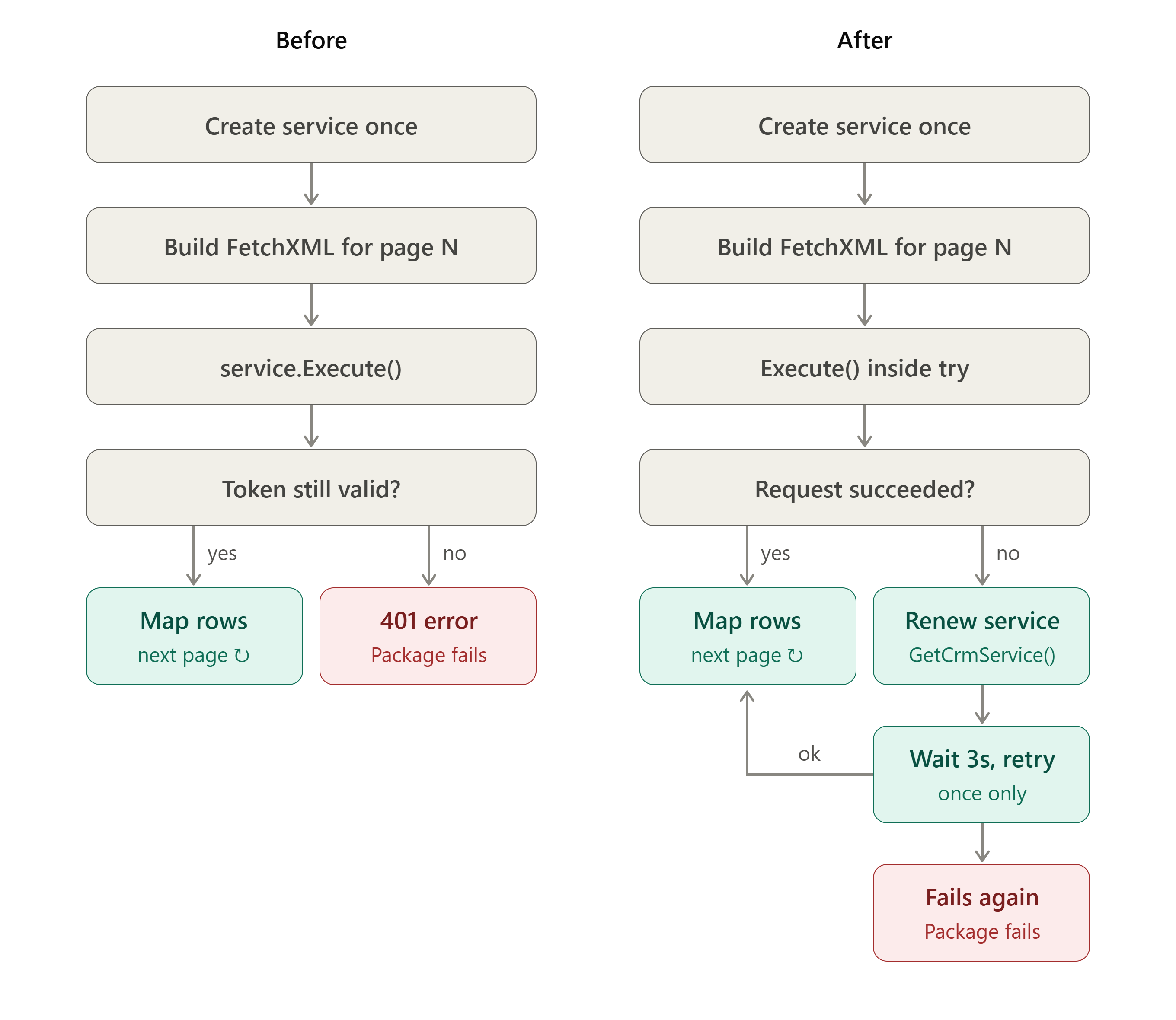
I recently encountered an authorization error when using KingswaySoft's IOrganizationService in a Script Component or Script Task:
The HTTP request is unauthorized with client authentication scheme 'Anonymous'. The authentication header received from the server was 'Bearer authorization_uri=https://login.microsoftonline.com//oauth2/authorize, resource_id='.
The original implementation worked, but the problem appeared after the Dataverse instance started processing larger volumes of data. My investigation indicated that the authentication token had expired. The custom code that created the IOrganizationService instance did not include logic to refresh it automatically.
Original Code
var connection = Variables.CrmConnectionString.Replace("ServiceEndpoint=WebAPI", "ServiceEndpoint=Soap2011");
var crmConnection = new CrmConnection(connection);

var service = (IOrganizationService)crmConnection.GetCrmService();

var pageNumber = 1;
string pagingCookie = null;
var moreRecords = true;

while (moreRecords)
{
	var fetchXml = string.Format(@"<fetch count='500' page='{0}' paging-cookie='{1}'>
				  <entity name='contact'>
					<attribute name='contactid' />
					<attribute name='lastname' />
					<attribute name='modifiedon' />
					<attribute name='statecode' />
					<filter>
					  <condition attribute='statecode' operator='eq' value='0' />
					</filter>
				  </entity>
				</fetch>", pageNumber, System.Security.SecurityElement.Escape(pagingCookie));

	var retrieveMultipeRequest = new RetrieveMultipleRequest { Query = new FetchExpression(fetchXml) };
	retrieveMultipeRequest.Parameters["UnMaskedData"] = true;
	RetrieveMultipleResponse response = (RetrieveMultipleResponse)service.Execute(retrieveMultipeRequest);
	}

	// Do mapping logic

	moreRecords = response.EntityCollection.MoreRecords;
	pagingCookie = response.EntityCollection.PagingCookie;
	pageNumber++;
}
This code follows a straightforward pagination pattern: it retrieves Contact records with FetchXML and processes one page at a time. However, when the result set is large, pagination can keep the process running for a long time. As the operation continues, the authentication token eventually expires, and subsequent requests can fail.
Fix
To address the issue, I renewed the IOrganizationService instance and added a retry mechanism when an exception occurred:
var connection = Variables.CrmConnectionString.Replace("ServiceEndpoint=WebAPI", "ServiceEndpoint=Soap2011");
var crmConnection = new CrmConnection(connection);

var service = (IOrganizationService)crmConnection.GetCrmService();

var pageNumber = 1;
string pagingCookie = null;
var moreRecords = true;

while (moreRecords)
{
	var fetchXml = string.Format(@"<fetch count='500' page='{0}' paging-cookie='{1}'>
				  <entity name='contact'>
					<attribute name='contactid' />
					<attribute name='lastname' />
					<attribute name='modifiedon' />
					<attribute name='statecode' />
					<filter>
					  <condition attribute='statecode' operator='eq' value='0' />
					</filter>
				  </entity>
				</fetch>", pageNumber, System.Security.SecurityElement.Escape(pagingCookie));

	var retrieveMultipeRequest = new RetrieveMultipleRequest { Query = new FetchExpression(fetchXml) };
	retrieveMultipeRequest.Parameters["UnMaskedData"] = true;
	RetrieveMultipleResponse response;
	try
	{
		response = (RetrieveMultipleResponse)service.Execute(retrieveMultipeRequest);
	}
	catch
	{
		// If any error, try to renew the CRM Service and retry the operation
		service = (IOrganizationService)crmConnection.GetCrmService();
		Thread.Sleep(3000);

		response = (RetrieveMultipleResponse)service.Execute(retrieveMultipeRequest);
	}

	// Do mapping logic

	moreRecords = response.EntityCollection.MoreRecords;
	pagingCookie = response.EntityCollection.PagingCookie;
	pageNumber++;
}
In the
catchblock, you can also add the specific error instead of keeping it generic.
Summary
- When implemented, KingswaySoft did not support the UnMasked read functionality. Writing custom code was therefore necessary.
- Refactoring the solution to use the standard KingswaySoft functionality could reduce complexity, but it would also require rework of the existing mapping logic.
- If custom code in a Script Component or Script Task is the only available option, test it with large data volumes to confirm that it handles long-running operations and pagination reliably.
Happy CRM-ing!🚀
Leave a comment
Your comment is sent privately to the author and isn't published on the site.