dynamics-crm , kingswaysoft , powerplatform , tips
Inside KingswaySoft's Dataverse Destination - Optional Settings: What You Need to Know

Today, we will learn how the Optional Setting features in KingswaySoft translate into HTTP Request-Response (with the help of Fiddler). The purpose of this document is to describe system behavior, to prevent performance degradation, and to support effective feature utilization. Enjoy!
Data Flow Setup
For demo purposes, I created a simple Excel to be ingested and mapped to the Dataverse/CDS/CRM Destination Component:
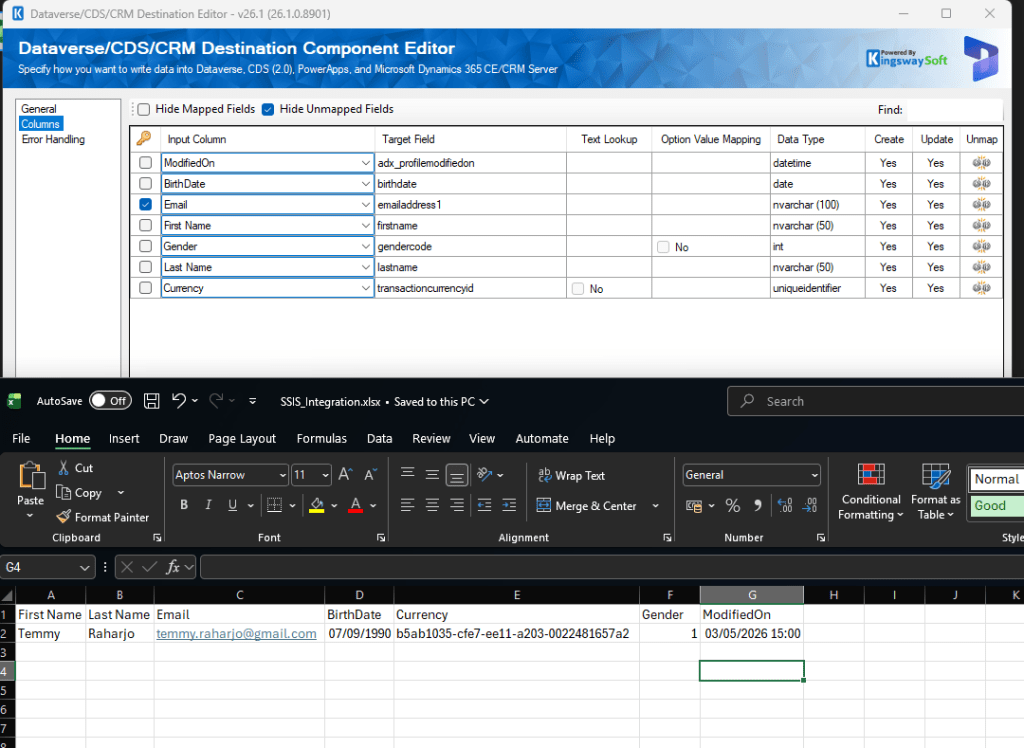
Mapping to Dataverse
Note: The Application User to run this package is already being set to GMT+8 (Singapore/Kuala Lumpur Timezone).
Before we try the available options, the following request was the original JSON when we tried to update to Dataverse:
--batch_61ebbbdb-7716-46cc-b1c9-4fba6a7c53bd
Content-Type: application/http
Content-Transfer-Encoding: binary
Content-ID: 1

PATCH https://yourcrmurl.crm5.dynamics.com/api/data/v9.2/contacts(ea8ddbf6-3d46-f111-bec7-6045bd5a1bec) HTTP/1.1
Content-Type: application/json;type=entry
MSCRM.SuppressDuplicateDetection: True
AutoDisassociate: true
If-Match: *

{
  "firstname": "Temmy",
  "birthdate": "1990-09-07",
  "gendercode": 1,
  "lastname": "Raharjo",
  "adx_profilemodifiedon": "2026-05-03T07:00:00Z",
  "transactioncurrencyid@odata.bind": "/transactioncurrencies(b5ab1035-cfe7-ee11-a203-0022481657a2)",
  "contactid": "ea8ddbf6-3d46-f111-bec7-6045bd5a1bec"
}
--batch_61ebbbdb-7716-46cc-b1c9-4fba6a7c53bd
Content-Type: application/http
Content-Transfer-Encoding: binary
Content-ID: 2

PATCH https://yourcrmurl.crm5.dynamics.com/api/data/v9.2/contacts(9c30a3ff-4b46-f111-bec7-6045bd5a1bec) HTTP/1.1
Content-Type: application/json;type=entry
MSCRM.SuppressDuplicateDetection: True
AutoDisassociate: true
If-Match: *

{
  "firstname": "John",
  "birthdate": "1990-02-17",
  "gendercode": 2,
  "lastname": "Doe",
  "adx_profilemodifiedon": "2026-05-03T07:00:00Z",
  "transactioncurrencyid@odata.bind": "/transactioncurrencies(b5ab1035-cfe7-ee11-a203-0022481657a2)",
  "contactid": "9c30a3ff-4b46-f111-bec7-6045bd5a1bec"
}
--batch_61ebbbdb-7716-46cc-b1c9-4fba6a7c53bd--
Send datetime Values in UTC Format
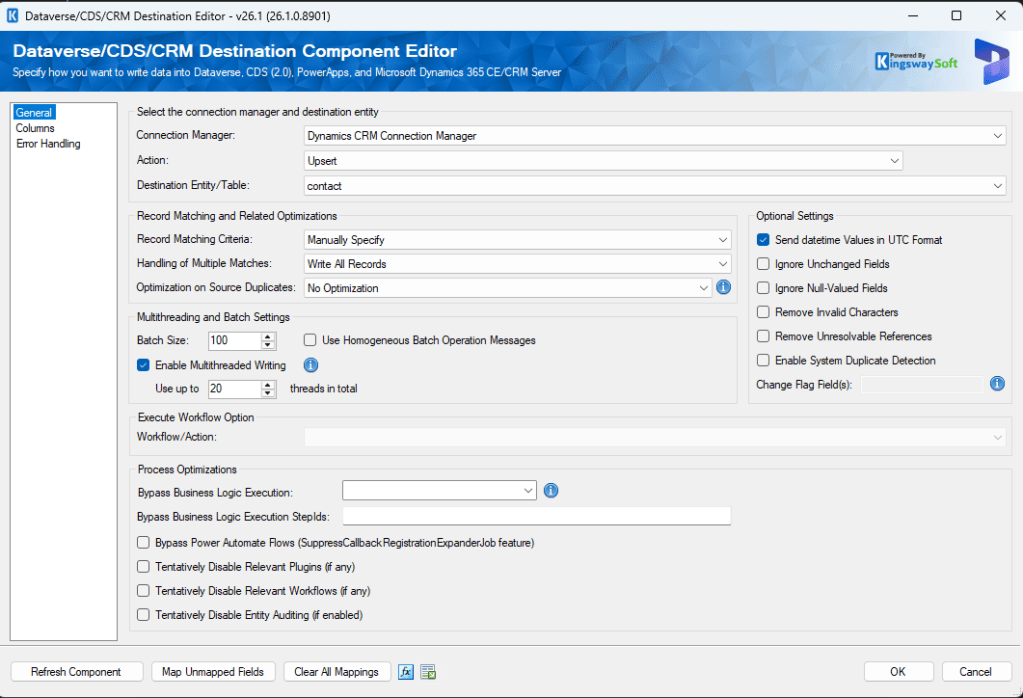
Send datetime Values in UTC Format
The following request was the result of checking the feature:
--batch_f38e2503-6ad8-4737-8873-1780d067ec07
Content-Type: application/http
Content-Transfer-Encoding: binary
Content-ID: 1

PATCH https://yourcrmurl.crm5.dynamics.com/api/data/v9.2/contacts(ea8ddbf6-3d46-f111-bec7-6045bd5a1bec) HTTP/1.1
Content-Type: application/json;type=entry
MSCRM.SuppressDuplicateDetection: True
AutoDisassociate: true
If-Match: *

{
  "firstname": "Temmy",
  "birthdate": "1990-09-07",
  "gendercode": 1,
  "lastname": "Raharjo",
  "adx_profilemodifiedon": "2026-05-03T15:00:00Z",
  "transactioncurrencyid@odata.bind": "/transactioncurrencies(b5ab1035-cfe7-ee11-a203-0022481657a2)",
  "contactid": "ea8ddbf6-3d46-f111-bec7-6045bd5a1bec"
}
--batch_f38e2503-6ad8-4737-8873-1780d067ec07
Content-Type: application/http
Content-Transfer-Encoding: binary
Content-ID: 2

PATCH https://yourcrmurl.crm5.dynamics.com/api/data/v9.2/contacts(9c30a3ff-4b46-f111-bec7-6045bd5a1bec) HTTP/1.1
Content-Type: application/json;type=entry
MSCRM.SuppressDuplicateDetection: True
AutoDisassociate: true
If-Match: *

{
  "firstname": "John",
  "birthdate": "1990-02-17",
  "gendercode": 2,
  "lastname": "Doe",
  "adx_profilemodifiedon": "2026-05-03T15:00:00Z",
  "transactioncurrencyid@odata.bind": "/transactioncurrencies(b5ab1035-cfe7-ee11-a203-0022481657a2)",
  "contactid": "9c30a3ff-4b46-f111-bec7-6045bd5a1bec"
}
--batch_f38e2503-6ad8-4737-8873-1780d067ec07--
As you can see from the above, the effect of turning it on was that DateTime values would be changed for attributes that weren't set as Date or Timezone independent.
Ignore Unchanged Fields
Below, I'm changing the Last Name of the two data points that I have:
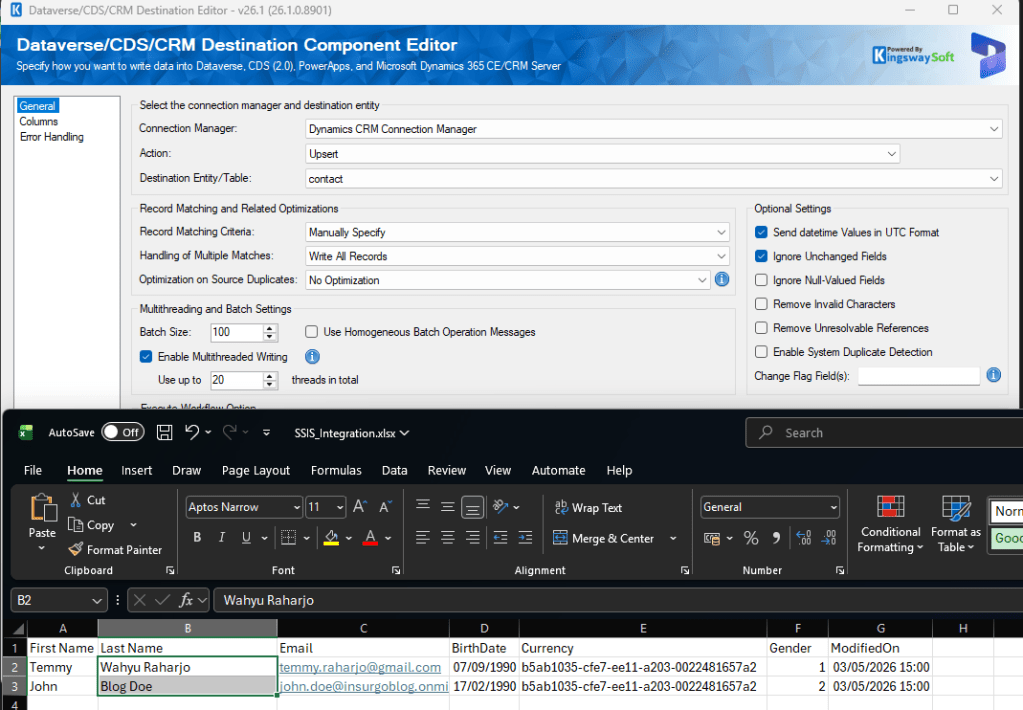
For this feature to work, KingswaySoft will create a batch request to retrieve the data based on the attributes that we used:
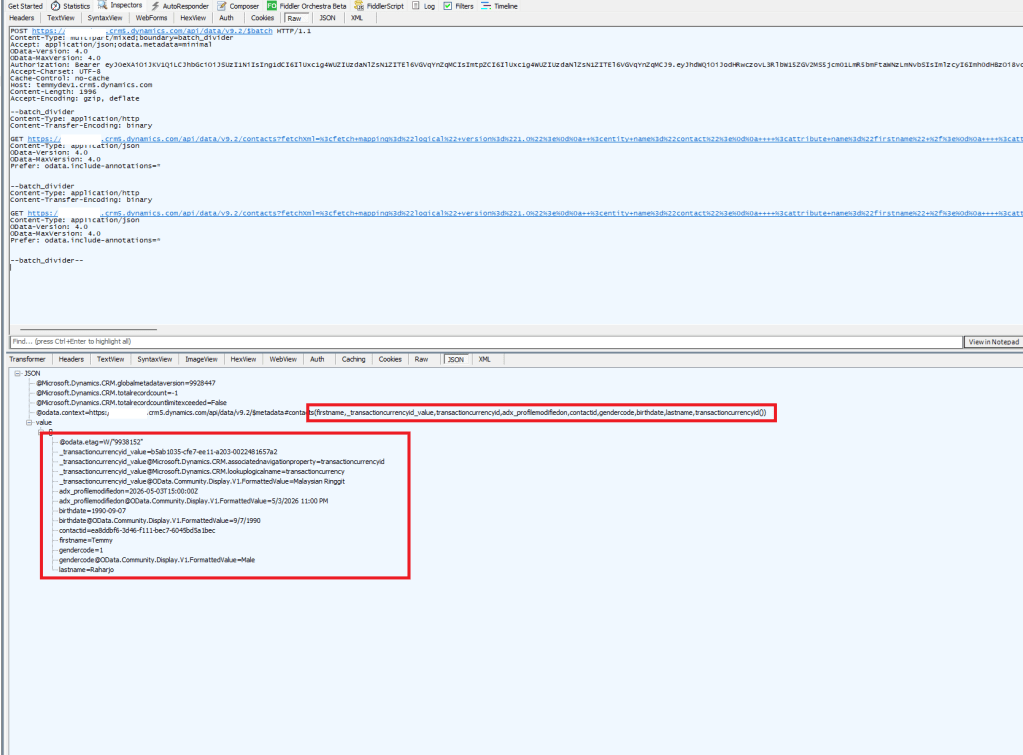
Retrieve data in the background to check whether the data has been changed
Then, based on the data retrieved, the system will compare the request change vs the current values and generate the request for only the changes:
PATCH https://yourcrmurl.crm5.dynamics.com/api/data/v9.2/contacts(ea8ddbf6-3d46-f111-bec7-6045bd5a1bec) HTTP/1.1
Content-Type: application/json;type=entry
MSCRM.SuppressDuplicateDetection: True
AutoDisassociate: true
If-Match: *

{
  "lastname": "Wahyu Raharjo",
  "adx_profilemodifiedon": "2026-05-03T15:00:00Z",
  "contactid": "ea8ddbf6-3d46-f111-bec7-6045bd5a1bec"
}
--batch_b51558e2-ffa3-48ea-a9e2-56966ce76f2b
Content-Type: application/http
Content-Transfer-Encoding: binary
Content-ID: 2

PATCH https://yourcrmurl.crm5.dynamics.com/api/data/v9.2/contacts(9c30a3ff-4b46-f111-bec7-6045bd5a1bec) HTTP/1.1
Content-Type: application/json;type=entry
MSCRM.SuppressDuplicateDetection: True
AutoDisassociate: true
If-Match: *

{
  "lastname": "Blog Doe",
  "adx_profilemodifiedon": "2026-05-03T15:00:00Z",
  "contactid": "9c30a3ff-4b46-f111-bec7-6045bd5a1bec"
}
--batch_b51558e2-ffa3-48ea-a9e2-56966ce76f2b--
Based on this, meaning, if you have 500k requests, the system will automatically retrieve 500k data first to generate the request changes, and it costs more time and resources to process this.
Ignore Null-Valued Fields
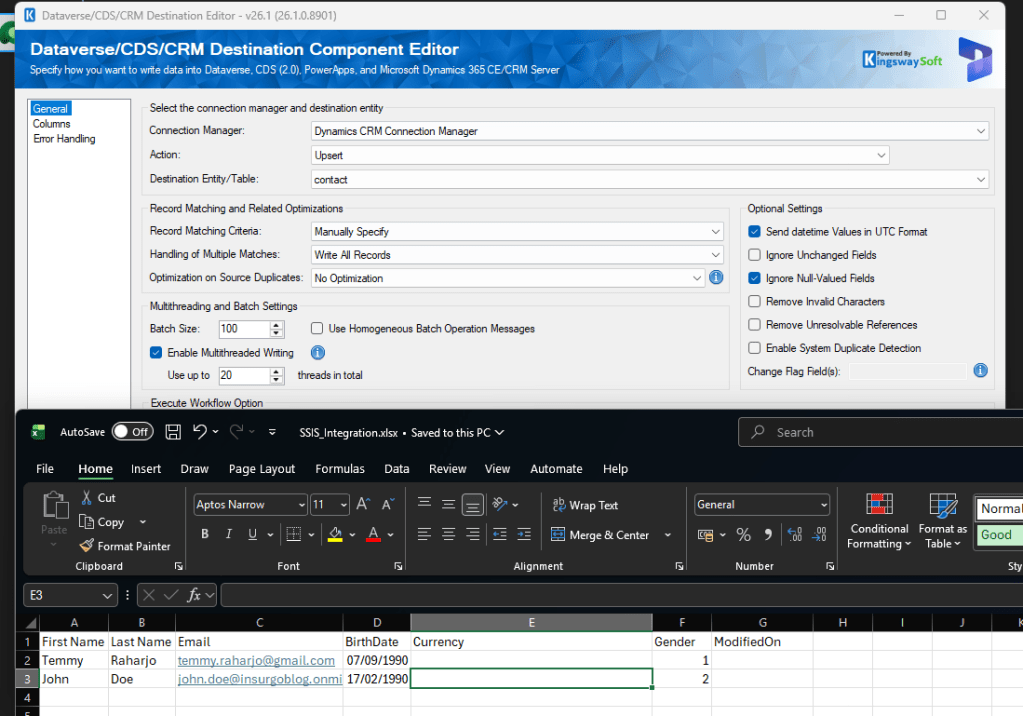
Ignore NULL Values (Currency and ModifiedOn)
If you are using Ignore Null-Valued Fields, it will only send the attributes that have values:
--batch_0f6c2f2b-f02a-489a-9fce-fee04ac8cd76
Content-Type: application/http
Content-Transfer-Encoding: binary
Content-ID: 1

PATCH https://yourcrmurl.crm5.dynamics.com/api/data/v9.2/contacts(ea8ddbf6-3d46-f111-bec7-6045bd5a1bec) HTTP/1.1
Content-Type: application/json;type=entry
MSCRM.SuppressDuplicateDetection: True
AutoDisassociate: true
If-Match: *

{
  "firstname": "Temmy",
  "birthdate": "1990-09-07",
  "gendercode": 1,
  "lastname": "Raharjo",
  "contactid": "ea8ddbf6-3d46-f111-bec7-6045bd5a1bec"
}
--batch_0f6c2f2b-f02a-489a-9fce-fee04ac8cd76
Content-Type: application/http
Content-Transfer-Encoding: binary
Content-ID: 2

PATCH https://yourcrmurl.crm5.dynamics.com/api/data/v9.2/contacts(9c30a3ff-4b46-f111-bec7-6045bd5a1bec) HTTP/1.1
Content-Type: application/json;type=entry
MSCRM.SuppressDuplicateDetection: True
AutoDisassociate: true
If-Match: *

{
  "firstname": "John",
  "birthdate": "1990-02-17",
  "gendercode": 2,
  "lastname": "Doe",
  "contactid": "9c30a3ff-4b46-f111-bec7-6045bd5a1bec"
}
--batch_0f6c2f2b-f02a-489a-9fce-fee04ac8cd76--
Use this if you want to push only columns that have values (skipping columns with NULL values, or you don't want to push NULL changes into the Dataverse).
Remove Invalid Characters
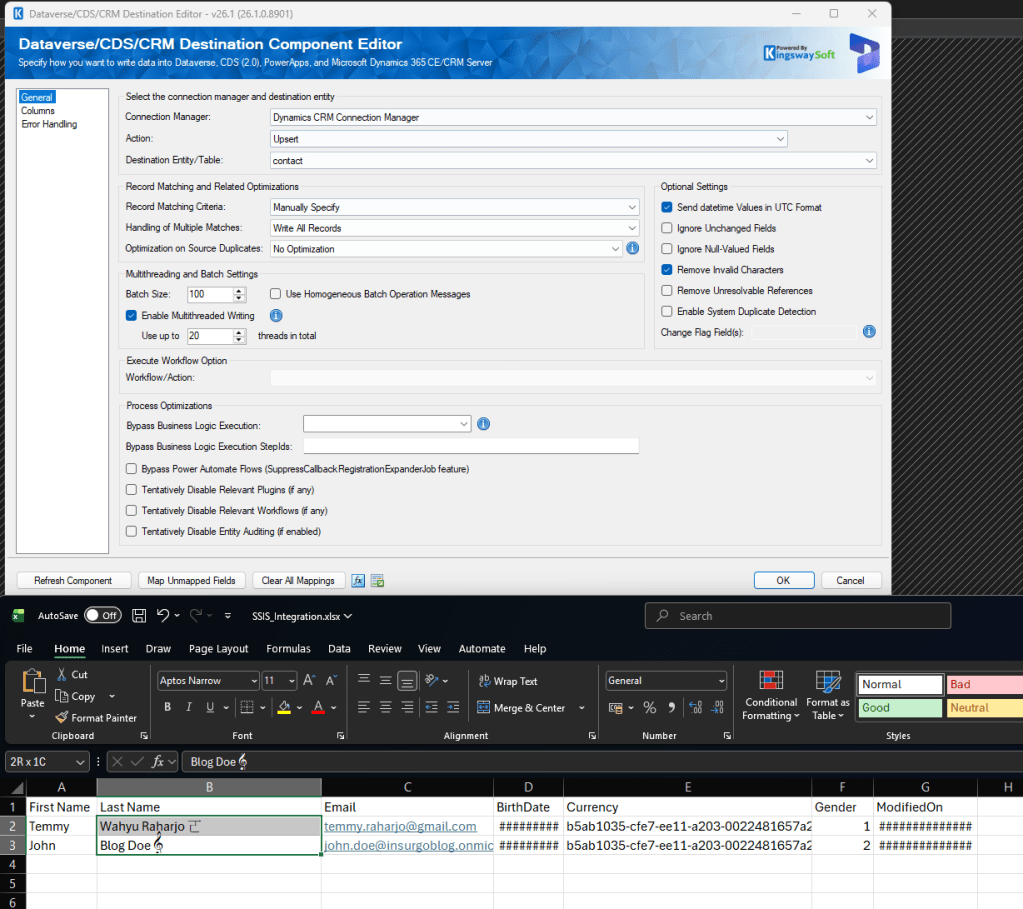
Remove Invalid Characters
When you use this option, it will scan the values that will be sent to Dataverse and deleted it automatically. For example, from the above Excel, it translates into the following request:
--batch_37171916-f7f2-4d0d-bcf4-9f785bfa5430
Content-Type: application/http
Content-Transfer-Encoding: binary
Content-ID: 1

PATCH https://yourcrmurl.crm5.dynamics.com/api/data/v9.2/contacts(ea8ddbf6-3d46-f111-bec7-6045bd5a1bec) HTTP/1.1
Content-Type: application/json;type=entry
MSCRM.SuppressDuplicateDetection: True
AutoDisassociate: true
If-Match: *

{
  "firstname": "Temmy",
  "birthdate": "1990-09-07",
  "gendercode": 1,
  "lastname": "Wahyu Raharjo ",
  "adx_profilemodifiedon": "2026-05-03T15:00:00Z",
  "transactioncurrencyid@odata.bind": "/transactioncurrencies(b5ab1035-cfe7-ee11-a203-0022481657a2)",
  "contactid": "ea8ddbf6-3d46-f111-bec7-6045bd5a1bec"
}
--batch_37171916-f7f2-4d0d-bcf4-9f785bfa5430
Content-Type: application/http
Content-Transfer-Encoding: binary
Content-ID: 2

PATCH https://yourcrmurl.crm5.dynamics.com/api/data/v9.2/contacts(9c30a3ff-4b46-f111-bec7-6045bd5a1bec) HTTP/1.1
Content-Type: application/json;type=entry
MSCRM.SuppressDuplicateDetection: True
AutoDisassociate: true
If-Match: *

{
  "firstname": "John",
  "birthdate": "1990-02-17",
  "gendercode": 2,
  "lastname": "Blog Doe ",
  "adx_profilemodifiedon": "2026-05-03T15:00:00Z",
  "transactioncurrencyid@odata.bind": "/transactioncurrencies(b5ab1035-cfe7-ee11-a203-0022481657a2)",
  "contactid": "9c30a3ff-4b46-f111-bec7-6045bd5a1bec"
}
--batch_37171916-f7f2-4d0d-bcf4-9f785bfa5430--
Remove Unresolvable References
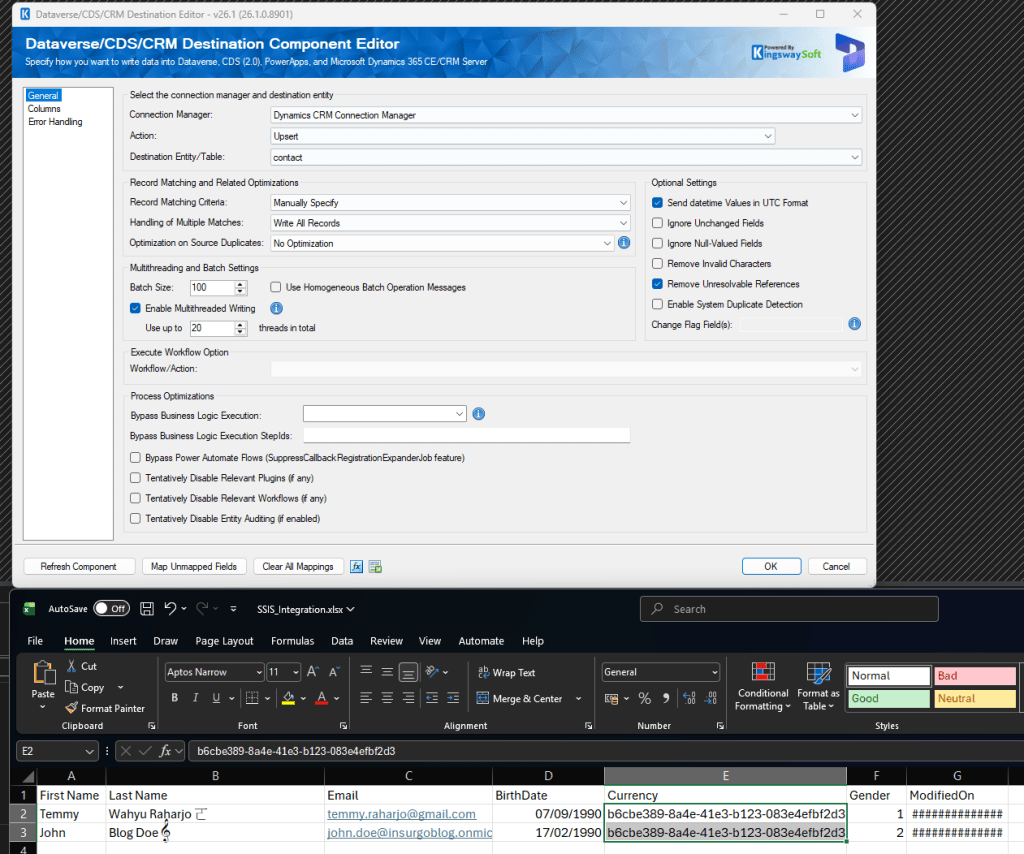
Remove Unresolvable References
When we activate this, the system will automatically create a data retrieval request with every GUID/Table that we want to use:
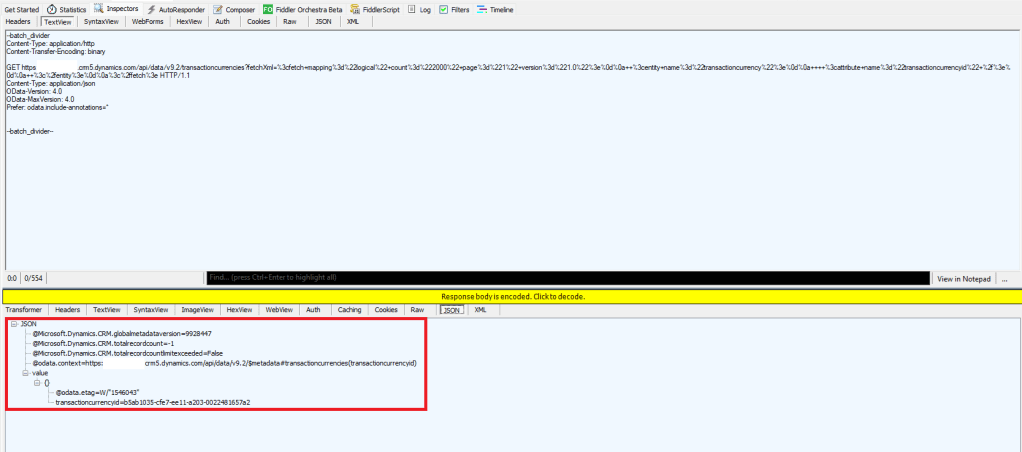
If the system detects that the value we are using is invalid, the system will automatically remove the invalid references:
--batch_5ccac47e-ffc5-4765-b12d-f018f3f90e5b
Content-Type: application/http
Content-Transfer-Encoding: binary
Content-ID: 1

PATCH https://yourcrmurl.crm5.dynamics.com/api/data/v9.2/contacts(ea8ddbf6-3d46-f111-bec7-6045bd5a1bec) HTTP/1.1
Content-Type: application/json;type=entry
MSCRM.SuppressDuplicateDetection: True
AutoDisassociate: true
If-Match: *

{
  "firstname": "Temmy",
  "birthdate": "1990-09-07",
  "gendercode": 1,
  "lastname": "Wahyu Raharjo 𠀀",
  "adx_profilemodifiedon": "2026-05-03T15:00:00Z",
  "contactid": "ea8ddbf6-3d46-f111-bec7-6045bd5a1bec"
}
--batch_5ccac47e-ffc5-4765-b12d-f018f3f90e5b
Content-Type: application/http
Content-Transfer-Encoding: binary
Content-ID: 2

PATCH https://yourcrmurl.crm5.dynamics.com/api/data/v9.2/contacts(9c30a3ff-4b46-f111-bec7-6045bd5a1bec) HTTP/1.1
Content-Type: application/json;type=entry
MSCRM.SuppressDuplicateDetection: True
AutoDisassociate: true
If-Match: *

{
  "firstname": "John",
  "birthdate": "1990-02-17",
  "gendercode": 2,
  "lastname": "Blog Doe 𝄞",
  "adx_profilemodifiedon": "2026-05-03T15:00:00Z",
  "contactid": "9c30a3ff-4b46-f111-bec7-6045bd5a1bec"
}
--batch_5ccac47e-ffc5-4765-b12d-f018f3f90e5b--
Enable System Duplicate Detection
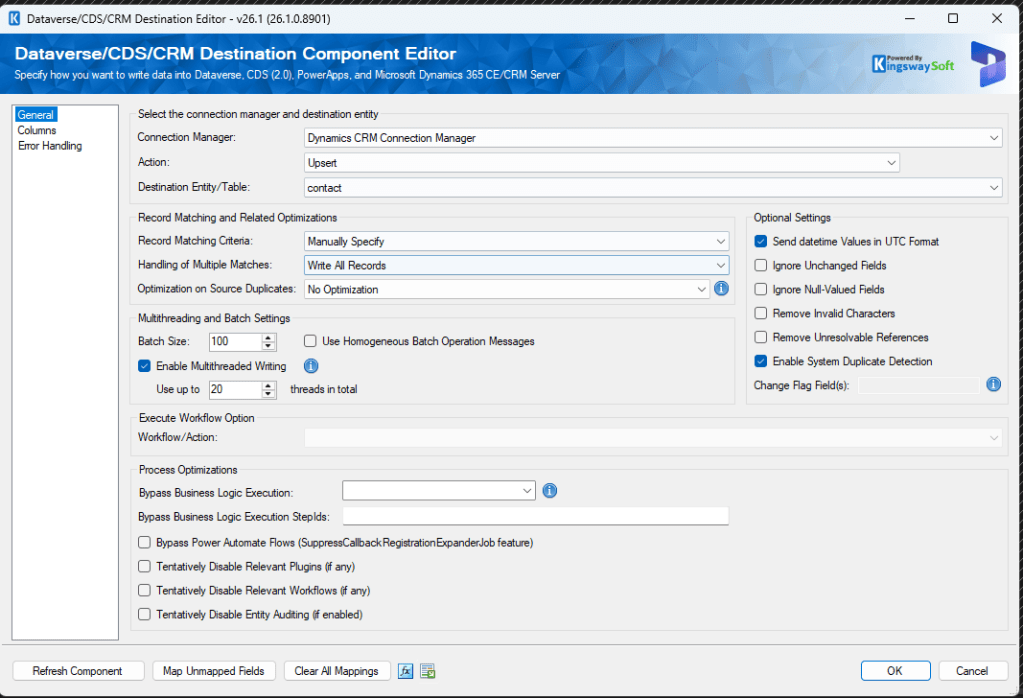
Enable System Duplicate Detection
For Enable System Duplicate Detection, the system will change MSCRM.SuppressDuplicateDetection to False:
--batch_3354d0d2-ab94-4fde-b313-213a531e485c
Content-Type: application/http
Content-Transfer-Encoding: binary
Content-ID: 1

PATCH https://yourcrmurl.crm5.dynamics.com/api/data/v9.2/contacts(ea8ddbf6-3d46-f111-bec7-6045bd5a1bec) HTTP/1.1
Content-Type: application/json;type=entry
MSCRM.SuppressDuplicateDetection: False
AutoDisassociate: true
If-Match: *

{
  "firstname": "Temmy",
  "birthdate": "1990-09-07",
  "gendercode": 1,
  "lastname": "Wahyu Raharjo 𠀀",
  "adx_profilemodifiedon": "2026-05-03T15:00:00Z",
  "transactioncurrencyid@odata.bind": "/transactioncurrencies(b5ab1035-cfe7-ee11-a203-0022481657a2)",
  "contactid": "ea8ddbf6-3d46-f111-bec7-6045bd5a1bec"
}
--batch_3354d0d2-ab94-4fde-b313-213a531e485c
Content-Type: application/http
Content-Transfer-Encoding: binary
Content-ID: 2

PATCH https://yourcrmurl.crm5.dynamics.com/api/data/v9.2/contacts(9c30a3ff-4b46-f111-bec7-6045bd5a1bec) HTTP/1.1
Content-Type: application/json;type=entry
MSCRM.SuppressDuplicateDetection: False
AutoDisassociate: true
If-Match: *

{
  "firstname": "John",
  "birthdate": "1990-02-17",
  "gendercode": 2,
  "lastname": "Blog Doe 𝄞",
  "adx_profilemodifiedon": "2026-05-03T15:00:00Z",
  "transactioncurrencyid@odata.bind": "/transactioncurrencies(b5ab1035-cfe7-ee11-a203-0022481657a2)",
  "contactid": "9c30a3ff-4b46-f111-bec7-6045bd5a1bec"
}
--batch_3354d0d2-ab94-4fde-b313-213a531e485c--
Change Flag Field(s)
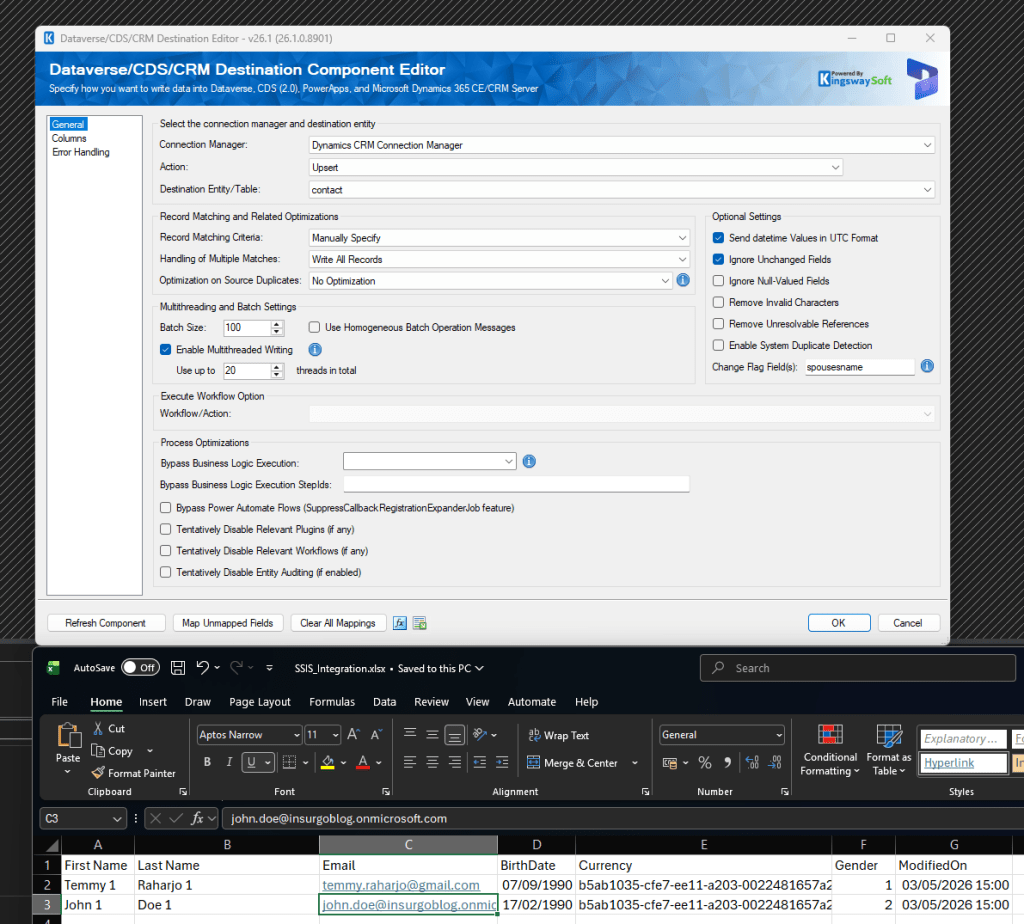
Change Flag Field(s)
When we set Ignore Unchanged Fields to true, we will get another option to enable Change Flag Field(s). Based on the definition, basically, the system will push the changes to the Change Flag Field(s) if it detects changes on the row level. For example, we have 2 attributes: First Name and Last Name. The system will automatically retrieve these 2 attributes first. If the request has no changes, the system will not generating $Batch to update. The purpose of it is actually to avoid infinite looping when doing integration. But, in reality, it's a bit tricky, as it appears not to adhere to some data types (in my sample, if I send a DateTime, it will always force the DateTime to be sent). Hence, the Change Flag Field(s) are always updated. Therefore, I suggest you skip this function, as it is unreliable at this point in time (in my opinion).
Summary
So, the below are the key takeaways in my opinion:
- Remove Invalid Characters, Send datetime Values in UTC Format, and Ignore Null-Valued Fields are features to change the values to be sent (not an expensive operation). There might be an additional request to retrieve Entity metadata to pull DateTime behaviours to apply the changes on a specific condition (you might be interested in reading this blog post of mine).
- Ignore Unchanged Fields works by retrieving all the data before the changes. This operation can be a heavy procedure depends on the number of rows and columns to be retrieved.
- The Enable System Duplicate Detection just changes the header operation.
- Remove Unresolvable References works by retrieving all the combinations of tables + GUIDs. If the system can't find it in the Dataverse, it will automatically remove the value inside the request. This operation can be a heavy procedure depends on the combination of Tables + GUIDs!
Hope this enriches your knowledge, and happy CRM-ing! 🚀
Leave a comment
Your comment is sent privately to the author and isn't published on the site.