dynamics-crm , Javascript , modeldrivenapps
MDA - Adding Record-Level Access Checks to Ribbon Buttons

When customizing a ribbon button, it's common to scope the visibility logic entirely to business conditions. For example, the Process Order button should only appear when the record's status is Ready to Process and at least one related Order Detail exists. Those conditions are usually the extent of what gets implemented, since they map directly to the functional requirement as written. What's often missing is a check on whether the current user actually has Edit (Write) access to the record. A status and data-driven rule doesn't account for security roles, sharing, or access hierarchy at all, so a button can be technically "correct" by business logic while still being clickable by a user who has no permission to act on it. The snippet below shows how to retrieve that access right so you can fold it into the same enable rule.
var AccessUtils = AccessUtils || {};

(function () {
    const editAccessRights = 'WriteAccess';

    this.checkUserAccess = function (userId, entityLogicalName, recordId) {
        const req = {
            entity: { entityType: "systemuser", id: userId },
            Target: { entityType: entityLogicalName, id: recordId },
            getMetadata: function () {
                return {
                    boundParameter: "entity",
                    parameterTypes: {
                        entity: { typeName: "mscrm.systemuser", structuralProperty: 5 },
                        Target: { typeName: `mscrm.${entityLogicalName}`, structuralProperty: 5 }
                    },
                    operationType: 1, // function
                    operationName: "RetrievePrincipalAccess"
                };
            }
        };
        return Xrm.WebApi.online.execute(req).then(r => r.json())
            .then(result => {
                {
                    const accessRights = result.AccessRights || "";
                    const rightsArray = accessRights.split(",").map(r => r.trim());

                    return rightsArray;
                }
            });
    };

    this.CheckCurrentUserAccessOfSpecificRecord = function (entityLogicalName, recordId) {
        const userId = Xrm.Utility.getGlobalContext().userSettings.userId;
        return this.checkUserAccess(userId, entityLogicalName, recordId);
    };

    this.CheckCurrentUserEditAccessOfCurrentRecord = function () {
        const userId = Xrm.Utility.getGlobalContext().userSettings.userId;
        const entityLogicalName = Xrm.Page.data.entity.getEntityName();
        const recordId = Xrm.Page.data.entity.getId();
        return this.checkUserAccess(userId, entityLogicalName, recordId)
            .then(accessRights => (accessRights.filter(e => e === editAccessRights)).length !== 0);
    }
}).apply(AccessUtils);
As you can see, the main functionality of how the code works is by calling Dataverse RetrievePrincipalAccess. The return value is actually a string of the Access of the records. Hence, we add logic to split by ',' and trim it. I also added several extension functions, such as CheckCurrentUserEditAccessOfCurrentRecord, which retrieves the current user's edit access for the record currently open. Feel free to add similar functions based on your own development needs.
Demo
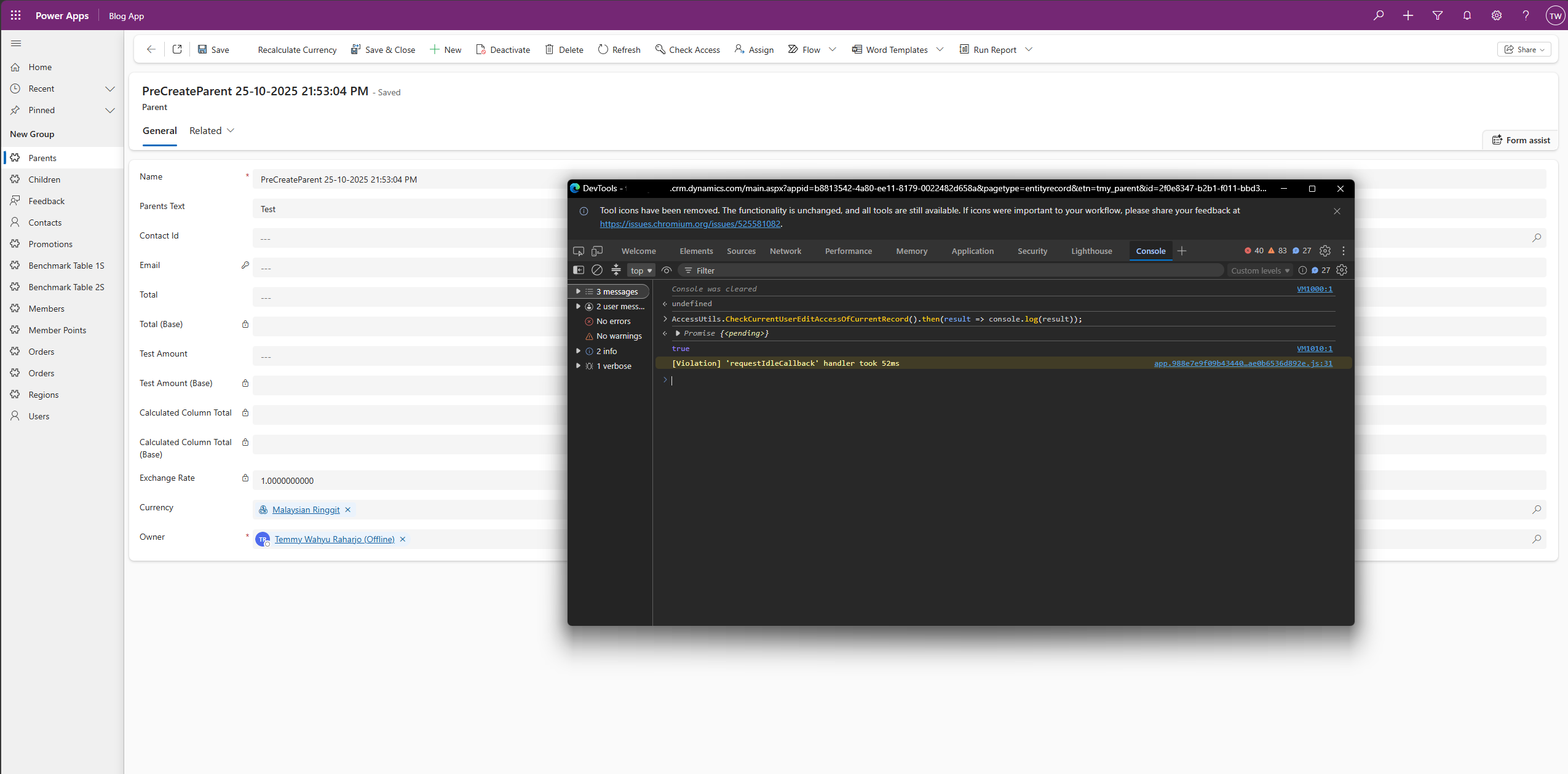
Here is how to use it (for this test, I'm just putting it in the log):
AccessUtils.CheckCurrentUserEditAccessOfCurrentRecord().then(result => console.log(result));
 Hope this helps!
Happy CRM-ing 🚀!
Leave a comment
Your comment is sent privately to the author and isn't published on the site.