.NET , dynamics-crm , kingswaysoft , powerplatform
Dataverse: Retrieve unmasked data (Masking Rule Column) via KingswaySoft

New day, new experience to discover! This time, I have a requirement to create an SSIS batch job function. During data retrieval, I found that the column is masked using the Masking Rule. This blog post is a brief note on how to retrieve the unmasked data. Enjoy!
Dataverse Column Security Profile
First, we need to ensure that the user has the permission to retrieve the data:
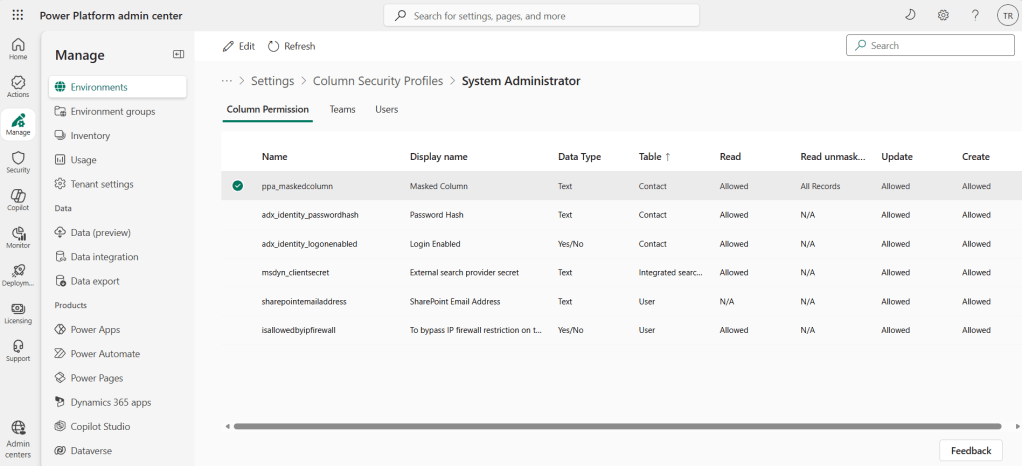
Column Security Profile
Data Flow Task
If we don't have any requirement to do Unmasked data via the KingswaySoft Dataverse Source, we can use the following query:
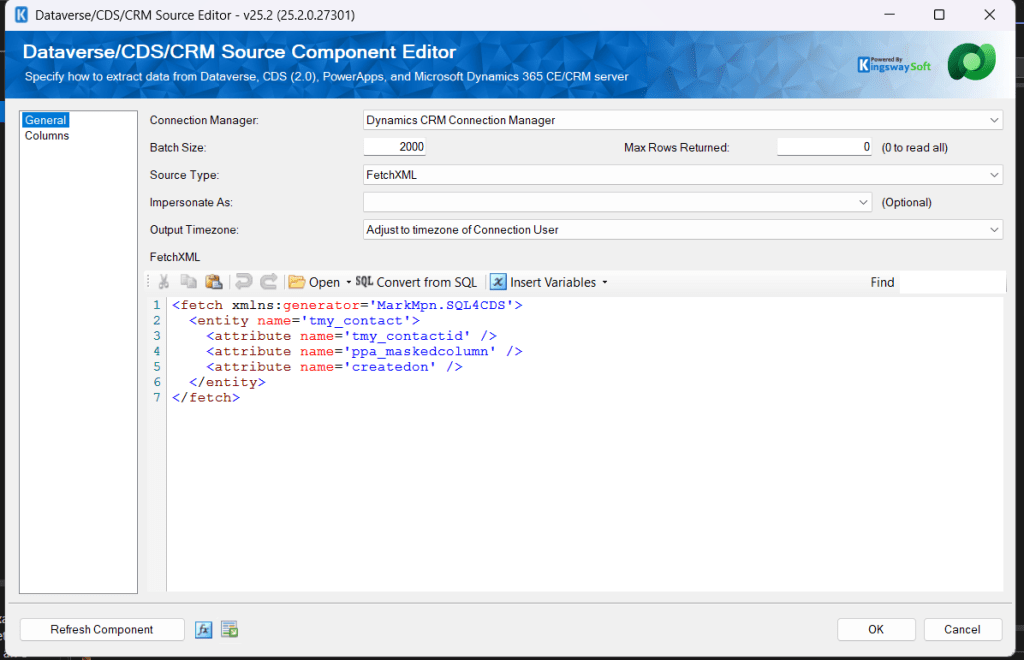
Retrieve the necessary table + columns
And it will result in this:
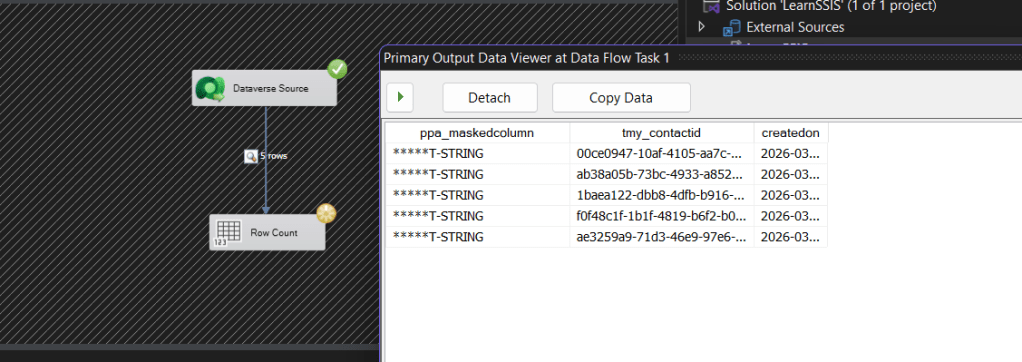
Retrieve masked column data
Fortunately, we can add the UnMaskedData parameter during retrieval via code. Because of this, we need to add several steps (still based on this old tutorial to enable the SSIS Script Task - KingswaySoft):
- On your Script Task, double-click and go to the Connection Managers tab > click the Add button below and give the Name and select your Dynamics CRM Connection (if you already created it, or you can click to create a new connection).
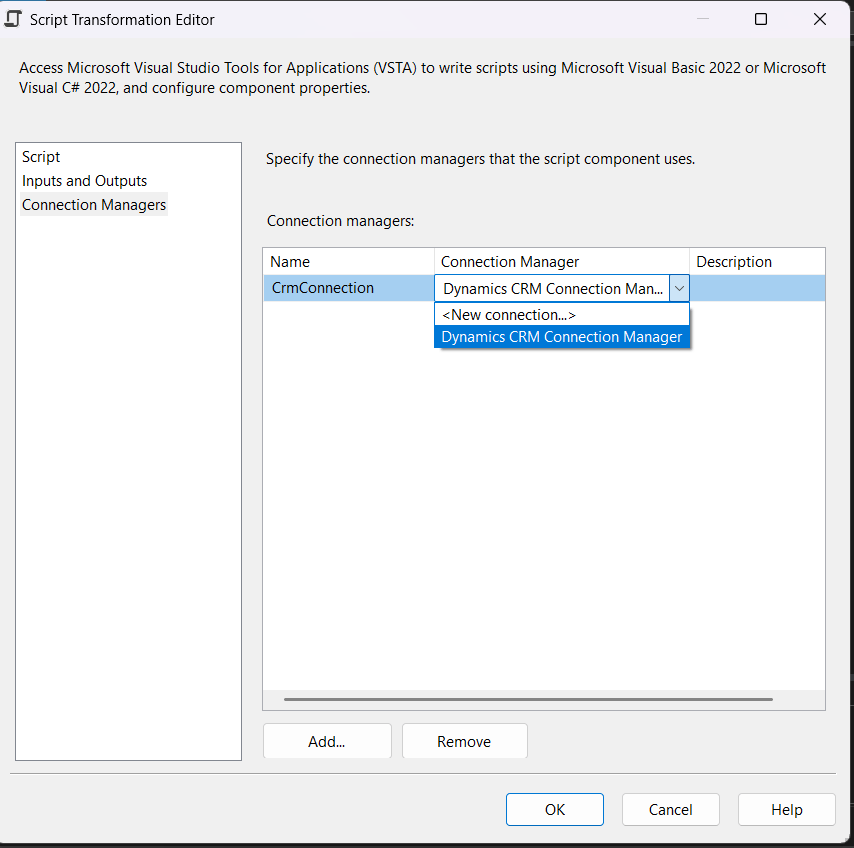
Enable the CRM Connection
- Go to Inputs and Outputs > add the necessary Output Columns
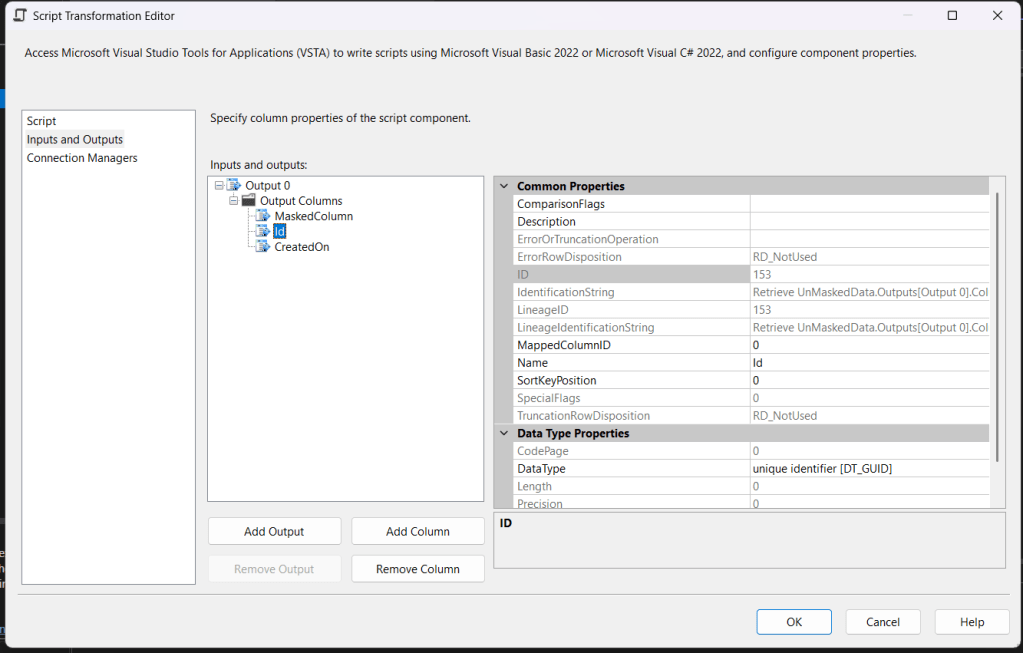
Add the necessary Outputs
Last, go to the Script tab and hit the Edit Script.
Add these below DLL references:
C:\Windows\Microsoft.NET\assembly\GAC_MSIL\KingswaySoft.DynamicsCrmServices{version}\KingswaySoft.DynamicsCrmServices.dll
C:\Windows\Microsoft.NET\assembly\GAC_MSIL\KingswaySoft.IntegrationToolkit.DynamicsCrm{version}\KingswaySoft.IntegrationToolkit.DynamicsCrm.dll
- This is the sample of the code that I'm using to retrieve the data:
#region Help:  Introduction to the Script Component
/* The Script Component allows you to perform virtually any operation that can be accomplished in
 * a .Net application within the context of an Integration Services data flow.
 *
 * Expand the other regions which have "Help" prefixes for examples of specific ways to use
 * Integration Services features within this script component. */
#endregion

#region Namespaces
using KingswaySoft.DynamicsCrmServices.Soap2011.OrganizationService;
using KingswaySoft.DynamicsCrmServices.Soap2011.OrganizationService.Messages;
using KingswaySoft.DynamicsCrmServices.Soap2011.OrganizationService.Query;
using KingswaySoft.IntegrationToolkit.DynamicsCrm;
using System;
using System.Linq;
#endregion

/// <summary>
/// This is the class to which to add your code.  Do not change the name, attributes, or parent
/// of this class.
/// </summary>
[Microsoft.SqlServer.Dts.Pipeline.SSISScriptComponentEntryPointAttribute]
public class ScriptMain : UserComponent
{
    #region Help:  Using Integration Services variables and parameters
    /* To use a variable in this script, first ensure that the variable has been added to
     * either the list contained in the ReadOnlyVariables property or the list contained in
     * the ReadWriteVariables property of this script component, according to whether or not your
     * code needs to write into the variable.  To do so, save this script, close this instance of
     * Visual Studio, and update the ReadOnlyVariables and ReadWriteVariables properties in the
     * Script Transformation Editor window.
     * To use a parameter in this script, follow the same steps. Parameters are always read-only.
     *
     * Example of reading from a variable or parameter:
     *  DateTime startTime = Variables.MyStartTime;
     *
     * Example of writing to a variable:
     *  Variables.myStringVariable = "new value";
     */
    #endregion

    #region Help:  Using Integration Services Connnection Managers
    /* Some types of connection managers can be used in this script component.  See the help topic
     * "Working with Connection Managers Programatically" for details.
     *
     * To use a connection manager in this script, first ensure that the connection manager has
     * been added to either the list of connection managers on the Connection Managers page of the
     * script component editor.  To add the connection manager, save this script, close this instance of
     * Visual Studio, and add the Connection Manager to the list.
     *
     * If the component needs to hold a connection open while processing rows, override the
     * AcquireConnections and ReleaseConnections methods.
     *
     * Example of using an ADO.Net connection manager to acquire a SqlConnection:
     *  object rawConnection = Connections.SalesDB.AcquireConnection(transaction);
     *  SqlConnection salesDBConn = (SqlConnection)rawConnection;
     *
     * Example of using a File connection manager to acquire a file path:
     *  object rawConnection = Connections.Prices_zip.AcquireConnection(transaction);
     *  string filePath = (string)rawConnection;
     *
     * Example of releasing a connection manager:
     *  Connections.SalesDB.ReleaseConnection(rawConnection);
     */
    #endregion

    #region Help:  Firing Integration Services Events
    /* This script component can fire events.
     *
     * Example of firing an error event:
     *  ComponentMetaData.FireError(10, "Process Values", "Bad value", "", 0, out cancel);
     *
     * Example of firing an information event:
     *  ComponentMetaData.FireInformation(10, "Process Values", "Processing has started", "", 0, fireAgain);
     *
     * Example of firing a warning event:
     *  ComponentMetaData.FireWarning(10, "Process Values", "No rows were received", "", 0);
     */
    #endregion

    /// <summary>
    /// This method is called once, before rows begin to be processed in the data flow.
    ///
    /// You can remove this method if you don't need to do anything here.
    /// </summary>
    public override void PreExecute()
    {
        base.PreExecute();
        /*
         * Add your code here
         */
    }

    /// <summary>
    /// This method is called after all the rows have passed through this component.
    ///
    /// You can delete this method if you don't need to do anything here.
    /// </summary>
    public override void PostExecute()
    {
        base.PostExecute();
        /*
         * Add your code here
         */
    }

    public override void CreateNewOutputRows()
    {
        /*
          Add rows by calling the AddRow method on the member variable named "<Output Name>Buffer".
          For example, call MyOutputBuffer.AddRow() if your output was named "MyOutput".
        */
        var connection = (string)Connections.CrmConnection.AcquireConnection(null);
        var service = (IOrganizationService)new CrmConnection(connection).GetCrmService();

        var whoAmiResponse = service.Execute(new WhoAmIRequest()) as WhoAmIResponse;

        var userTimeZone = TimeZoneInfo.FindSystemTimeZoneById(TimeZoneDefinitionQueries.GetTimezoneByUserId(whoAmiResponse.UserId, service));

        var fetchXml = "<fetch xmlns:generator='MarkMpn.SQL4CDS'>\r\n  <entity name='tmy_contact'>\r\n    <attribute name='tmy_contactid' />\r\n    <attribute name='ppa_maskedcolumn' />\r\n    <attribute name='createdon' />\r\n  </entity>\r\n</fetch>";
        var retrieveMultipeRequest = new RetrieveMultipleRequest { Query = new FetchExpression(fetchXml) };
        retrieveMultipeRequest.Parameters["UnMaskedData"] = true;
        var response = (RetrieveMultipleResponse)service.Execute(retrieveMultipeRequest);

        foreach (var entity in response.EntityCollection.Entities)
        {
            Output0Buffer.AddRow();
            Output0Buffer.Id = entity.GetAttributeValue<Guid>("tmy_contactid");
            Output0Buffer.MaskedColumn = entity.GetAttributeValue<string>("ppa_maskedcolumn");
            Output0Buffer.CreatedOn = userTimeZone.ConvertToLocal(entity.GetAttributeValue<DateTime>("createdon"));
        }
    }
}

public static class TimeZoneDefinitionQueries
{
    public const string USER_DOES_NOT_EXIST = "User with Id='{0}' does not exist";
    public static string GetTimezoneByUserId(Guid userId, IOrganizationService service)
    {
        var query = new QueryExpression("timezonedefinition")
        {
            NoLock = true,
            TopCount = 1,
            ColumnSet = new ColumnSet("standardname")
        };
        query.AddLink("usersettings", "timezonecode", "timezonecode")
             .LinkCriteria
             .AddCondition("systemuserid", ConditionOperator.Equal, userId);
        var result = service.RetrieveMultiple(query).Entities.FirstOrDefault();
        if (result == null)
        {
            throw new Exception(string.Format(USER_DOES_NOT_EXIST, userId));
        }
        return result.GetAttributeValue<string>("standardname");
    }
}

public static class TimeZoneInfoExtensions
{
    public static DateTime ConvertToUTC(this TimeZoneInfo timeZoneInfo, DateTime localDateTime)
    {
        var adjustment = timeZoneInfo.GetAdjustmentRule(localDateTime);
        if (adjustment == null)
        {
            return DateTime.SpecifyKind(localDateTime.Add(-timeZoneInfo.BaseUtcOffset), DateTimeKind.Utc);
        }
        var timeDifference = timeZoneInfo.BaseUtcOffset;
        if (timeZoneInfo.SupportsDaylightSavingTime && timeZoneInfo.IsDaylightSavingTime(localDateTime))
        {
            timeDifference = timeDifference.Add(adjustment.DaylightDelta);
        }
        return DateTime.SpecifyKind(localDateTime.Add(-timeDifference), DateTimeKind.Utc);
    }

    public static DateTime ConvertToLocal(this TimeZoneInfo timeZoneInfo, DateTime utcDateTime)
    {
        var adjustment = timeZoneInfo.GetAdjustmentRule(utcDateTime);
        if (adjustment == null)
        {
            return DateTime.SpecifyKind(utcDateTime.Add(timeZoneInfo.BaseUtcOffset), DateTimeKind.Unspecified);
        }
        var timeDifference = timeZoneInfo.BaseUtcOffset;
        if (timeZoneInfo.SupportsDaylightSavingTime && timeZoneInfo.IsDaylightSavingTime(utcDateTime))
        {
            timeDifference = timeDifference.Add(adjustment.DaylightDelta);
        }
        return DateTime.SpecifyKind(utcDateTime.Add(timeDifference), DateTimeKind.Unspecified);
    }

    public static DateTime GetDaylightTransitionAsDate(this TimeZoneInfo.TransitionTime transition, DateTime date)
    {
        if (transition.IsFixedDateRule)
        {
            return new DateTime(date.Year, transition.Month, transition.Day);
        }
        else
        {
            var transitionMonth1st = new DateTime(date.Year, transition.Month, 1);

            var daysToDayOfWeek = transition.DayOfWeek - transitionMonth1st.DayOfWeek;
            var weeks = daysToDayOfWeek >= 0 ? transition.Week - 1 : transition.Week;
            var transitionMonthDay = transitionMonth1st.AddDays(daysToDayOfWeek);
            if (transitionMonthDay.AddDays(7 * weeks).Month != transition.Month)
            {
                weeks -= 1;
            }
            return transitionMonthDay.AddDays(7 * weeks);
        }
    }

    public static TimeZoneInfo.AdjustmentRule GetAdjustmentRule(this TimeZoneInfo localTimezone, DateTime date)
    {
        var adjustments = localTimezone.GetAdjustmentRules();
        // Iterate adjustment rules for time zone
        foreach (TimeZoneInfo.AdjustmentRule adjustment in adjustments)
        {
            // Determine if this adjustment rule covers year desired
            if (adjustment.DateStart <= date && adjustment.DateEnd >= date)
                return adjustment;
        }
        return null;
    }
}
In the code above, in line 117, I'm adding UnMaskedData to true. And FYI, since the data retrieved will always be in UTC, I'm adding Betim Beja's helper logic to convert to local time, based on this blog post.
Here is the result:
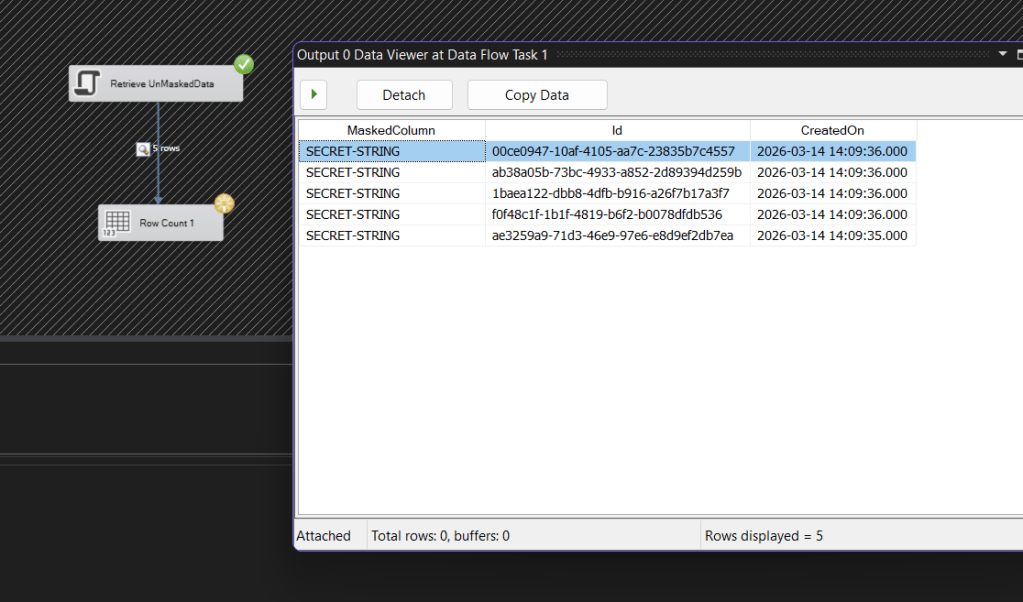
Result
Happy CRM-ing! 🚀
Leave a comment
Your comment is sent privately to the author and isn't published on the site.