Overview Work queues

UPDATED: Carina M Claesson DM-ing me that this feature is already in GA based on this article (but in my tenant, the label naming is still in Preview). Sorry for the confusion guys 😊.
Work queues is a feature based on Dataverse, that simplifies the process for creating queue mechanisms. While the functionality is being marketed on Power Automate, it can be used in Dataverse as well. I learned a lot from this YouTube video about the Work Queues that you can watch here.
Create Work Queue
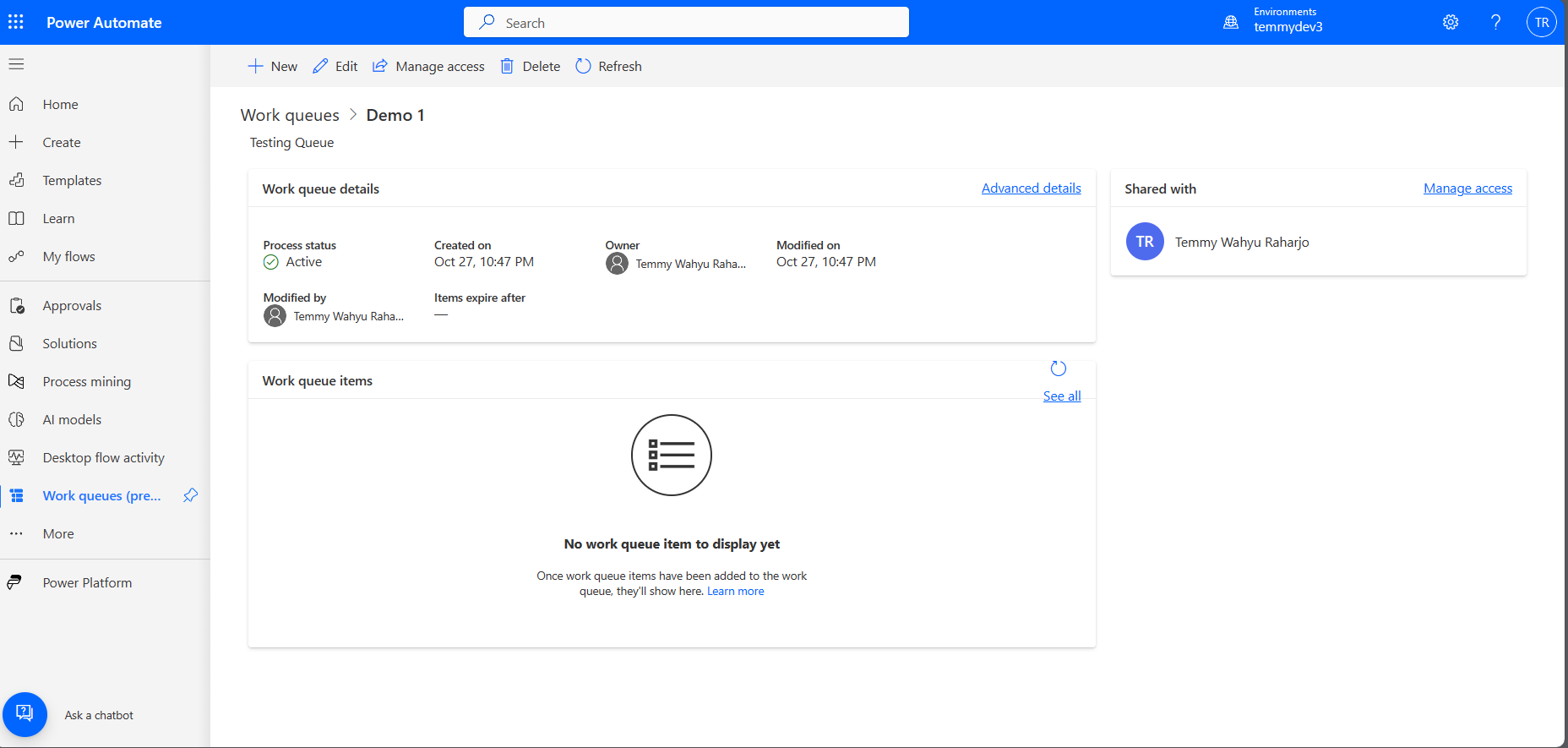
To create the Work queues, you need to go to make.powerautomate.com > More > and find the "Work queues (Preview)". Here in the below sample, I created Work queues with the named "Demo 1":
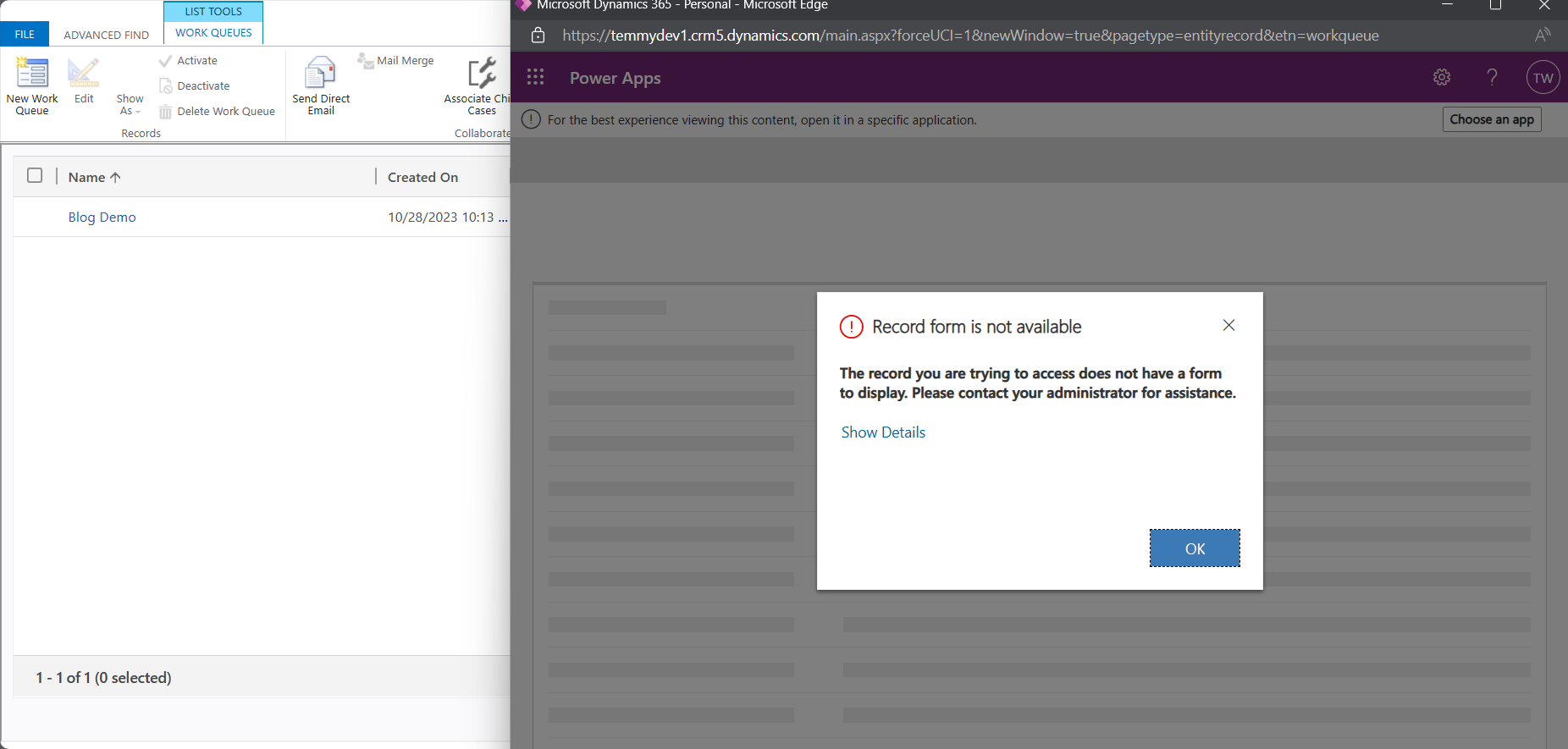
Even if in Advance Settings you can find the Work Queue table, you can't create or amend data from there (Model Driven Apps):
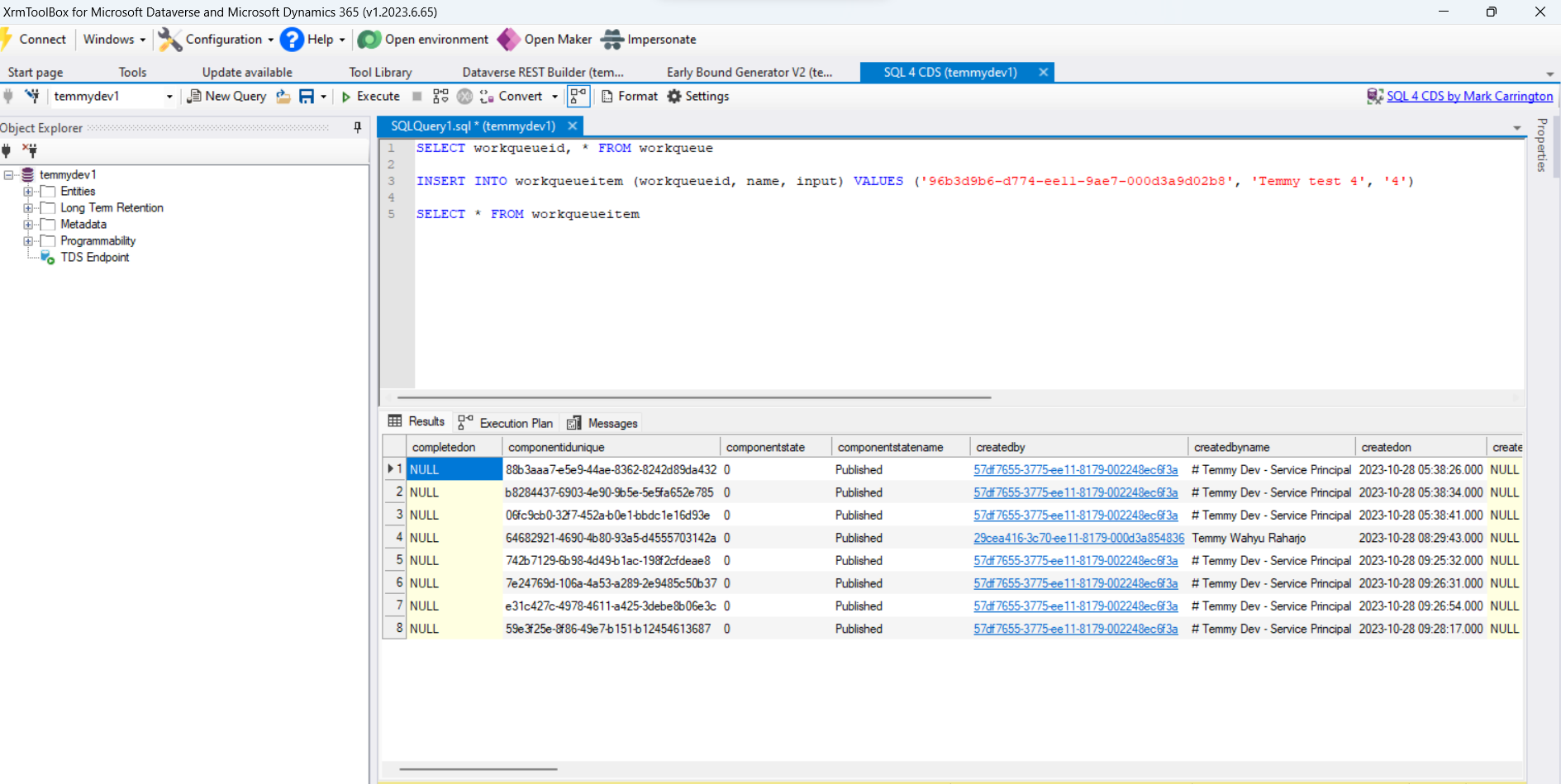
But you don't need to worry, it still can be accessible via SQL 4 CDS:
How it works
When creating Work Queue Items, the Dequeueprocess will respect the Priority (High - 100, Normal - 200, and Low - 300):
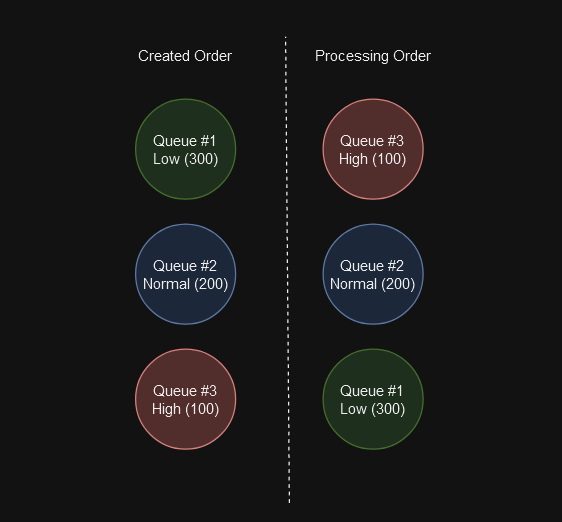
For example, we have the above queue data. The system will automatically order the process based on the priority.
If you ever wonder how we can execute Dequeue using C#, here is the SDK Message that is being generated via "pac modelbuilder build -a":
#pragma warning disable CS1591
//------------------------------------------------------------------------------
// <auto-generated>
//     This code was generated by a tool.
//     Runtime Version:4.0.30319.42000
//
//     Changes to this file may cause incorrect behavior and will be lost if
//     the code is regenerated.
// </auto-generated>
//------------------------------------------------------------------------------
namespace Blog
{[System.Runtime.Serialization.DataContractAttribute(Namespace="http://schemas.microsoft.com/xrm/2011/new/")][Microsoft.Xrm.Sdk.Client.RequestProxyAttribute("Dequeue")][System.CodeDom.Compiler.GeneratedCodeAttribute("Dataverse Model Builder", "2.0.0.6")]public partial class DequeueRequest : Microsoft.Xrm.Sdk.OrganizationRequest{		public Microsoft.Xrm.Sdk.EntityReference Target	{		get		{			if (this.Parameters.Contains("Target"))			{				return ((Microsoft.Xrm.Sdk.EntityReference)(this.Parameters["Target"]));			}			else			{				return default(Microsoft.Xrm.Sdk.EntityReference);			}		}		set		{			this.Parameters["Target"] = value;		}	}		public DequeueRequest()	{		this.RequestName = "Dequeue";		this.Target = default(Microsoft.Xrm.Sdk.EntityReference);	}}[System.Runtime.Serialization.DataContractAttribute(Namespace="http://schemas.microsoft.com/xrm/2011/new/")][Microsoft.Xrm.Sdk.Client.ResponseProxyAttribute("Dequeue")][System.CodeDom.Compiler.GeneratedCodeAttribute("Dataverse Model Builder", "2.0.0.6")]public partial class DequeueResponse : Microsoft.Xrm.Sdk.OrganizationResponse{		public DequeueResponse()	{	}		public Microsoft.Xrm.Sdk.Entity nextItem	{		get		{			if (this.Results.Contains("nextItem"))			{				return ((Microsoft.Xrm.Sdk.Entity)(this.Results["nextItem"]));			}			else			{				return default(Microsoft.Xrm.Sdk.Entity);			}		}	}}
}
#pragma warning restore CS1591
While for simulating the processing, here is the code that I used:
var service = serviceProvider.GetRequiredService<ServiceClient>();
var lowQueue = new workqueueitem
{
    workqueueid = new EntityReference(workqueue.EntityLogicalName, new Guid("57f2dc97-3775-ee11-8179-002248ec6f3a")),
    name = "Blog-" + DateTime.Now.ToString("yyyyMMddHHss"),
    input = "123",
    priority = 300 // Low
};
var low = service.Create(lowQueue);
var normalQueue = new workqueueitem
{
    workqueueid = new EntityReference(workqueue.EntityLogicalName, new Guid("57f2dc97-3775-ee11-8179-002248ec6f3a")),
    name = "Blog-" + DateTime.Now.ToString("yyyyMMddHHss"),
    input = "123",
    priority = 200 // Normal
};
var normal = service.Create(normalQueue);
var highQueue = new workqueueitem
{
    workqueueid = new EntityReference(workqueue.EntityLogicalName, new Guid("57f2dc97-3775-ee11-8179-002248ec6f3a")),
    name = "Blog-" + DateTime.Now.ToString("yyyyMMddHHss"),
    input = "123",
    priority = 100 // High
};
var high = service.Create(highQueue);
var dequeue = new DequeueRequest
{
    Target = new EntityReference(workqueue.EntityLogicalName, new Guid("57f2dc97-3775-ee11-8179-002248ec6f3a"))
};
var resultQueue = (DequeueResponse)service.Execute(dequeue);
Console.WriteLine(high == resultQueue.nextItem.Id);
Console.ReadKey();
It resulting below data in the Work Queue:
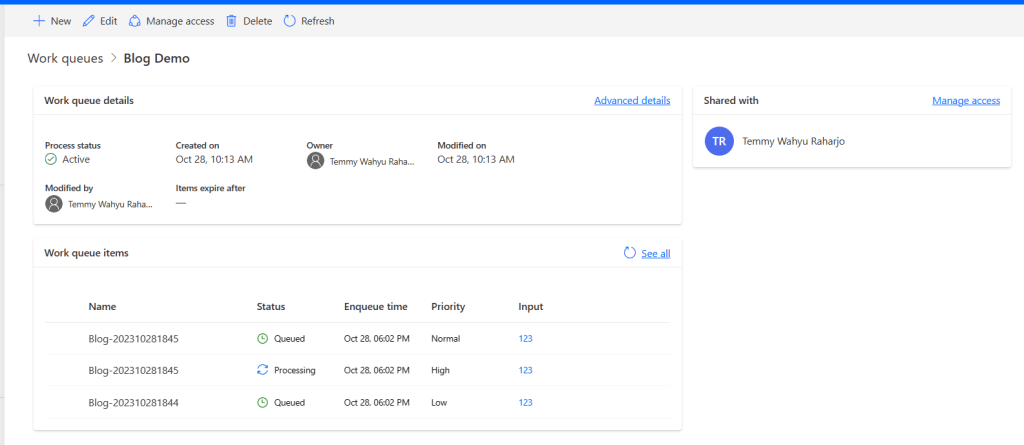
Once we call the "Dequeue" action, the selected Work Queue Item will be changed to "Processing". But we are still responsible for updating the statuscode and the statecode like in the below snippets:
public sealed class OptionSets
{[System.Runtime.Serialization.DataContractAttribute()][System.CodeDom.Compiler.GeneratedCodeAttribute("CrmSvcUtil", "9.1.0.118")]public enum statecode{		[System.Runtime.Serialization.EnumMemberAttribute()]	Queued = 0,		[System.Runtime.Serialization.EnumMemberAttribute()]	Processing = 1,		[System.Runtime.Serialization.EnumMemberAttribute()]	Processed = 2,		[System.Runtime.Serialization.EnumMemberAttribute()]	OnHold = 3,		[System.Runtime.Serialization.EnumMemberAttribute()]	Error = 4,}[System.Runtime.Serialization.DataContractAttribute()][System.CodeDom.Compiler.GeneratedCodeAttribute("CrmSvcUtil", "9.1.0.118")]public enum statuscode{		[System.Runtime.Serialization.EnumMemberAttribute()]	Queued = 0,		[System.Runtime.Serialization.EnumMemberAttribute()]	Processing = 1,		[System.Runtime.Serialization.EnumMemberAttribute()]	Processed = 2,		[System.Runtime.Serialization.EnumMemberAttribute()]	Paused = 3,		[System.Runtime.Serialization.EnumMemberAttribute()]	GenericException = 4,		[System.Runtime.Serialization.EnumMemberAttribute()]	ITException = 5,		[System.Runtime.Serialization.EnumMemberAttribute()]	BusinessException = 6,		[System.Runtime.Serialization.EnumMemberAttribute()]	DeadLetter = 7,}
}
Trigger Work Queues
If you think this is the same with Azure Queues, I don't think it is. For the triggering part in Power Automate, in the official documentation, we don't have auto-triggering when the queue is being created (you can learn more here). But still, this is a Dataverse table! So basically you can create an Automated Trigger when a Work Queue Item is created:
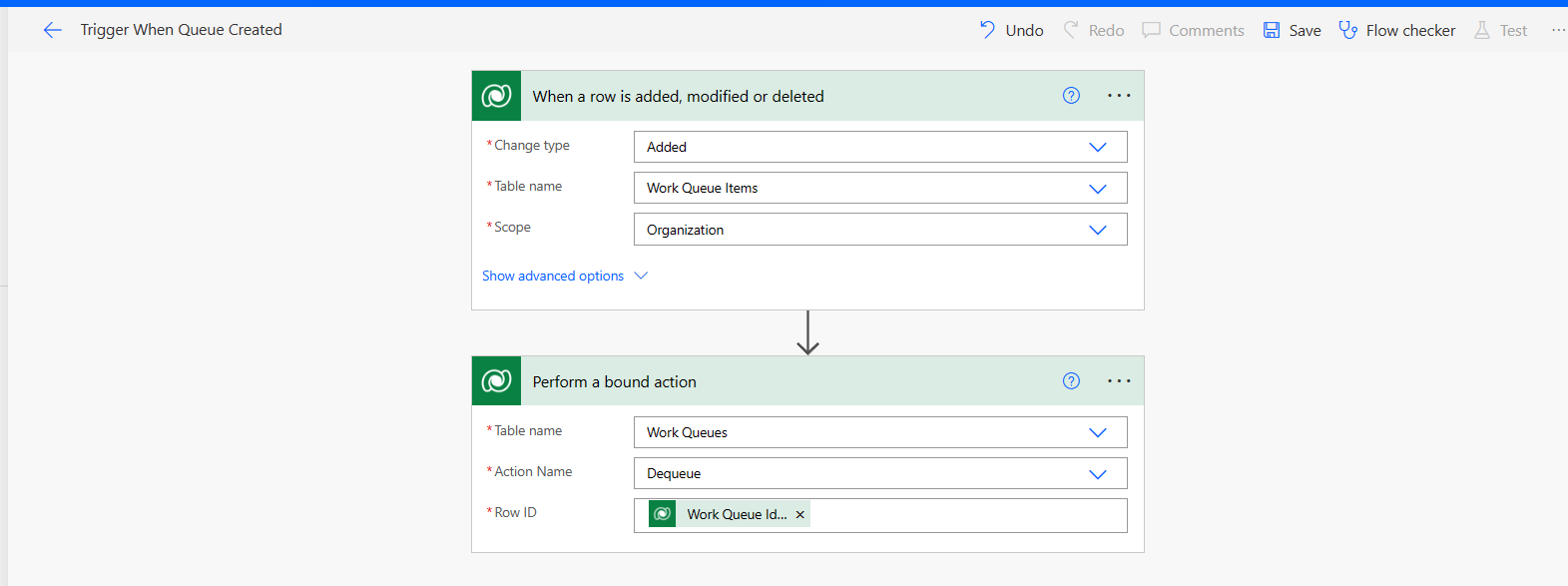
However, the Work Queues feature can be tailored based on what your business needs (you can set the trigger based on the manual trigger, automated, scheduled, etc!).
I think that's all for now. I will revisit this again if I have a real-world scenario where we can implement this. 😊
Happy CRM-ing!
Leave a comment
Your comment is sent privately to the author and isn't published on the site.