.NET , Architecture , C# , dynamics-crm , powerplatform
Learn how to use Dataverse Background operations (preview)

Let's learn how to use Dataverse Background operations (preview). For those who don't know, this is a way to call our custom API via background task (system job). Unfortunately, this method is not a way to bypass a two-minute execution time-out. For me, this feature is more of a system design method where all the actions (custom APIs) we wrap with this method will automatically run in the background (no waiting). Then, you have two choices to subscribe to the completed event (optional) that will be explained in this article. Hopefully, you will learn something today! 😎
Plugins
Because the operation needs aCustom API and also Plugin, I created this code:
using System;
using System.Collections.Generic;
using System.Linq;
using System.Text;
using System.Text.Json;
using System.Threading;
using Microsoft.Xrm.Sdk;
using Microsoft.Xrm.Sdk.Extensions;
using Microsoft.Xrm.Sdk.Query;
namespace BackgroundApi
{
    public class DemoBackgroundApi : PluginBase
    {
        public class ContactModel
        {
            public string FirstName { get; set; }
            public string LastName { get; set; }
        }
        public const string InputParamKey = "input";
        public const string OutputParamKey = "output";
        public DemoBackgroundApi() : base(typeof(DemoBackgroundApi))
        {
        }
        protected override void ExecuteDataversePlugin(ILocalPluginContext localPluginContext)
        {
            Thread.Sleep(TimeSpan.FromMinutes(1.5));
            var inputParam = localPluginContext.PluginExecutionContext.InputParameterOrDefault<string>(InputParamKey);
            if (string.IsNullOrEmpty(inputParam)) return;
            var contactInput = JsonSerializer.Deserialize<ContactModel>(inputParam);
            var entity = new Entity("contact")
            {
                ["firstname"] = contactInput.FirstName,
                ["lastname"] = contactInput.LastName
            };
            var id = localPluginContext.InitiatingUserService.Create(entity);
            localPluginContext.PluginExecutionContext.OutputParameters[OutputParamKey] = id;
        }
    }
    public class OnBackgroundOperationCompletePlugin : PluginBase
    {
        public OnBackgroundOperationCompletePlugin() : base(typeof(OnBackgroundOperationCompletePlugin))
        {
        }
        protected override void ExecuteDataversePlugin(ILocalPluginContext localPluginContext)
        {
            var adminService = localPluginContext.OrgSvcFactory.CreateOrganizationService(null);
            localPluginContext.Trace("InputParameters \n" + ToString(localPluginContext.PluginExecutionContext.InputParameters));
            localPluginContext.Trace("OutputParameters \n" + ToString(localPluginContext.PluginExecutionContext.OutputParameters));
            var backgroundOperationId = localPluginContext.PluginExecutionContext.InputParameters["BackgroundOperationId"].ToString();
            if (string.IsNullOrEmpty(backgroundOperationId)) return;
            var backgroundOperation = adminService.Retrieve("backgroundoperation", new Guid(backgroundOperationId),
                new ColumnSet("outputparameters"));
            var output = JsonSerializer
                    .Deserialize<List<KeyValuePair<string, string>>>((string)backgroundOperation["outputparameters"]);
            var id = output.First().Value;
            if (string.IsNullOrEmpty(id)) return;
            var contact = new Entity("contact", new Guid(id))
            {
                ["lastname"] = $"OnComplete-{DateTime.Now.ToLongTimeString()}"
            };
            localPluginContext.InitiatingUserService.Update(contact);
        }
        public string ToString(ParameterCollection collection)
        {
            var sb = new StringBuilder();
            foreach (var item in collection)
            {
                sb.AppendLine($"{item.Key}: {item.Value} {item.Value?.GetType()?.FullName}");
            }
            return sb.ToString();
        }
    }
}
I'll explain the code later on 😊.
Custom API
First, I register the Custom API using the below definition:
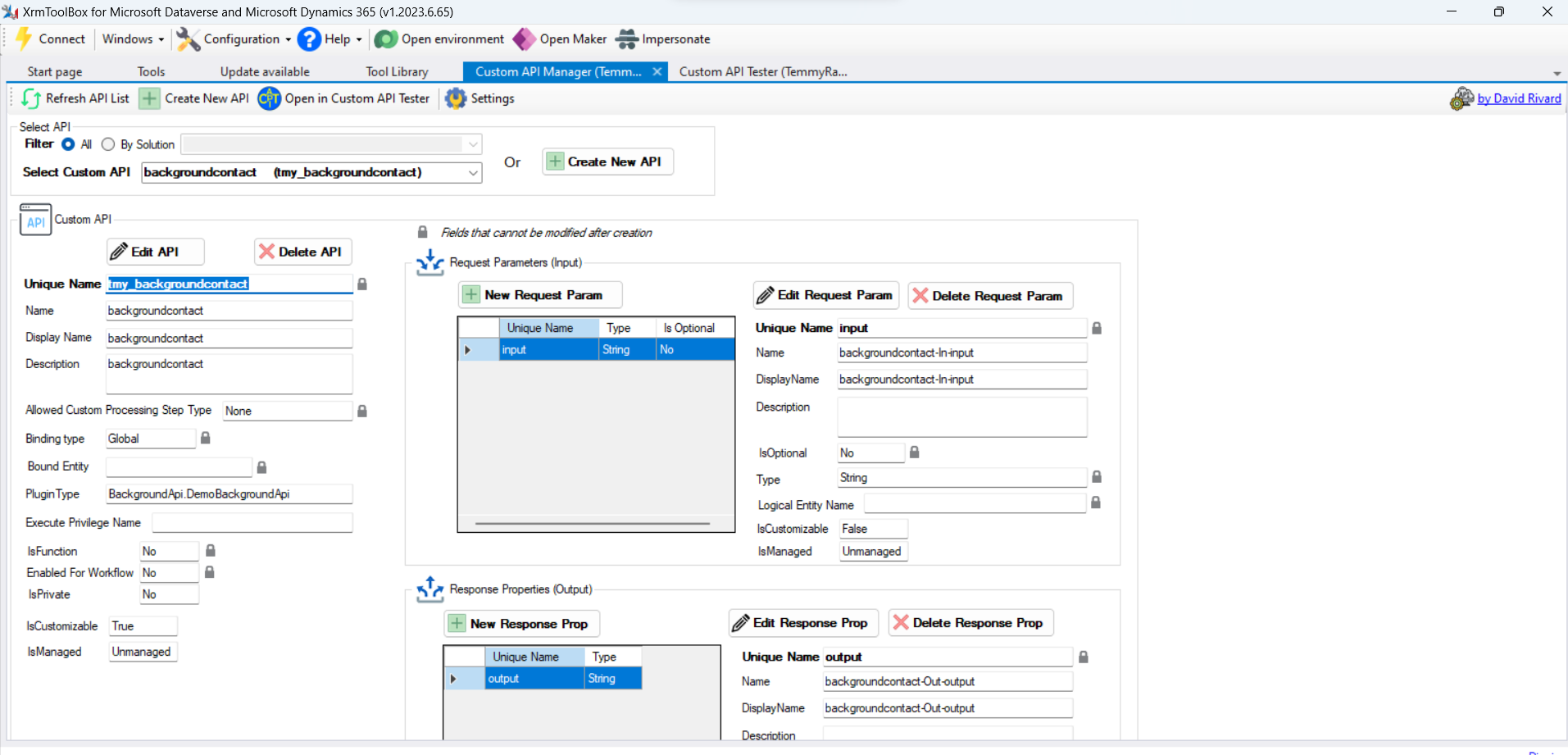
If you check the implementation (code), the functionality of the Custom API is just to create the Contact based on the parameters (FirstName and LastName). But before we create the Contact, we will Sleep the execution for 1.5 minutes. When the Contact is created, we will assign the ID to the OutputParameters to be used later.
Call ExecuteBackgroundOperation + WebHook
The first option to subscribe to the Background Operation finished is via the WebHook. Once the Background Operation is done, it will trigger the WebHook that we set. Here is a sample of the code (external exe):
using DataverseClient;
using Microsoft.Extensions.DependencyInjection;
using Microsoft.PowerPlatform.Dataverse.Client;
using Microsoft.Xrm.Sdk;
using Newtonsoft.Json;
var builder = Helper.CreateHostBuilder().Build();
var serviceProvider = builder.Services;
var service = serviceProvider.GetRequiredService<ServiceClient>();
var firstName = "Temmy";
var lastName = $"Background-{DateTime.Now.ToLongTimeString()}";
var inputString = JsonConvert.SerializeObject(new { FirstName = firstName, LastName = lastName });
var backgroundAccount = new OrganizationRequest("tmy_backgroundcontact")
{
    ["input"] = inputString
};
var req = new OrganizationRequest("ExecuteBackgroundOperation")
{
    ["Request"] = backgroundAccount,
    ["CallbackUri"] = "https://webhook.site/b8e92bc2-ef37-481e-828e-1541b80ed4f3"
};
service.Execute(req);
Console.ReadKey();
In the code above, you can see that we will call our Custom API (tmy_backgroundcontact). To make it run in the background, we need to use "ExecuteBackgroundOperation" and assign the tmy_backgroundcontact to the Request property. Then, to hook the response, we need to set the "CallbackUri" property.
Here is a sample of what's the response from Background operation:
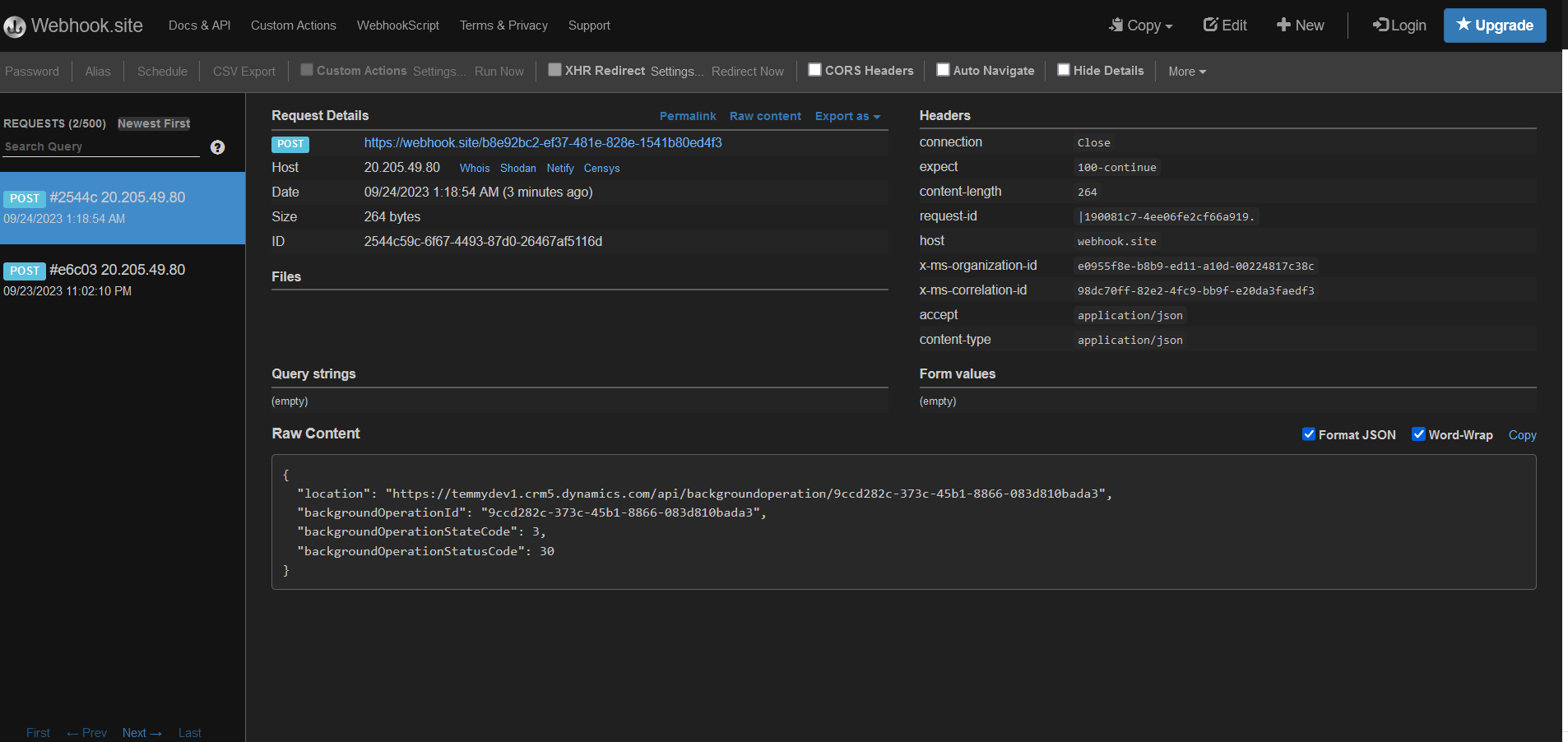
One thing to note with this method is we only can implement authentication that using QueryStringas we don't have the option to pass anything such as the "Headers" property.
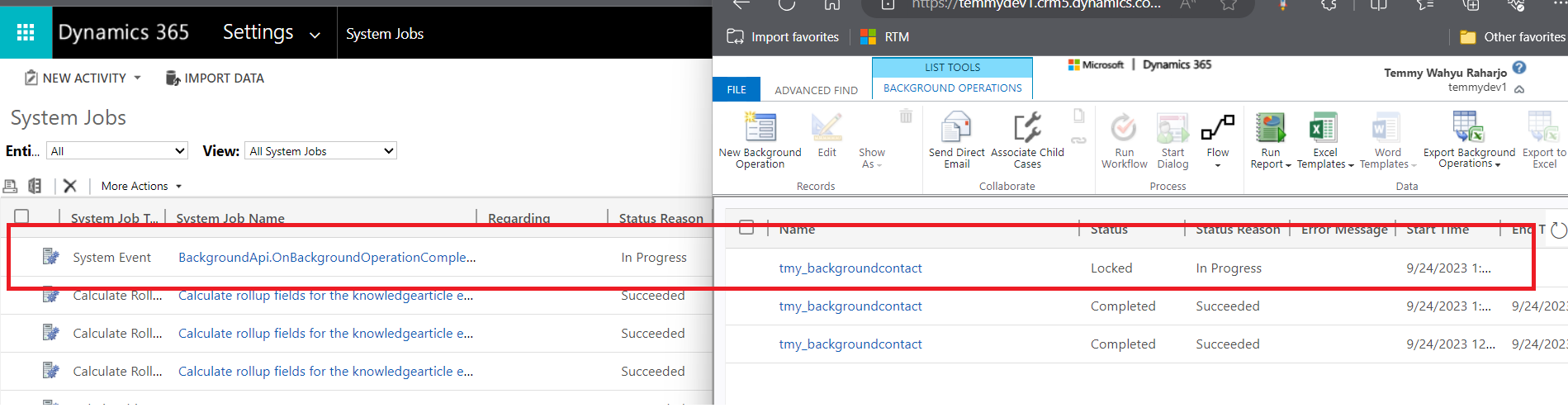
FYI, when the background process running, it will create a record in the System Job and the Background Operations tables:
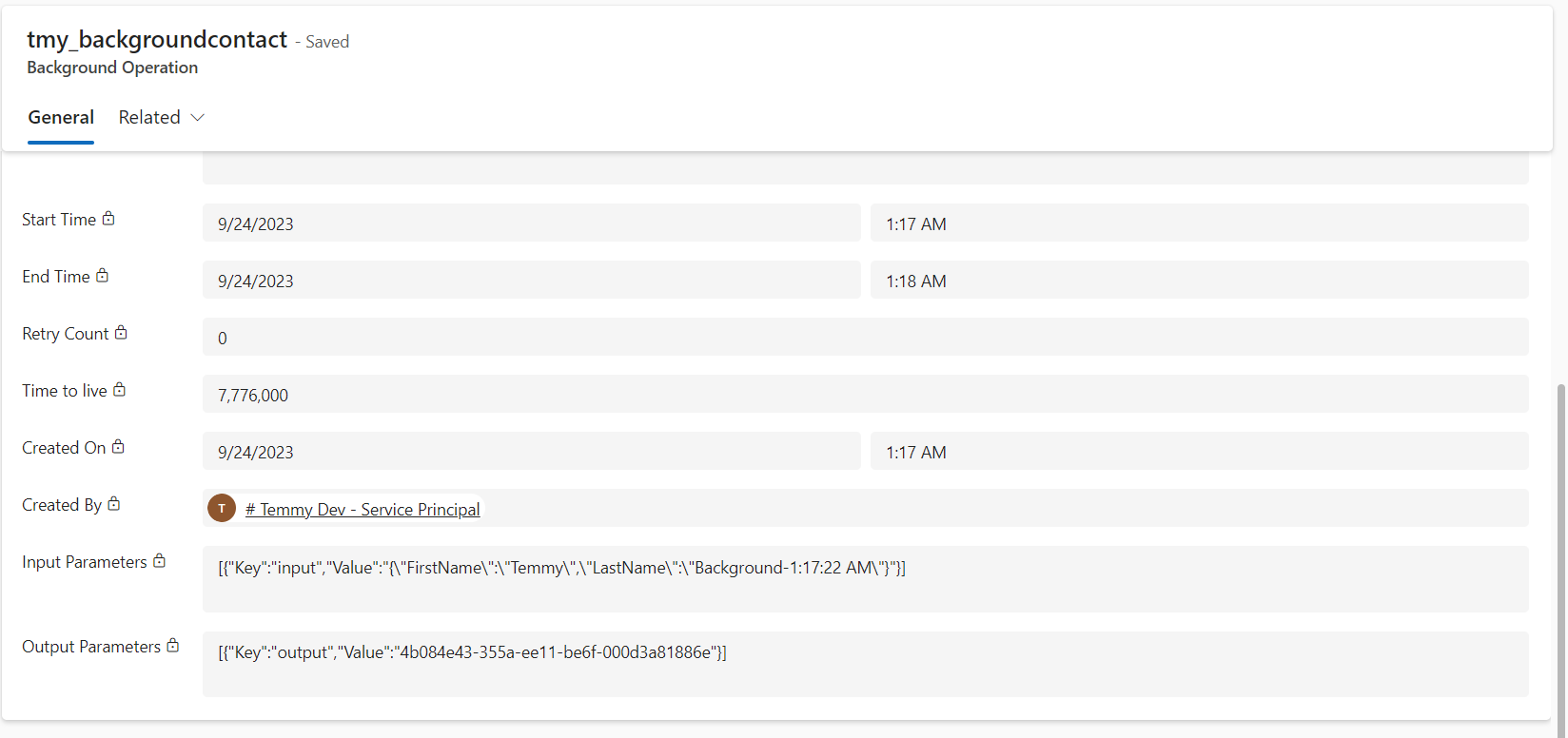
Here is the Information that we can get from the Background Operation record:
OnBackgroundOperationComplete Plugin
Next, we can register the OnBackgroundOperationComplete plugin. Because previously we already prepared the code, now I only show you how to register the plugin:
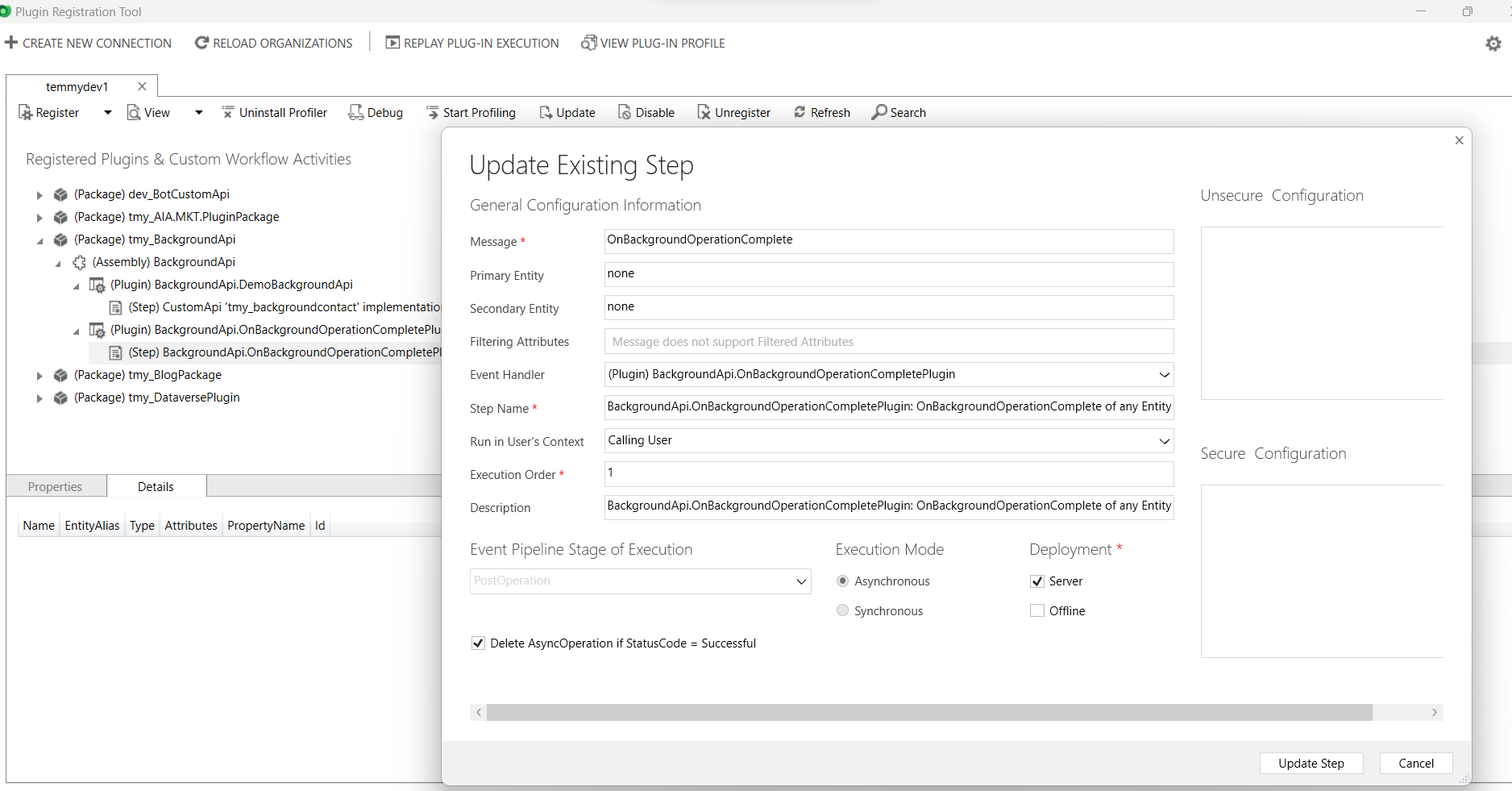
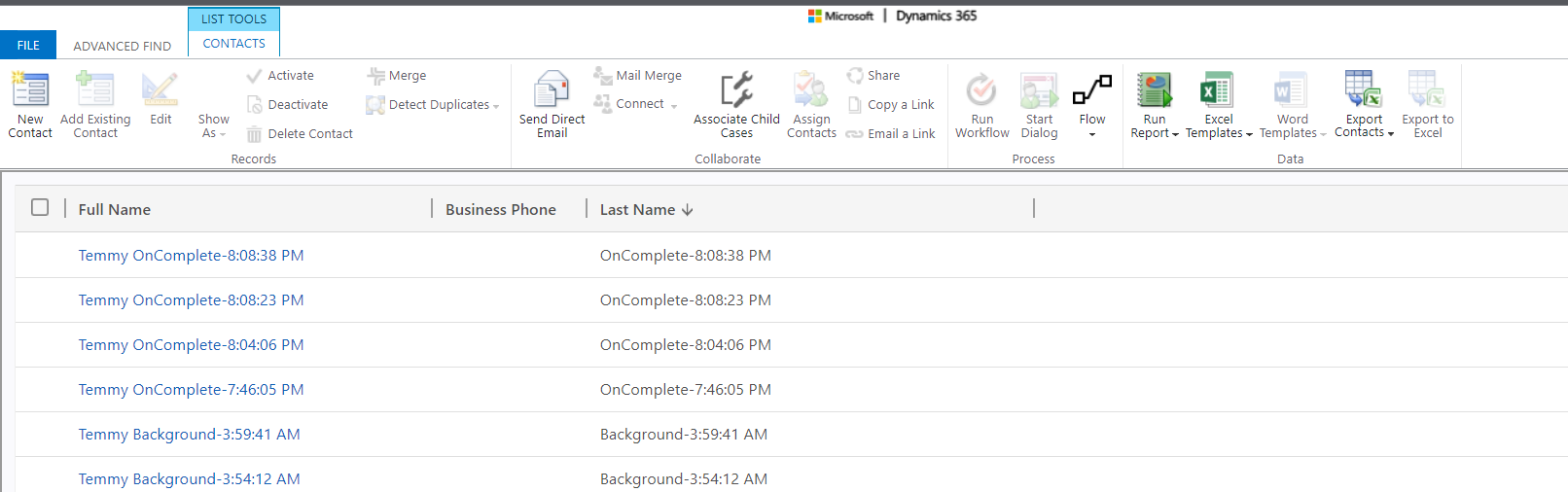
For the logic of the plugin, it will retrieve the BackgroundOperation record based on the BackgroundOperationId from the InputParameters. Then we need to retrieve the outputparameters to get the ContactId. Once we've got the ContactId, we will update the LastName with the format "OnComplete-{DateTime.Now.ToLongTimeString()}".
Again, you can run the client code, and here is the result:
Happy CRM-ing!
Leave a comment
Your comment is sent privately to the author and isn't published on the site.