Azure , C# , dynamics-crm , powerplatform
[Exploration] Dynamics CRM Azure-aware plug-in + Azure Queue + Power Automate

Do you know the Azure-aware plugin? In short, we can create a simple plugin that invokes Azure Service Bus that enables us to do the Publisher-Subscriber model. In this blog post, we will try to make Azure Service Bus, Dynamics CRM Service Endpoint, and CRM Plugin for creating the queue. For the processing part (subscriber), we will create Cloud Flow that will listen to the queue + insert a row on the Google sheet.
Creating Azure Service Bus
You can go to your portal.azure.com > Service Bus > click the Create button. On that page, you can fill in the Subscription, create/select the Resource group, fill in the Namespace, set the Location, and set the Pricing tier (I choose Basic for the demonstration purpose which is the cheapest tier). After that, you can hit the Review+create button and proceed to create the resource.
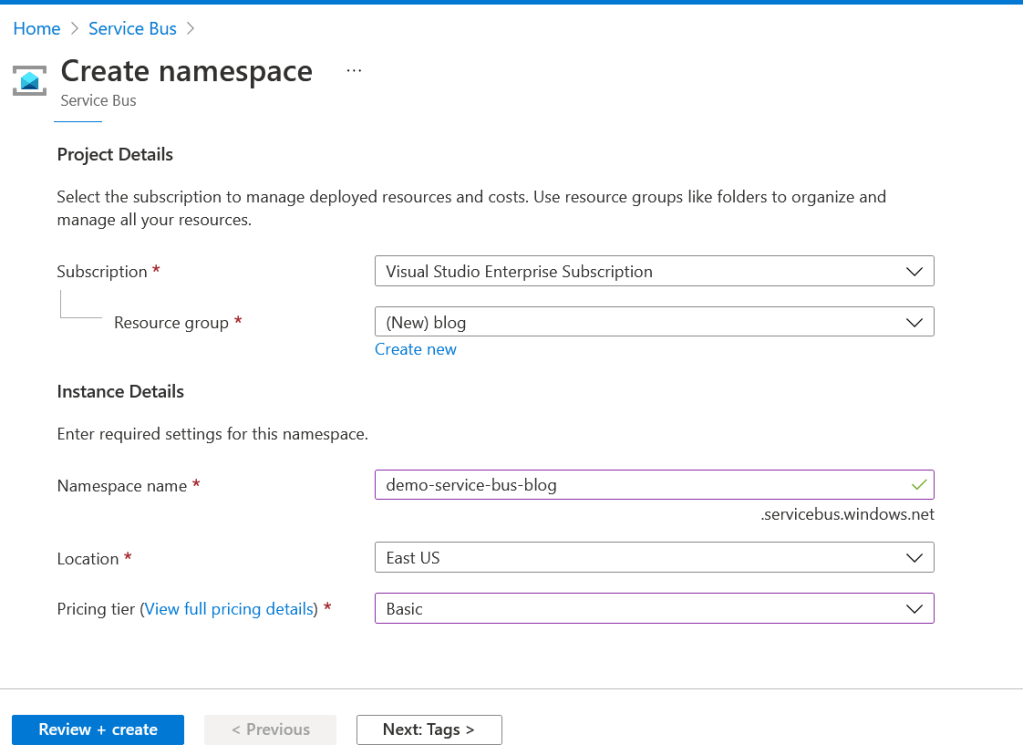 Create Service Bus
Then, you can go to Shared access policies blade > click Add button. The purpose of this is to make a new SAS Policy (try to avoid using the created one because the RootManageSharedAccessKey got Manage, Send, and Listen claims). You can give the Policy name, and check for Send and Listen > click the Create button.
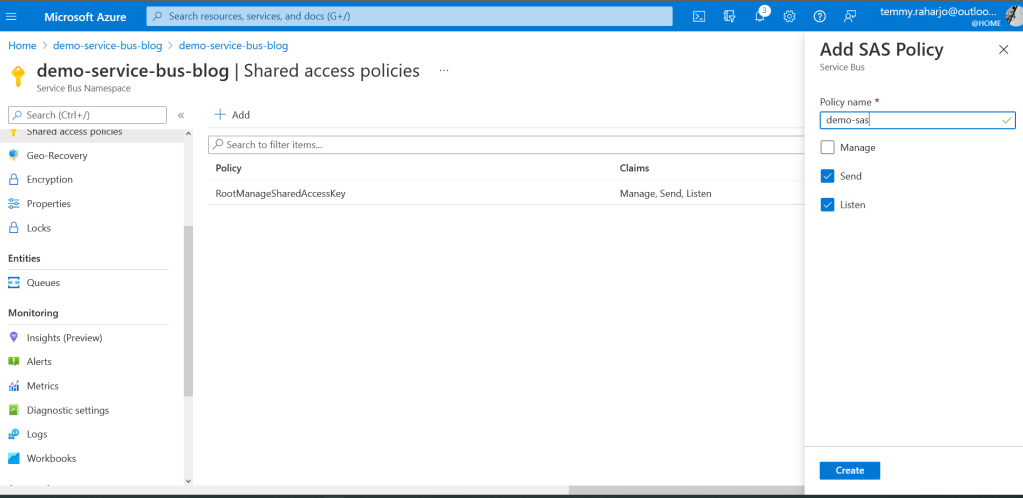 Create a Shared Access Policy
After it is created, you can copy the Primary Connection String for the future step.
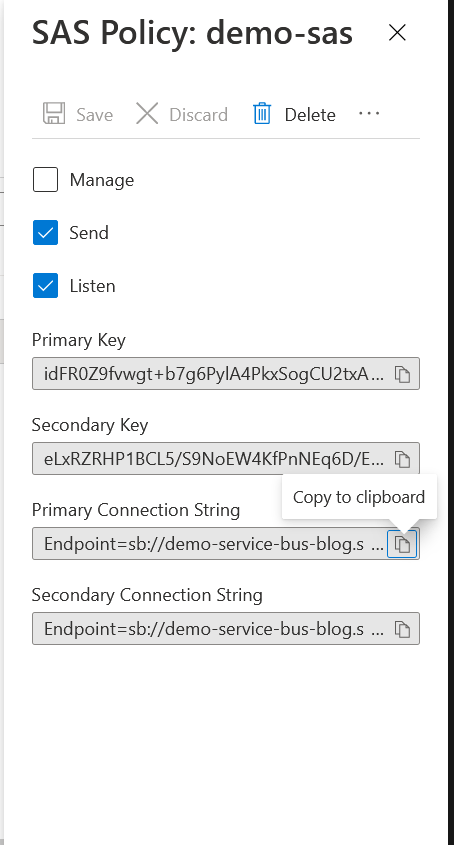 Copy the Primary Connection String for future use
The last part is to set up the queue. You can go to the Entities > Queues blade > click the Queue button. Give the Name as queue1, and for the rest of the properties, I will not change it. Then you can click the Createbutton.
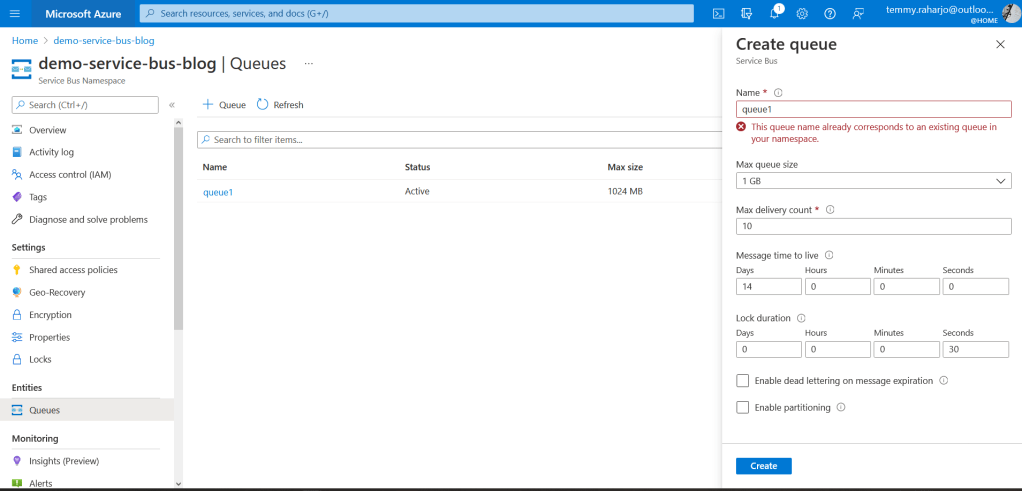 Create Queue
Creating New Service Endpoint In Dynamics CRM
Connect to your Plugin Registration Tool > Register > Register New Service Endpoint. Once the dialog comes out, you can paste the Primary Connection Stringfrom the previous step.
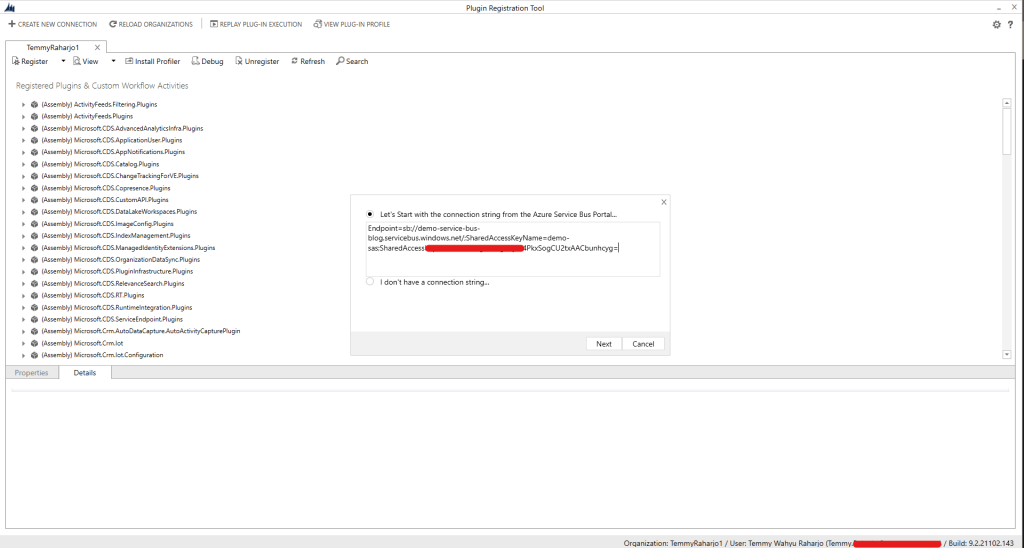 Register New Service Endpoint
In the next step, you need to fill in the Queue Name (queue1), and change the Message Format to JSON. Then you can click the Save button.
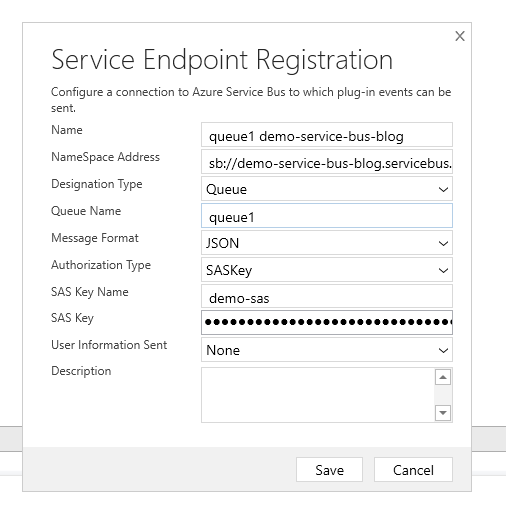 Set Service Endpoint
After you save it, then what you need to do is to get the ServiceEndpointId. To do this, you can open any CRM form, and then you can open developer tools (F12). Then you can run this command:
Xrm.WebApi.retrieveMultipleRecords('serviceendpoint', '?$select=name,description,serviceendpointid').then(result => console.log(result))
Once you run that command, you can find and select the Service Endpoint that you created before, copy the Idand save it for the next step.
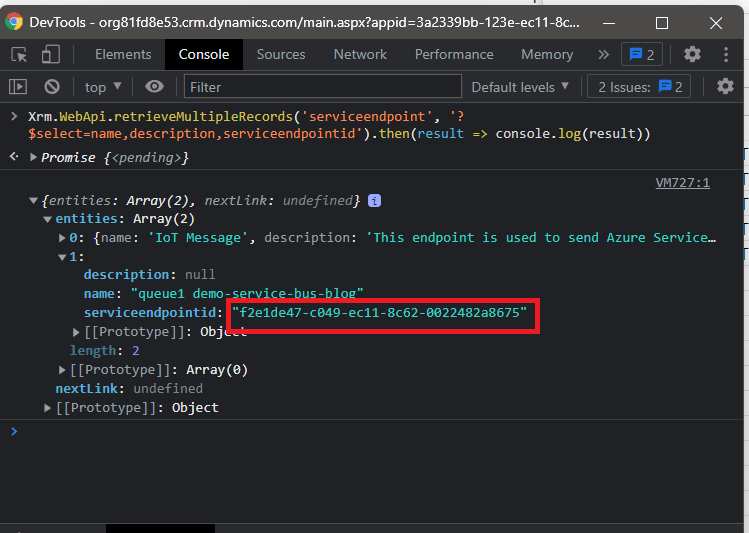 Get ServiceEndpointId
Create Dynamics CRM Plugin
For this step, I'd like to use Microsoft Power Platform CLI. You always can execute the command "pac plugin create" on the folder that you want, and wait until the command finishes. Once you open the .csproj, then you can update the Plugin1.cs as below:
using Microsoft.Xrm.Sdk;
using System;
namespace DemoPlugin
{
    public class Plugin1 : PluginBase
    {
        private readonly string _unsecureConfiguration;
        public Plugin1(string unsecureConfiguration, string secureConfiguration)
            : base(typeof(Plugin1))
        {
            _unsecureConfiguration = unsecureConfiguration;
        }
        protected override void ExecuteCdsPlugin(ILocalPluginContext localPluginContext)
        {
            if (localPluginContext == null)
            {
                throw new ArgumentNullException("localPluginContext");
            }
            var endpointRef =
                new EntityReference("serviceendpoint", new Guid(_unsecureConfiguration));
            localPluginContext.NotificationService.Execute(endpointRef, localPluginContext.PluginExecutionContext);
        }
    }
}
The code is pretty simple, we will receive the unsecureConfigurationwhich will be the serviceEndpointId. In ExecuteCdsPlugin, we only need to create the Azure queue using the command "localPluginContext.NotificationService.Execute(endpointRef, localPluginContext.PluginExecutionContext)".
In the next step, you can build it and register the plugin using the Plugin Registration Tool. Here is my setup:
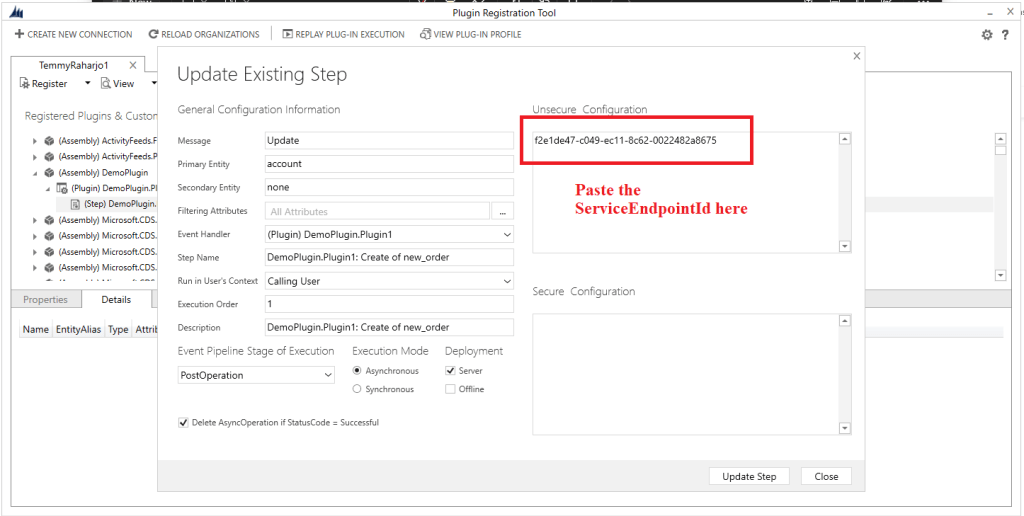 Register new plugin step
The best way in my opinion to call this function is in the Asynchronous mode. Because actually what we want to do is to fire and forget about it. But you always can set the plugin step in Synchronous mode.
From this step, you can try to invoke it (we already cover our setting to the Publisher model). We can verify the result by updating an account (from Dynamics CRM Screen), then go to the portal.azure.com > go to queue1 > Service Bus Explorer (preview) blade > go to Receive tab > you will see there is 1 Active Message that you can receive > click the Receive button and you can inspect the result.
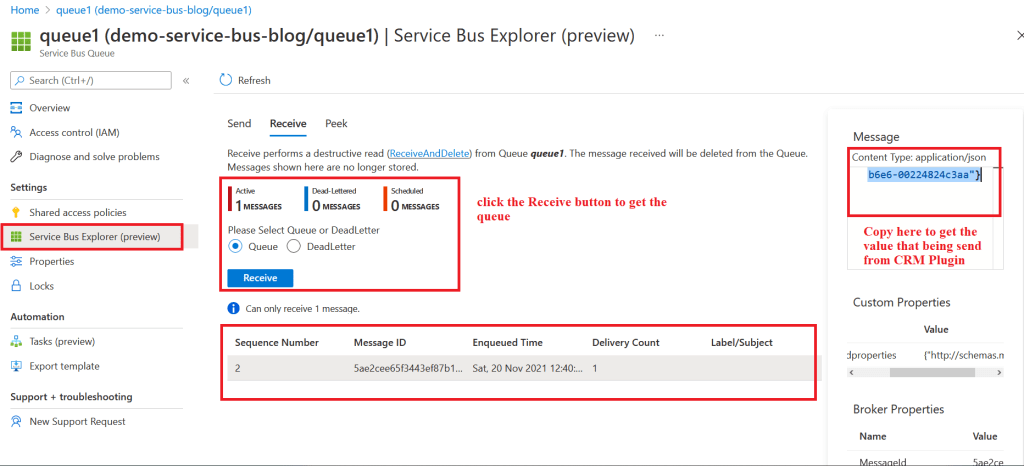 Verify the Publisher result
Power Automate as Subscriber Model
The last part is to listen to the queue that we already created. For demonstration purpose, I will create a Google sheet like the one below:
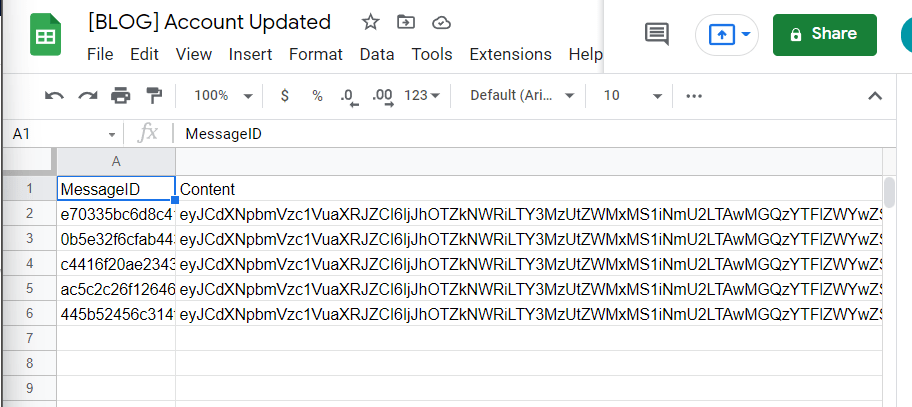 Google Sheet Content
For the trigger, search Service Bus > choose When one or more messages arrive in queue (auto-complete). The purpose of this is to make sure the message is deleted from the queue instantly. For the connection string, you can paste the Primary Connection String from the previous step, and name the connection string. Then you can set up the rest of the flow like below:
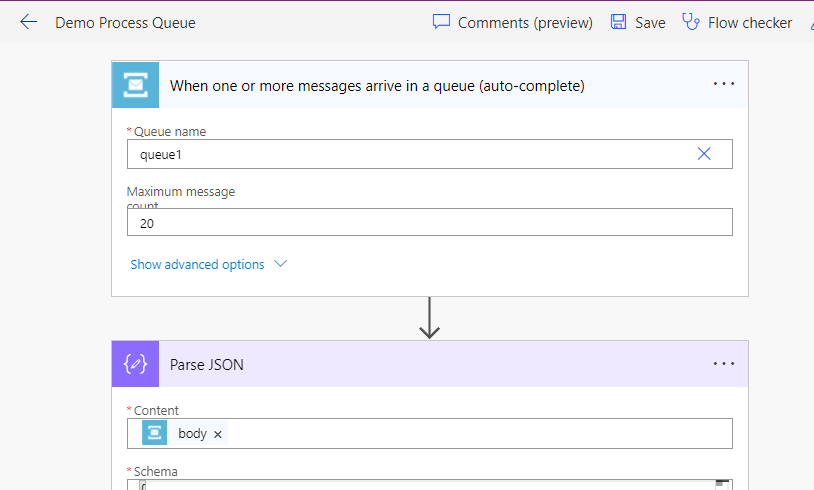 Flow Steps #1
Below is the response from the first step (you can use the below result as Generate from the sample in the next step):
{
  "ContentData": "eyJCdXNpbmVzc1VuaXRJZCI6IjJhOTZkNWRiLTY3MzUtZWMxMS1iNmU2LTAwMGQzYTFlZWYwZSIsIkNvcnJlbGF0aW9uSWQiOiI0NzRmODJjNS0wY2I0LTQwY2EtOGI5ZS1kOTBlYjIxMjFhNTQiLCJEZXB0aCI6MSwiSW5pdGlhdGluZ1VzZXJBenVyZUFjdGl2ZURpcmVjdG9yeU9iamVjdElkIjoiNGU4YTU5NGYtNjhhNi00YWQ4LWJlN2MtNzcxZWQwZjllNjU3IiwiSW5pdGlhdGluZ1VzZXJJZCI6IjJkNTY2MjM0LWVmMzctZWMxMS1iNmU2LTAwMjI0ODI0YzNhYSIsIklucHV0UGFyYW1ldGVycyI6W3sia2V5IjoiVGFyZ2V0IiwidmFsdWUiOnsiX190eXBlIjoiRW50aXR5Omh0dHA6XC9cL3NjaGVtYXMubWljcm9zb2Z0LmNvbVwveHJtXC8yMDExXC9Db250cmFjdHMiLCJBdHRyaWJ1dGVzIjpbeyJrZXkiOiJuYW1lIiwidmFsdWUiOiJ0ZXN0MTIzOCJ9LHsia2V5IjoiYWNjb3VudGlkIiwidmFsdWUiOiIyM2M5ZTdkYy1iZjQ5LWVjMTEtOGM2Mi0wMDIyNDgyYTg3ZTIifSx7ImtleSI6Im1vZGlmaWVkb24iLCJ2YWx1ZSI6IlwvRGF0ZSgxNjM3NDE5Njk4MDAwKVwvIn0seyJrZXkiOiJtb2RpZmllZGJ5IiwidmFsdWUiOnsiX190eXBlIjoiRW50aXR5UmVmZXJlbmNlOmh0dHA6XC9cL3NjaGVtYXMubWljcm9zb2Z0LmNvbVwveHJtXC8yMDExXC9Db250cmFjdHMiLCJJZCI6IjJkNTY2MjM0LWVmMzctZWMxMS1iNmU2LTAwMjI0ODI0YzNhYSIsIktleUF0dHJpYnV0ZXMiOltdLCJMb2dpY2FsTmFtZSI6InN5c3RlbXVzZXIiLCJOYW1lIjpudWxsLCJSb3dWZXJzaW9uIjpudWxsfX0seyJrZXkiOiJtb2RpZmllZG9uYmVoYWxmYnkiLCJ2YWx1ZSI6bnVsbH1dLCJFbnRpdHlTdGF0ZSI6bnVsbCwiRm9ybWF0dGVkVmFsdWVzIjpbXSwiSWQiOiIyM2M5ZTdkYy1iZjQ5LWVjMTEtOGM2Mi0wMDIyNDgyYTg3ZTIiLCJLZXlBdHRyaWJ1dGVzIjpbXSwiTG9naWNhbE5hbWUiOiJhY2NvdW50IiwiUmVsYXRlZEVudGl0aWVzIjpbXSwiUm93VmVyc2lvbiI6bnVsbH19XSwiSXNFeGVjdXRpbmdPZmZsaW5lIjpmYWxzZSwiSXNJblRyYW5zYWN0aW9uIjp0cnVlLCJJc09mZmxpbmVQbGF5YmFjayI6ZmFsc2UsIklzb2xhdGlvbk1vZGUiOjIsIk1lc3NhZ2VOYW1lIjoiVXBkYXRlIiwiTW9kZSI6MCwiT3BlcmF0aW9uQ3JlYXRlZE9uIjoiXC9EYXRlKDE2Mzc0MTk2OTgwMDArMDAwMClcLyIsIk9wZXJhdGlvbklkIjoiOTM0OTI5N2EtMDM4MC00MmYzLThjMWMtOGYyMTI5Mzk3N2FmIiwiT3JnYW5pemF0aW9uSWQiOiI4OWQzMmRjYy1hYzAxLTQwNzEtODc4MS1hNTExODEyODQ1MTQiLCJPcmdhbml6YXRpb25OYW1lIjoidW5xODlkMzJkY2NhYzAxNDA3MTg3ODFhNTExODEyODQiLCJPdXRwdXRQYXJhbWV0ZXJzIjpbXSwiT3duaW5nRXh0ZW5zaW9uIjp7IklkIjoiMjgyYzFmYjUtYmM0OS1lYzExLThjNjItMDAyMjQ4MmE4Njc1IiwiS2V5QXR0cmlidXRlcyI6W10sIkxvZ2ljYWxOYW1lIjoic2RrbWVzc2FnZXByb2Nlc3NpbmdzdGVwIiwiTmFtZSI6IkRlbW9QbHVnaW4uUGx1Z2luMTogQ3JlYXRlIG9mIG5ld19vcmRlciIsIlJvd1ZlcnNpb24iOm51bGx9LCJQYXJlbnRDb250ZXh0Ijp7IkJ1c2luZXNzVW5pdElkIjoiMmE5NmQ1ZGItNjczNS1lYzExLWI2ZTYtMDAwZDNhMWVlZjBlIiwiQ29ycmVsYXRpb25JZCI6IjQ3NGY4MmM1LTBjYjQtNDBjYS04YjllLWQ5MGViMjEyMWE1NCIsIkRlcHRoIjoxLCJJbml0aWF0aW5nVXNlckF6dXJlQWN0aXZlRGlyZWN0b3J5T2JqZWN0SWQiOiI0ZThhNTk0Zi02OGE2LTRhZDgtYmU3Yy03NzFlZDBmOWU2NTciLCJJbml0aWF0aW5nVXNlcklkIjoiMmQ1NjYyMzQtZWYzNy1lYzExLWI2ZTYtMDAyMjQ4MjRjM2FhIiwiSW5wdXRQYXJhbWV0ZXJzIjpbeyJrZXkiOiJUYXJnZXQiLCJ2YWx1ZSI6eyJfX3R5cGUiOiJFbnRpdHk6aHR0cDpcL1wvc2NoZW1hcy5taWNyb3NvZnQuY29tXC94cm1cLzIwMTFcL0NvbnRyYWN0cyIsIkF0dHJpYnV0ZXMiOlt7ImtleSI6Im5hbWUiLCJ2YWx1ZSI6InRlc3QxMjM4In0seyJrZXkiOiJhY2NvdW50aWQiLCJ2YWx1ZSI6IjIzYzllN2RjLWJmNDktZWMxMS04YzYyLTAwMjI0ODJhODdlMiJ9XSwiRW50aXR5U3RhdGUiOm51bGwsIkZvcm1hdHRlZFZhbHVlcyI6W10sIklkIjoiMjNjOWU3ZGMtYmY0OS1lYzExLThjNjItMDAyMjQ4MmE4N2UyIiwiS2V5QXR0cmlidXRlcyI6W10sIkxvZ2ljYWxOYW1lIjoiYWNjb3VudCIsIlJlbGF0ZWRFbnRpdGllcyI6W10sIlJvd1ZlcnNpb24iOm51bGx9fSx7ImtleSI6IngtbXMtYXBwLW5hbWUiLCJ2YWx1ZSI6ImNyYTMyX0Jsb2dBcHAifSx7ImtleSI6IlN1cHByZXNzRHVwbGljYXRlRGV0ZWN0aW9uIiwidmFsdWUiOmZhbHNlfV0sIklzRXhlY3V0aW5nT2ZmbGluZSI6ZmFsc2UsIklzSW5UcmFuc2FjdGlvbiI6dHJ1ZSwiSXNPZmZsaW5lUGxheWJhY2siOmZhbHNlLCJJc29sYXRpb25Nb2RlIjoyLCJNZXNzYWdlTmFtZSI6IlVwZGF0ZSIsIk1vZGUiOjAsIk9wZXJhdGlvbkNyZWF0ZWRPbiI6IlwvRGF0ZSgxNjM3NDE5Njk4MDAwKzAwMDApXC8iLCJPcGVyYXRpb25JZCI6IjkzNDkyOTdhLTAzODAtNDJmMy04YzFjLThmMjEyOTM5NzdhZiIsIk9yZ2FuaXphdGlvbklkIjoiODlkMzJkY2MtYWMwMS00MDcxLTg3ODEtYTUxMTgxMjg0NTE0IiwiT3JnYW5pemF0aW9uTmFtZSI6InVucTg5ZDMyZGNjYWMwMTQwNzE4NzgxYTUxMTgxMjg0IiwiT3V0cHV0UGFyYW1ldGVycyI6W10sIk93bmluZ0V4dGVuc2lvbiI6eyJJZCI6IjYzY2RiYjFiLWVhM2UtZGIxMS04NmE3LTAwMGEzYTU0NzNlOCIsIktleUF0dHJpYnV0ZXMiOltdLCJMb2dpY2FsTmFtZSI6InNka21lc3NhZ2Vwcm9jZXNzaW5nc3RlcCIsIk5hbWUiOiJPYmplY3RNb2RlbCBJbXBsZW1lbnRhdGlvbiIsIlJvd1ZlcnNpb24iOm51bGx9LCJQYXJlbnRDb250ZXh0IjpudWxsLCJQb3N0RW50aXR5SW1hZ2VzIjpbXSwiUHJlRW50aXR5SW1hZ2VzIjpbXSwiUHJpbWFyeUVudGl0eUlkIjoiMjNjOWU3ZGMtYmY0OS1lYzExLThjNjItMDAyMjQ4MmE4N2UyIiwiUHJpbWFyeUVudGl0eU5hbWUiOiJhY2NvdW50IiwiUmVxdWVzdElkIjoiOTM0OTI5N2EtMDM4MC00MmYzLThjMWMtOGYyMTI5Mzk3N2FmIiwiU2Vjb25kYXJ5RW50aXR5TmFtZSI6Im5vbmUiLCJTaGFyZWRWYXJpYWJsZXMiOlt7ImtleSI6IklzQXV0b1RyYW5zYWN0IiwidmFsdWUiOnRydWV9LHsia2V5IjoieC1tcy1hcHAtbmFtZSIsInZhbHVlIjoiY3JhMzJfQmxvZ0FwcCJ9LHsia2V5IjoiQ2hhbmdlZEVudGl0eVR5cGVzIiwidmFsdWUiOlt7Il9fdHlwZSI6IktleVZhbHVlUGFpck9mc3RyaW5nc3RyaW5nOiNTeXN0ZW0uQ29sbGVjdGlvbnMuR2VuZXJpYyIsImtleSI6InBvc3Rmb2xsb3ciLCJ2YWx1ZSI6IlVwZGF0ZSJ9LHsiX190eXBlIjoiS2V5VmFsdWVQYWlyT2ZzdHJpbmdzdHJpbmc6I1N5c3RlbS5Db2xsZWN0aW9ucy5HZW5lcmljIiwia2V5IjoiY29udGFjdCIsInZhbHVlIjoiVXBkYXRlIn0seyJfX3R5cGUiOiJLZXlWYWx1ZVBhaXJPZnN0cmluZ3N0cmluZzojU3lzdGVtLkNvbGxlY3Rpb25zLkdlbmVyaWMiLCJrZXkiOiJzb2NpYWxwcm9maWxlIiwidmFsdWUiOiJVcGRhdGUifSx7Il9fdHlwZSI6IktleVZhbHVlUGFpck9mc3RyaW5nc3RyaW5nOiNTeXN0ZW0uQ29sbGVjdGlvbnMuR2VuZXJpYyIsImtleSI6ImNvbm5lY3Rpb24iLCJ2YWx1ZSI6IlVwZGF0ZSJ9LHsiX190eXBlIjoiS2V5VmFsdWVQYWlyT2ZzdHJpbmdzdHJpbmc6I1N5c3RlbS5Db2xsZWN0aW9ucy5HZW5lcmljIiwia2V5IjoicXVvdGUiLCJ2YWx1ZSI6IlVwZGF0ZSJ9LHsiX190eXBlIjoiS2V5VmFsdWVQYWlyT2ZzdHJpbmdzdHJpbmc6I1N5c3RlbS5Db2xsZWN0aW9ucy5HZW5lcmljIiwia2V5IjoiY29udHJhY3QiLCJ2YWx1ZSI6IlVwZGF0ZSJ9LHsiX190eXBlIjoiS2V5VmFsdWVQYWlyT2ZzdHJpbmdzdHJpbmc6I1N5c3RlbS5Db2xsZWN0aW9ucy5HZW5lcmljIiwia2V5IjoiaW52b2ljZSIsInZhbHVlIjoiVXBkYXRlIn0seyJfX3R5cGUiOiJLZXlWYWx1ZVBhaXJPZnN0cmluZ3N0cmluZzojU3lzdGVtLkNvbGxlY3Rpb25zLkdlbmVyaWMiLCJrZXkiOiJzb2NpYWxhY3Rpdml0eSIsInZhbHVlIjoiVXBkYXRlIn0seyJfX3R5cGUiOiJLZXlWYWx1ZVBhaXJPZnN0cmluZ3N0cmluZzojU3lzdGVtLkNvbGxlY3Rpb25zLkdlbmVyaWMiLCJrZXkiOiJlbnRpdGxlbWVudCIsInZhbHVlIjoiVXBkYXRlIn0seyJfX3R5cGUiOiJLZXlWYWx1ZVBhaXJPZnN0cmluZ3N0cmluZzojU3lzdGVtLkNvbGxlY3Rpb25zLkdlbmVyaWMiLCJrZXkiOiJvcHBvcnR1bml0eSIsInZhbHVlIjoiVXBkYXRlIn0seyJfX3R5cGUiOiJLZXlWYWx1ZVBhaXJPZnN0cmluZ3N0cmluZzojU3lzdGVtLkNvbGxlY3Rpb25zLkdlbmVyaWMiLCJrZXkiOiJpbmNpZGVudCIsInZhbHVlIjoiVXBkYXRlIn0seyJfX3R5cGUiOiJLZXlWYWx1ZVBhaXJPZnN0cmluZ3N0cmluZzojU3lzdGVtLkNvbGxlY3Rpb25zLkdlbmVyaWMiLCJrZXkiOiJzYWxlc29yZGVyIiwidmFsdWUiOiJVcGRhdGUifSx7Il9fdHlwZSI6IktleVZhbHVlUGFpck9mc3RyaW5nc3RyaW5nOiNTeXN0ZW0uQ29sbGVjdGlvbnMuR2VuZXJpYyIsImtleSI6ImxlYWQiLCJ2YWx1ZSI6IlVwZGF0ZSJ9LHsiX190eXBlIjoiS2V5VmFsdWVQYWlyT2ZzdHJpbmdzdHJpbmc6I1N5c3RlbS5Db2xsZWN0aW9ucy5HZW5lcmljIiwia2V5IjoiYWNjb3VudCIsInZhbHVlIjoiVXBkYXRlIn1dfV0sIlN0YWdlIjozMCwiVXNlckF6dXJlQWN0aXZlRGlyZWN0b3J5T2JqZWN0SWQiOiI0ZThhNTk0Zi02OGE2LTRhZDgtYmU3Yy03NzFlZDBmOWU2NTciLCJVc2VySWQiOiIyZDU2NjIzNC1lZjM3LWVjMTEtYjZlNi0wMDIyNDgyNGMzYWEifSwiUG9zdEVudGl0eUltYWdlcyI6W10sIlByZUVudGl0eUltYWdlcyI6W10sIlByaW1hcnlFbnRpdHlJZCI6IjIzYzllN2RjLWJmNDktZWMxMS04YzYyLTAwMjI0ODJhODdlMiIsIlByaW1hcnlFbnRpdHlOYW1lIjoiYWNjb3VudCIsIlJlcXVlc3RJZCI6IjkzNDkyOTdhLTAzODAtNDJmMy04YzFjLThmMjEyOTM5NzdhZiIsIlNlY29uZGFyeUVudGl0eU5hbWUiOiJub25lIiwiU2hhcmVkVmFyaWFibGVzIjpbeyJrZXkiOiJJc0F1dG9UcmFuc2FjdCIsInZhbHVlIjp0cnVlfSx7ImtleSI6IngtbXMtYXBwLW5hbWUiLCJ2YWx1ZSI6ImNyYTMyX0Jsb2dBcHAifV0sIlN0YWdlIjo0MCwiVXNlckF6dXJlQWN0aXZlRGlyZWN0b3J5T2JqZWN0SWQiOiI0ZThhNTk0Zi02OGE2LTRhZDgtYmU3Yy03NzFlZDBmOWU2NTciLCJVc2VySWQiOiIyZDU2NjIzNC1lZjM3LWVjMTEtYjZlNi0wMDIyNDgyNGMzYWEifQ==",
  "ContentType": "application/json",
  "ContentTransferEncoding": "Base64",
  "Properties": {
    "http://schemas.microsoft.com/xrm/2011/Claims/Organization": "org81fd8e53.crm.dynamics.com",
    "http://schemas.microsoft.com/xrm/2011/Claims/User": "{2d566234-ef37-ec11-b6e6-00224824c3aa}",
    "http://schemas.microsoft.com/xrm/2011/Claims/InitiatingUser": "{2d566234-ef37-ec11-b6e6-00224824c3aa}",
    "http://schemas.microsoft.com/xrm/2011/Claims/EntityLogicalName": "account",
    "http://schemas.microsoft.com/xrm/2011/Claims/RequestName": "Update",
    "CorrelationId": "{474f82c5-0cb4-40ca-8b9e-d90eb2121a54}",
    "DeliveryCount": "1",
    "EnqueuedSequenceNumber": "0",
    "EnqueuedTimeUtc": "2021-11-20T14:48:18Z",
    "ExpiresAtUtc": "2021-12-04T14:48:18Z",
    "LockedUntilUtc": "2021-11-20T14:48:48Z",
    "LockToken": "2b305a8b-a296-428b-a362-15838f0a2d42",
    "MessageId": "445b52456c314f6891f32f0908b592ab",
    "ScheduledEnqueueTimeUtc": "0001-01-01T00:00:00Z",
    "SequenceNumber": "13",
    "Size": "5868",
    "State": "Active",
    "TimeToLive": "12096000000000"
  },
  "MessageId": "445b52456c314f6891f32f0908b592ab",
  "ScheduledEnqueueTimeUtc": "0001-01-01T00:00:00Z",
  "CorrelationId": "{474f82c5-0cb4-40ca-8b9e-d90eb2121a54}",
  "SequenceNumber": 13,
  "LockToken": "2b305a8b-a296-428b-a362-15838f0a2d42",
  "TimeToLive": "12096000000000"
}
Below is the rest of the flow I set:
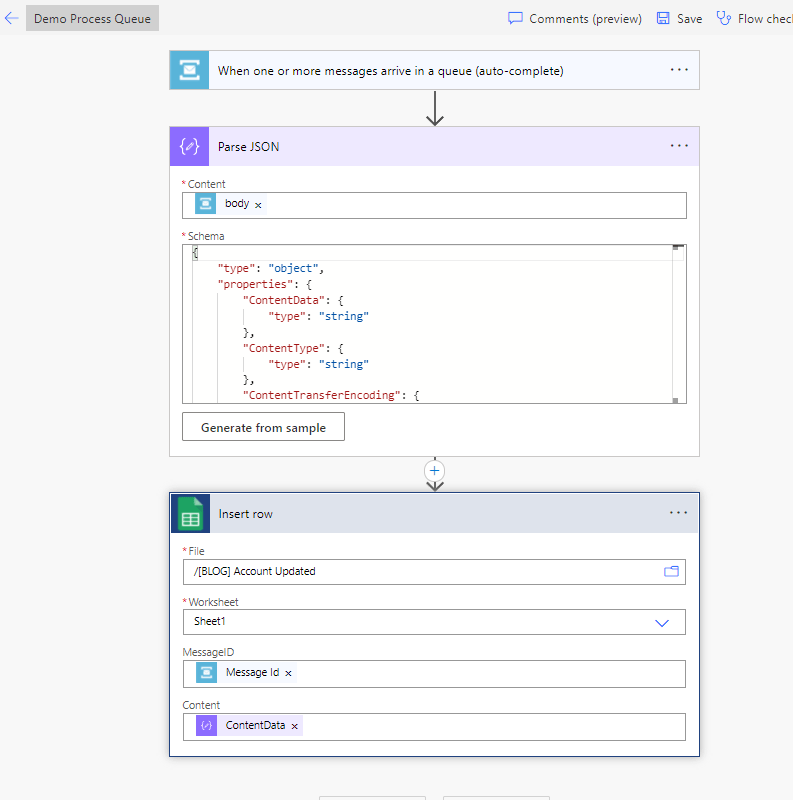 Flow Steps #2
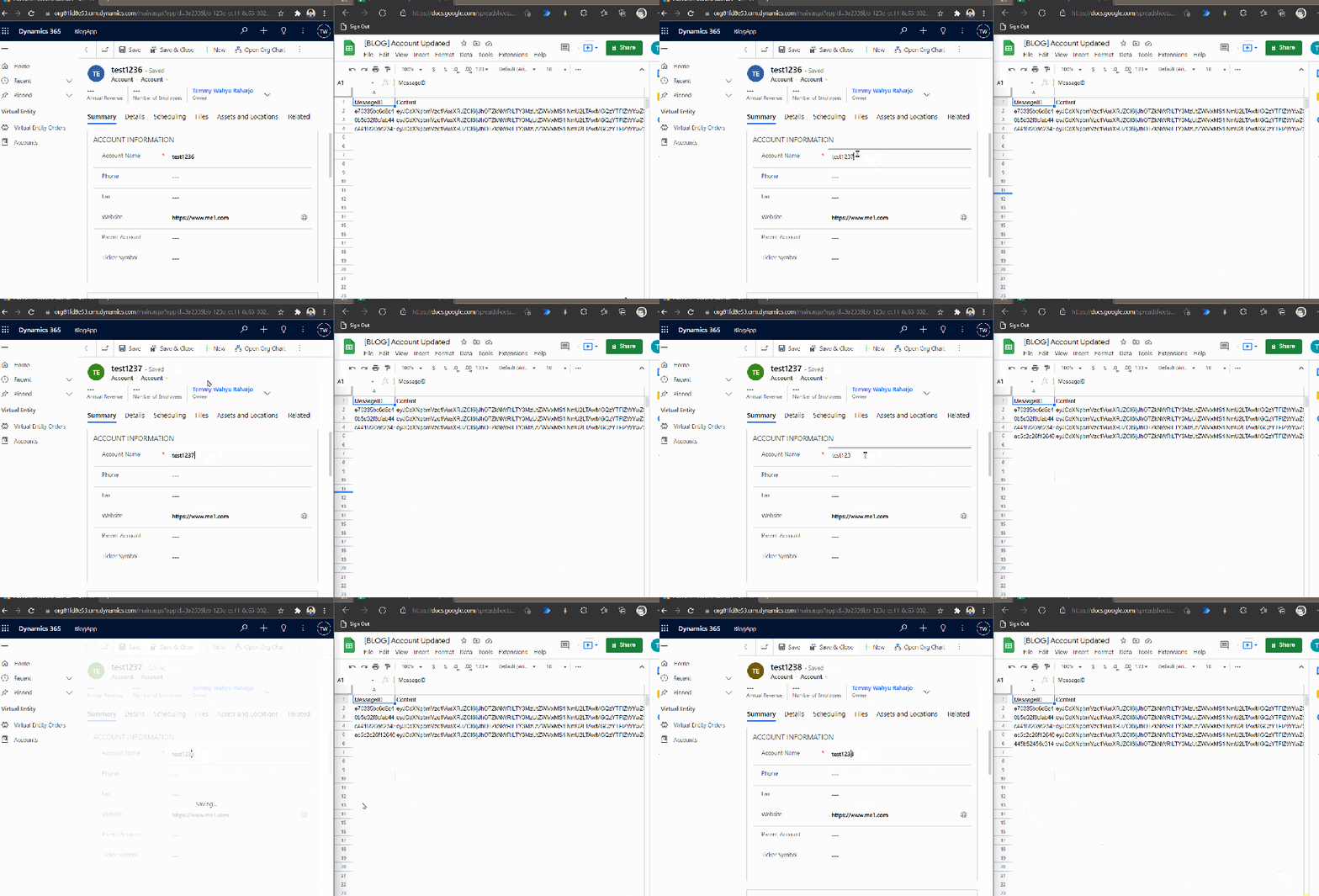
Below is the full demo when we run it from CRM + the result in the google sheet:
 Demo time
In the google sheet, the Message is automatically encoded as base64String. So if you want to get the content, you will need to decode it.
Summary
I think this method is way more complex compared to using the Webhook that you can see from this blogpost. But as a Consultant/Developer, this is a good alternative to know.
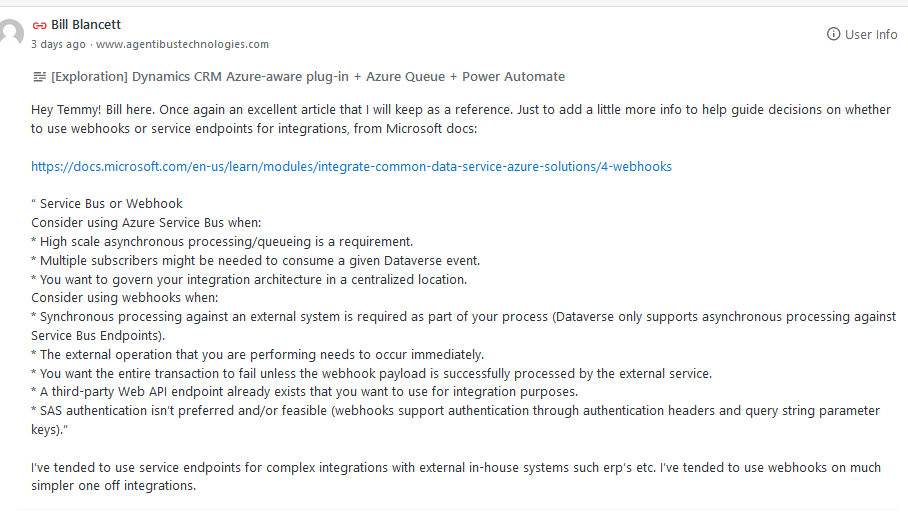
Updated on 23 November 2021. Here are Bill Blancett's recommendations on how to choose a Service Bus/Webhook:
 Bill's recommendation
Leave a comment
Your comment is sent privately to the author and isn't published on the site.