C# , dynamics-crm , tips
Dynamics CRM: To Set or Not To Set MaxConnectionTimeOut CrmServiceClient?

Do you ever wonder when using CrmServiceClient, why there is a setting for extending the MaxConnectionTimeOut? In my current company, I have faced a timeout issue when CRM process ExecuteMultipleRequestthat contains 1000 of data. One thing that I know based on the return error, by default, when we are using CrmServiceClient, the default timeout is set for 2 minutes. And because of this, here is the result of my investigation.
For my investigation, I created a plugin with the below logic (to wait for 3 minutes to trigger Dynamics CRM Plugin timeout) and registered it in the Message: Update and Stage: PreOperation:
using Microsoft.Xrm.Sdk;
using System;
using System.Threading;
namespace DemoPlugin
{
    public class Plugin1 : IPlugin
    {
        public void Execute(IServiceProvider serviceProvider)
        {
            Thread.Sleep(TimeSpan.FromMinutes(3));
        }
    }
}
Then I created a simple exe program that will update the same data 5 times using ExecuteMultipleRequest:
using System;
using System.Linq;
using System.Web.Configuration;
using Microsoft.Xrm.Sdk;
using Microsoft.Xrm.Sdk.Messages;
using Microsoft.Xrm.Sdk.Query;
using Microsoft.Xrm.Tooling.Connector;
namespace CrmCheck
{
    class Program
    {
        static void Main(string[] args)
        {
            var connectionString = WebConfigurationManager.AppSettings["connectionString"];
            CrmServiceClient.MaxConnectionTimeout = TimeSpan.FromSeconds(10);
            var client = new CrmServiceClient(connectionString);
            var query = new QueryExpression("new_test")
            {
                ColumnSet = new ColumnSet(false),
                TopCount = 1
            };
            var result = client.RetrieveMultiple(query);
            for (var i = 0; i < 5; i++)
            {
                var item = result.Entities[0];
                try
                {
                    var multipleRequests = new ExecuteMultipleRequest
                    {
                        Settings = new ExecuteMultipleSettings
                        {
                            ContinueOnError = true
                        },
                        Requests = new OrganizationRequestCollection()
                    };
                    var update = new Entity("new_test") { Id = item.Id, ["new_name"] = "Temmy" };
                    multipleRequests.Requests.Add(new UpdateRequest { Target = update });
                    var response = (ExecuteMultipleResponse)client.Execute(multipleRequests);
                    Console.WriteLine("Response: " + response.Responses.FirstOrDefault()?.Fault);
                }
                catch (Exception ex)
                {
                    Console.WriteLine("CRM Error: " + ex.Message);
                }
            }
            Console.ReadKey();
        }
    }
}
From the above code, as you can see I purposely set the MaxConnectionTimeOutto 10 seconds, and here is the result:
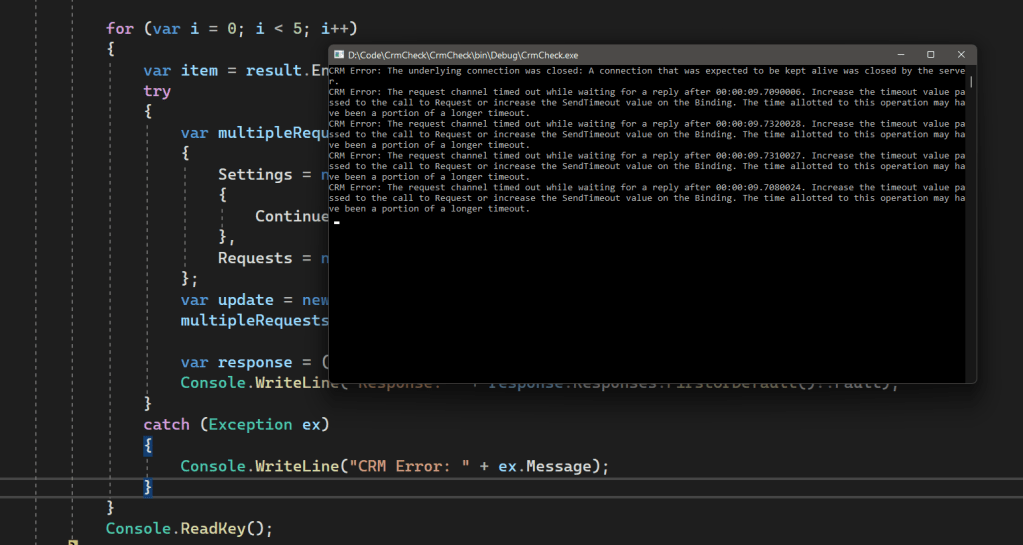 The CrmServiceClient set to be 10 seconds, hence always go to catch block
From the image above, every execution always goes to the catch block. It proves that MaxConnectionTimeOut is a property that sets the Time To Live (TTL) of the connection to the CRM.
Summary
In my opinion, we indeed can change this property and of course, depending on the situation. If we are using CrmServiceClient to export the Solution, it is impossible to depend on the 2-minute default MaxConnectionTimeOut. But it is also a stupid idea to set the MaxConnectionTimeOut globally without thinking specific purpose.
So for the above scenario when we are dealing with batch operations, this is the recommended solution (utilize CrmServiceClient.Clone method):
using System;
using System.Linq;
using System.Web.Configuration;
using Microsoft.Xrm.Sdk;
using Microsoft.Xrm.Sdk.Messages;
using Microsoft.Xrm.Sdk.Query;
using Microsoft.Xrm.Tooling.Connector;
namespace CrmCheck
{
    class Program
    {
        static void Main(string[] args)
        {
            var connectionString = WebConfigurationManager.AppSettings["connectionString"];
            // CrmServiceClient.MaxConnectionTimeout = TimeSpan.FromSeconds(10);
            var client = new CrmServiceClient(connectionString);
            var query = new QueryExpression("new_test")
            {
                ColumnSet = new ColumnSet(false),
                TopCount = 1
            };
            var result = client.RetrieveMultiple(query);
            for (var i = 0; i < 5; i++)
            {
                var localSvc = client.Clone();
                var item = result.Entities[0];
                try
                {
                    var multipleRequests = new ExecuteMultipleRequest
                    {
                        Settings = new ExecuteMultipleSettings
                        {
                            ContinueOnError = true
                        },
                        Requests = new OrganizationRequestCollection()
                    };
                    var update = new Entity("new_test") { Id = item.Id, ["new_name"] = "Temmy" };
                    multipleRequests.Requests.Add(new UpdateRequest { Target = update });
                    var response = (ExecuteMultipleResponse)localSvc.Execute(multipleRequests);
                    Console.WriteLine("Response: " + response.Responses.FirstOrDefault()?.Fault);
                }
                catch (Exception ex)
                {
                    Console.WriteLine("CRM Error: " + ex.Message);
                }
                finally
                {
                    localSvc.Dispose();
                }
            }
            client.Dispose();
            Console.ReadKey();
        }
    }
}
* The improvement above will still make the update operations not successful but is a best practice when doing batch operations to create a new instance of CrmServiceClient/IOrganizationService.
Bonus Content
To improve the performance + throughput (the data that we can process in the batch), you can follow these articles:
Then based on those articles, the default structure that I can imagine is like this (you must update Microsoft.CrmSdk.XrmTooling.CoreAssembly with version at least 9.1.0.92):
using System;
using System.Collections.Generic;
using System.Linq;
using System.Threading.Tasks;
using System.Web.Configuration;
using Microsoft.Xrm.Sdk;
using Microsoft.Xrm.Sdk.Messages;
using Microsoft.Xrm.Sdk.Query;
using Microsoft.Xrm.Tooling.Connector;
namespace CrmCheck
{
    class Program
    {
        static void Main(string[] args)
        {
            //Change max connections from .NET to a remote service default: 2
            System.Net.ServicePointManager.DefaultConnectionLimit = 65000;
            //Bump up the min threads reserved for this app to ramp connections faster - minWorkerThreads defaults to 4, minIOCP defaults to 4
            System.Threading.ThreadPool.SetMinThreads(100, 100);
            //Turn off the Expect 100 to continue message - 'true' will cause the caller to wait until it round-trip confirms a connection to the server
            System.Net.ServicePointManager.Expect100Continue = false;
            //Can decrease overall transmission overhead but can cause delay in data packet arrival
            System.Net.ServicePointManager.UseNagleAlgorithm = false;
            var connectionString = WebConfigurationManager.AppSettings["connectionString"];
            // CrmServiceClient.MaxConnectionTimeout = TimeSpan.FromSeconds(10);
            var client = new CrmServiceClient(connectionString);
            // Split the data to 100 (up to you haha!)
            var groups = RetrieveBigData(client).Split(100).ToArray();
            var errors = new List<string>();
            Parallel.ForEach(groups,
                new ParallelOptions
                {
                    // Set based on the recommended CRM Environment
                    MaxDegreeOfParallelism = client.RecommendedDegreesOfParallelism
                },
                () => client.Clone(), // Clone the client for each batch
                (entities, loopState, index, threadLocalSvc) =>
                {
                    // Your logic to update/create/delete
                    var executeMultipleRequest = new ExecuteMultipleRequest
                    {
                        Settings = new ExecuteMultipleSettings
                        {
                            ContinueOnError = true
                        },
                        Requests = new OrganizationRequestCollection()
                    };
                    var updateRequests = entities.Select(entity =>
                        new UpdateRequest
                        {
                            Target = new Entity("new_test")
                            {
                                Id = entity.Id,
                                ["new_name"] = "Temmy"
                            }
                        }).ToArray();
                    executeMultipleRequest.Requests.AddRange(updateRequests);
                    var executeMultipleResponse = (ExecuteMultipleResponse)
                        threadLocalSvc.Execute(executeMultipleRequest);
                    if (executeMultipleResponse.Responses.Any(e => e?.Fault != null))
                    {
                        errors.AddRange(executeMultipleResponse.Responses
                            .Where(e => e.Fault != null)
                            .Select(e => e.Fault.ToString()));
                    }
                    return threadLocalSvc;
                },
                (threadLocalSvc) => threadLocalSvc.Dispose()
            );
            //Process the error if necessary
            client.Dispose();
            Console.ReadKey();
        }
        private static Entity[] RetrieveBigData(CrmServiceClient client)
        {
            // Insert your query
            return new Entity[] { };
        }
    }
    //https://jianmingli.com/wp/?p=11517
    public static class Extensions
    {
        public static IEnumerable<IEnumerable<T>> Split<T>(this T[] array, int size)
        {
            for (var i = 0; i < (float)array.Length / size; i++)
            {
                yield return array.Skip(i * size).Take(size);
            }
        }
    }
}
* Microsoft.CrmSdk.XrmTooling.CoreAssembly version 9.1.0.92 introduces a new attribute named RecommendedDegreesOfParallelismon CrmServiceClientwhere it will return an integer value for the best Parallel Setting for the machine that runs it.
Happy CRM-ing!
Leave a comment
Your comment is sent privately to the author and isn't published on the site.