dynamics-crm , Javascript , tips
Dynamics CRM: addOnLookupTagClick and removeOnLookupTagClick

Today we will learn simple methods that are related to the datatype lookupon CRM: addOnLookupTagClickand removeOnLookupTagClick. Basically, addOnLookupTagClickis a function to register an event when the user is clicking the lookup tag value.
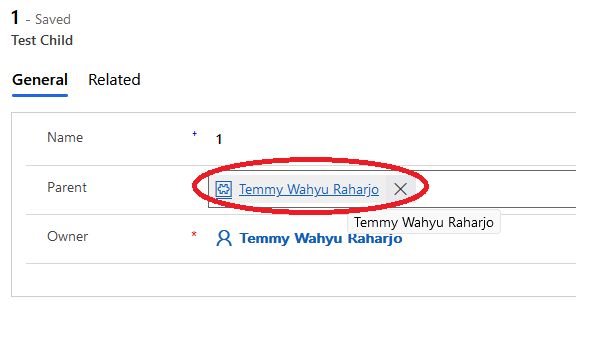 Click the Lookup Tag value
From the image above, if we click the lookup tag value and register the events using addOnLookupTagClick, those events will be called.
While removeOnLookupTagClickis a function to remove the event that we registered before using addOnLookupTagClick.
So what is the scenario that I can think of using this method? Let's say when we want to open a specific form, then we can use this code:
var blog = {};
(function () {
  var lookupFunction = function (context) {
    var eventArgs = context.getEventArgs();
    // Disabled the original open form
    eventArgs.preventDefault();
    var lookupTagValue = eventArgs.getTagValue();
    var entityFormOption = {
      entityName: lookupTagValue.entityType,
      entityId: lookupTagValue.id,
      formId: "708c87fc-0e43-4cff-bcd9-d5bf15af5a5d",
    };
    // Open the lookup with specific formId
    Xrm.Navigation.openForm(entityFormOption);
  };
  var addLookupTagClickFn = function (context) {
    const formContext = context.getFormContext();
    formContext.getControl("new_parentid").addOnLookupTagClick(lookupFunction);
  };
  var removeLookupTagClickFn = function (context) {
    const formContext = context.getFormContext();
    // To Removee the event we registered before
    formContext.getControl("new_parentid").removeOnLookupTagClick(lookupFunction);
  };
  this.formOnLoad = function (context) {
    addLookupTagClickFn(context);
  };
}.apply(blog));
From the code above, we can see that we are intercepting the original open form (when we click the lookup tag value), we call eventArgs.preventDefault() to disable the original navigation behavior and open the form that we wanted using Xrm.Navigation.openForm(entityFormOption) method.
Happy CRM-ing!
Leave a comment
Your comment is sent privately to the author and isn't published on the site.