Debunking: KingswaySoft Dynamics CRM Source- Output Timezone

Hi! I'm back after so a long hiatus (probably I'll write the reason for this later 🤣). As [lazy] Developers, we're most likely to interact with a "wrapper" (can be components, services, etc) that hides all the complexity needed. But, I believe at some point, we will be facing some issues which force us to dig deeper to understand better the "wrapper" that we are using. For instance, regarding KingswaySoft Dynamics CRM Source - Output Timezone. I encountered the error SQL Timeout, which led me to analyze more deeply how the component works. With the help of Fiddler Classic, here is the summary of my learning! Enjoy!
Fiddler Setup
The Fiddlersetup is pretty easy. I just need to enable the filter of my Dynamics CRM URL:
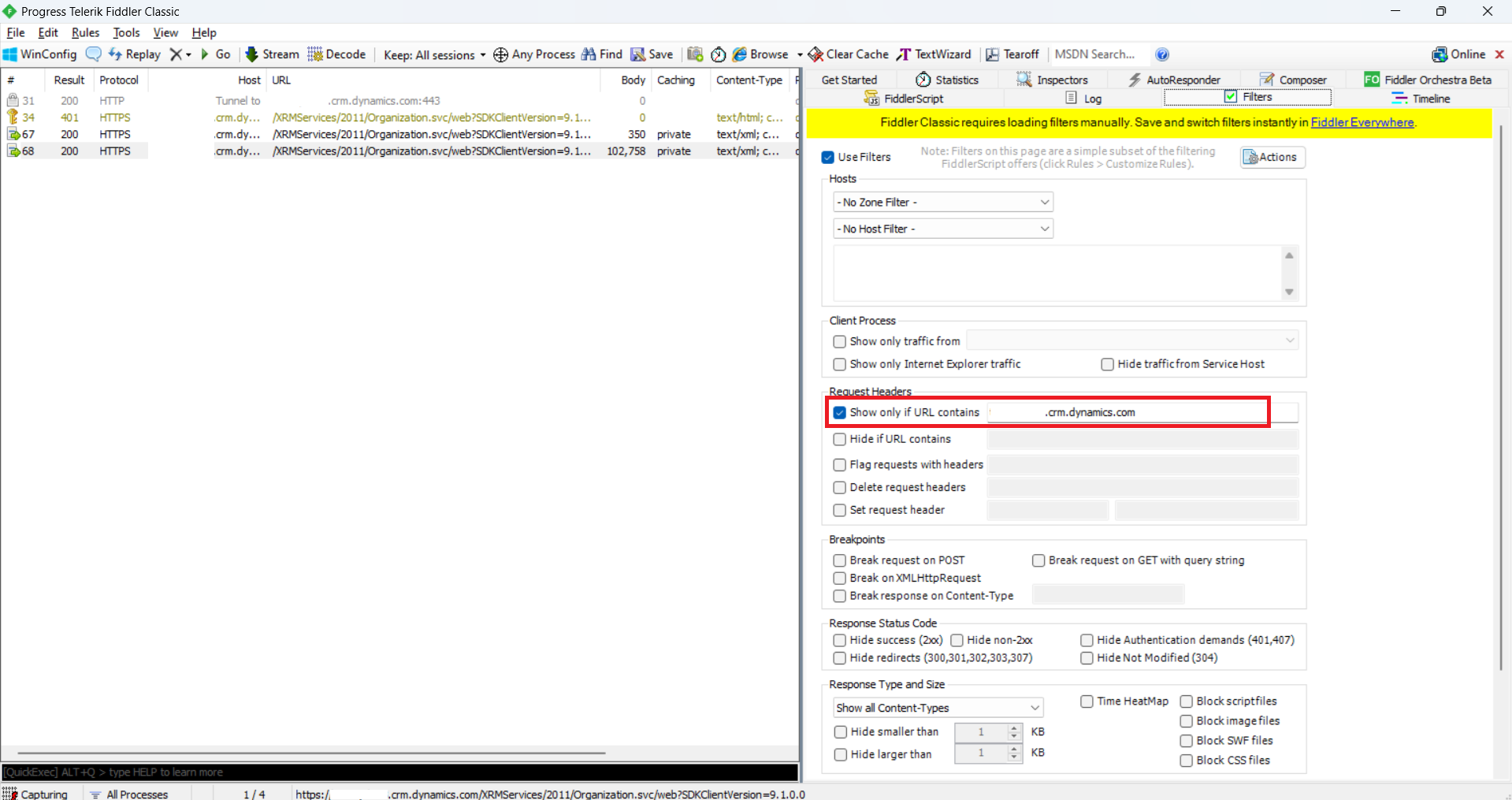
Enable Filter for your Dynamics CRM instance
You only need to start your Fiddler > Go to Filters > Request Headers > Tick the "Show only if URL contains" > in the textbox, put your CRM URL.
Dynamics CRM Source - Output Timezone: UTC (Default)
Next, I created a simple package that retrieves the FullName and CreatedOn of Contacts:
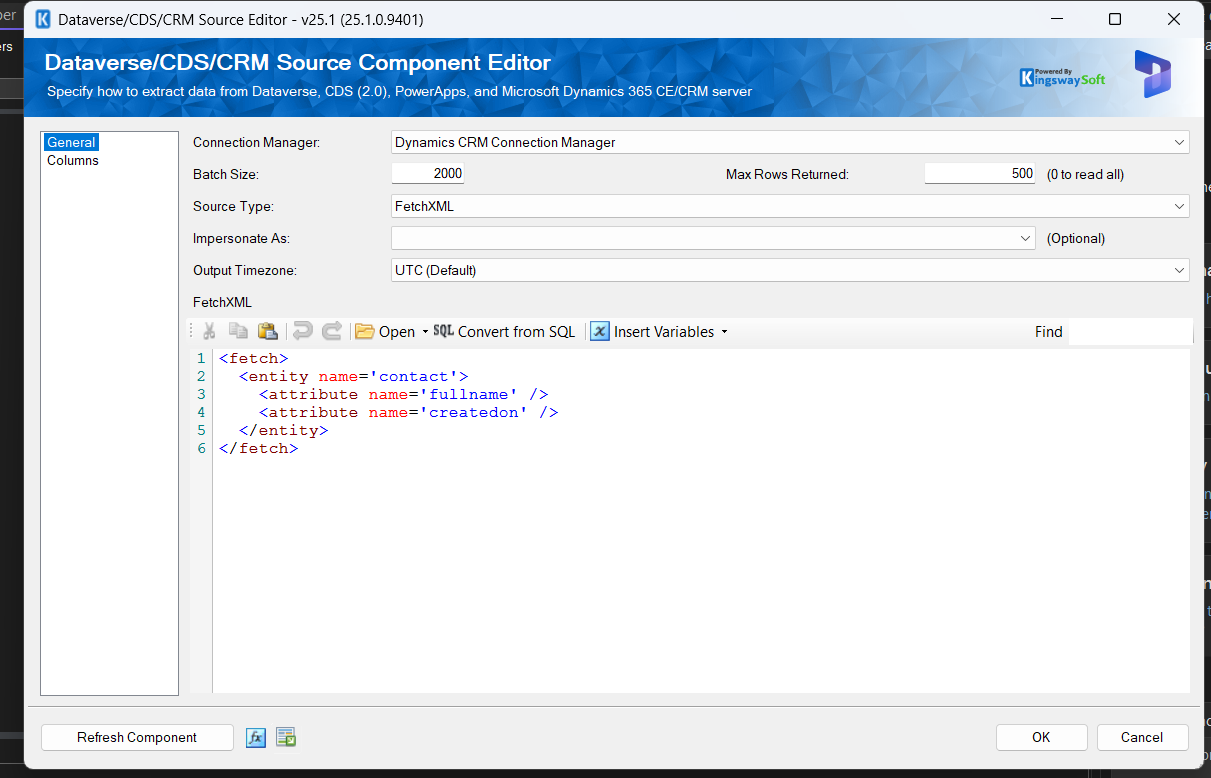
Dynamics CRM Source - Output Timezone: UTC (Default)
After I executed the Package, here are the important steps (I skipped the part that was not necessary, such as Authentication, Retrieving Version, etc) from the Fiddler:
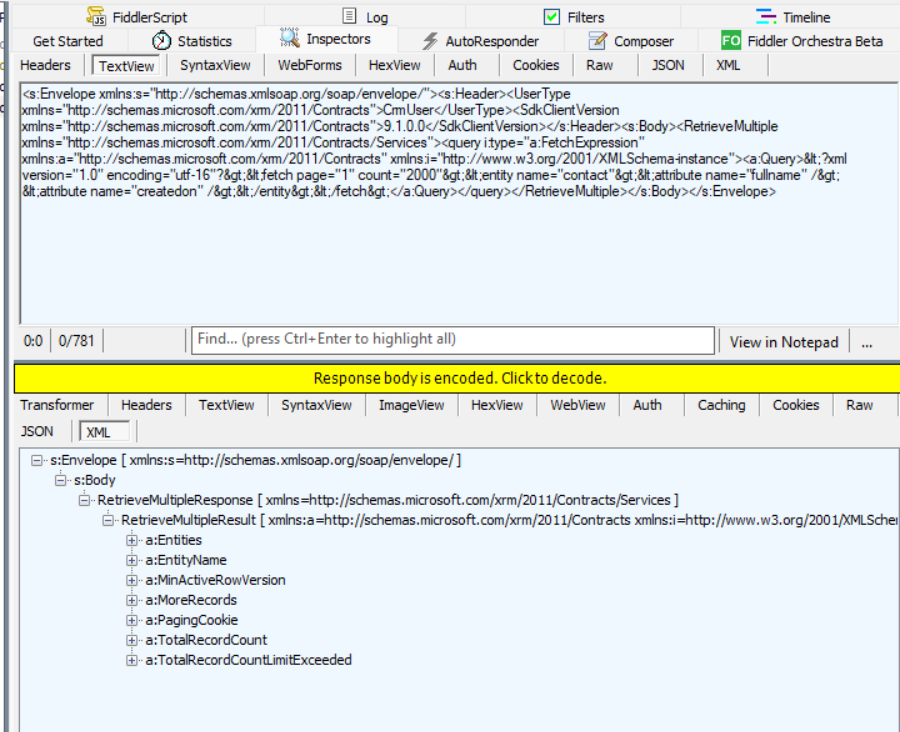
RetrieveMultipleRequest
As you can see in the above screenshot, it will directly execute RetrieveMultipleRequest(from FetchXML), and the Dataverse will return the RetrieveMultipleResponse!
Dynamics CRM Source - Output Timezone: Adjust to timezone of Connection User
Here is how to set the Output Timezone to "Adjust to timezone of Connection User":
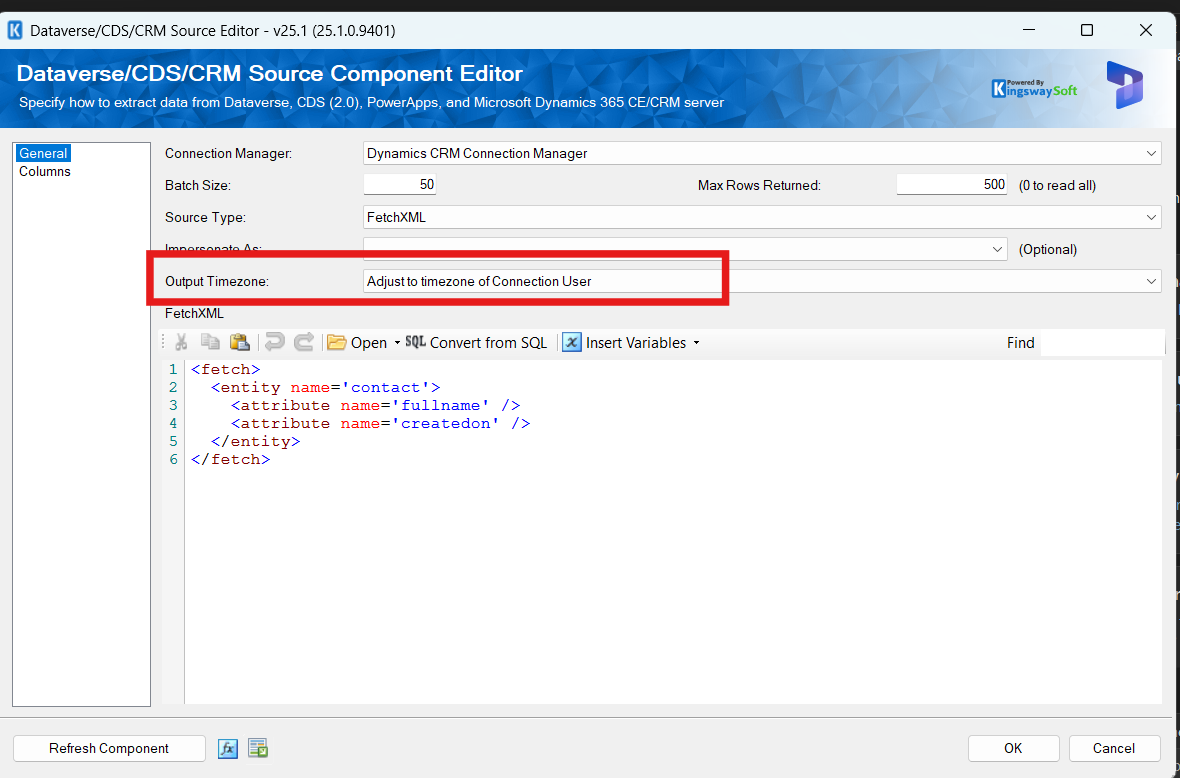
Dynamics CRM Source - Output Timezone: Adjust to timezone of Connection User
Before retrieving the data, the system will be execute the following:
<s:Envelope xmlns:s="http://schemas.xmlsoap.org/soap/envelope/"><s:Header><UserType xmlns="http://schemas.microsoft.com/xrm/2011/Contracts">CrmUser</UserType><SdkClientVersion xmlns="http://schemas.microsoft.com/xrm/2011/Contracts">9.1.0.0</SdkClientVersion></s:Header><s:Body><RetrieveMultiple xmlns="http://schemas.microsoft.com/xrm/2011/Contracts/Services"><query i:type="a:FetchExpression" xmlns:a="http://schemas.microsoft.com/xrm/2011/Contracts" xmlns:i="http://www.w3.org/2001/XMLSchema-instance"><a:Query><fetch mapping='logical'>
<entity name='timezonerule'>
<attribute name='bias' />
<attribute name='daylightbias' />
<attribute name='daylightyear' />
<attribute name='daylightmonth' />
<attribute name='daylightday' />
<attribute name='daylighthour' />
<attribute name='daylightminute' />
<attribute name='daylightsecond' />
<attribute name='daylightdayofweek' />
<attribute name='standardbias' />
<attribute name='standardyear' />
<attribute name='standardmonth' />
<attribute name='standardday' />
<attribute name='standardhour' />
<attribute name='standardminute' />
<attribute name='standardsecond' />
<attribute name='standarddayofweek' />
<attribute name='effectivedatetime' />
<link-entity name='timezonedefinition' to='timezonedefinitionid' from='timezonedefinitionid' alias='d' link-type='inner'>
<link-entity name='usersettings' to='timezonecode' from='timezonecode' alias='us' link-type='inner'>
<filter>
<condition attribute='systemuserid' operator='eq-userid' />
</filter>
</link-entity>
</link-entity>
<order attribute='timezoneruleversionnumber' descending='true' />
<order attribute='effectivedatetime' descending='true' />
</entity>
</fetch></a:Query></query></RetrieveMultiple></s:Body></s:Envelope>
Last, it will execute the query retrieval and in KingswaySoft will process based on the User Timezone (The AppUser that I'm using is set as MYT - UTC+8):
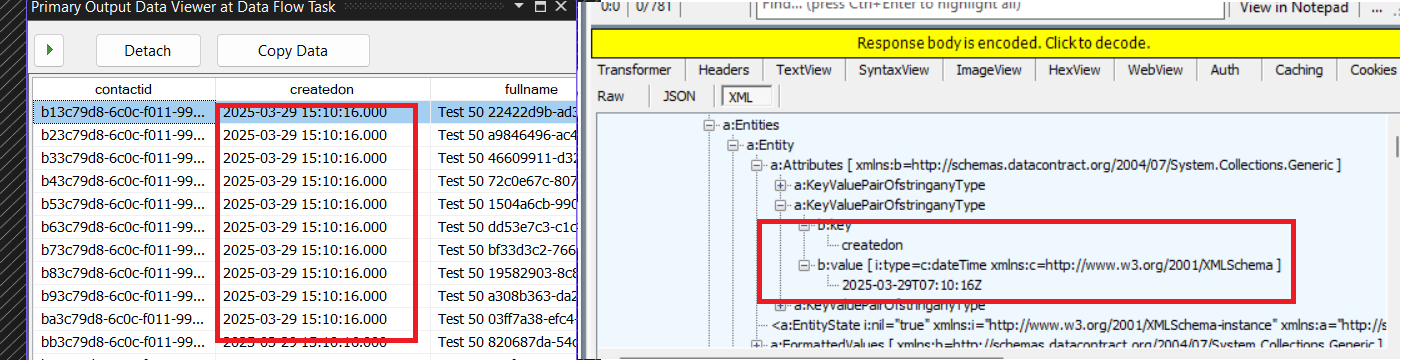
CreatedOn is set as MYT on the result
Dynamics CRM Source - Output Timezone: Adjust to timezone of Impersonate User
Last, the impersonated user. We need to select first the user that we want, and set the Output Timezone to "Adjust to timezone of Impersonate User":
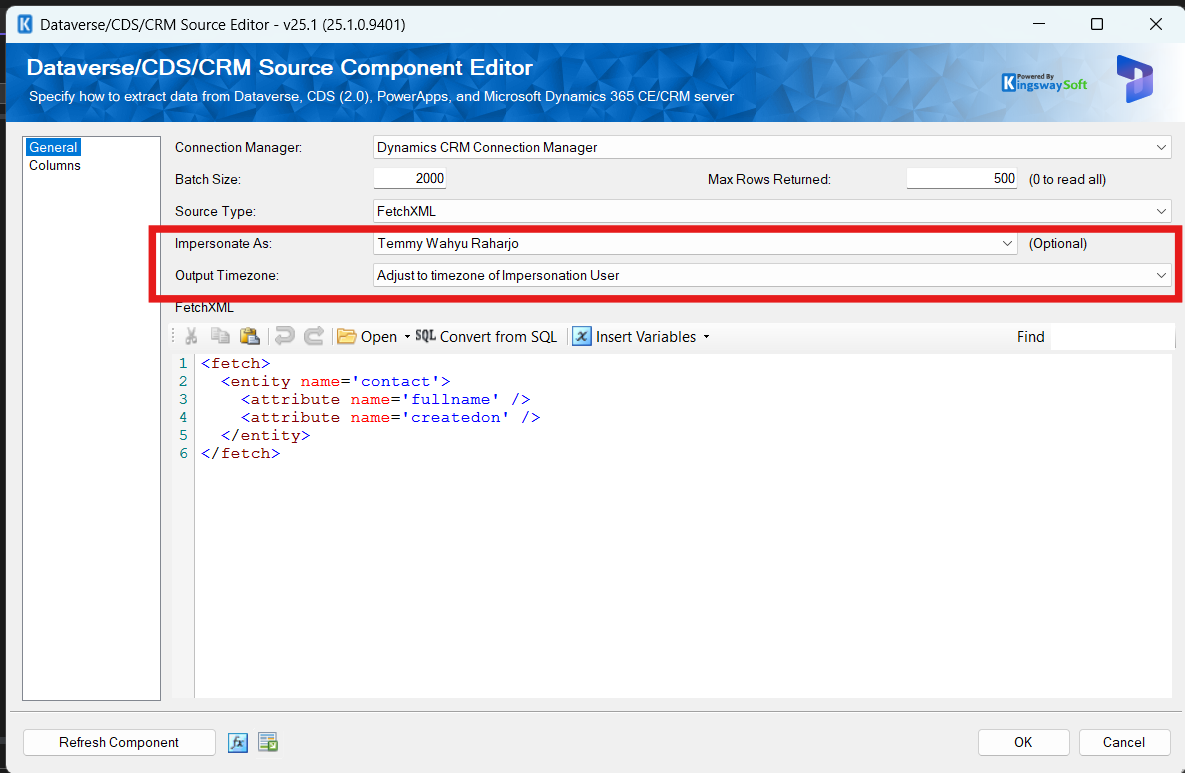
Dynamics CRM Source - Output Timezone: Adjust to timezone of Impersonate User
When we execute the package, it will run the following query:
<s:Envelope xmlns:s="http://schemas.xmlsoap.org/soap/envelope/"><s:Header><CallerId xmlns="http://schemas.microsoft.com/xrm/2011/Contracts">f9e7905c-cf7a-ee11-8179-002248201668</CallerId><UserType xmlns="http://schemas.microsoft.com/xrm/2011/Contracts">CrmUser</UserType><SdkClientVersion xmlns="http://schemas.microsoft.com/xrm/2011/Contracts">9.1.0.0</SdkClientVersion></s:Header><s:Body><RetrieveMultiple xmlns="http://schemas.microsoft.com/xrm/2011/Contracts/Services"><query i:type="a:FetchExpression" xmlns:a="http://schemas.microsoft.com/xrm/2011/Contracts" xmlns:i="http://www.w3.org/2001/XMLSchema-instance"><a:Query><fetch mapping='logical'>
<entity name='timezonerule'>
<attribute name='bias' />
<attribute name='daylightbias' />
<attribute name='daylightyear' />
<attribute name='daylightmonth' />
<attribute name='daylightday' />
<attribute name='daylighthour' />
<attribute name='daylightminute' />
<attribute name='daylightsecond' />
<attribute name='daylightdayofweek' />
<attribute name='standardbias' />
<attribute name='standardyear' />
<attribute name='standardmonth' />
<attribute name='standardday' />
<attribute name='standardhour' />
<attribute name='standardminute' />
<attribute name='standardsecond' />
<attribute name='standarddayofweek' />
<attribute name='effectivedatetime' />
<link-entity name='timezonedefinition' to='timezonedefinitionid' from='timezonedefinitionid' alias='d' link-type='inner'>
<link-entity name='usersettings' to='timezonecode' from='timezonecode' alias='us' link-type='inner'>
<filter>
<condition attribute='systemuserid' operator='eq' value='f9e7905c-cf7a-ee11-8179-002248201668' />
</filter>
</link-entity>
</link-entity>
<order attribute='timezoneruleversionnumber' descending='true' />
<order attribute='effectivedatetime' descending='true' />
</entity>
</fetch></a:Query></query></RetrieveMultiple></s:Body></s:Envelope>
It will retrieve the ***timezonerule***table based on the Impersonate User that we have selected.
Then, it will be querying the data, and KingswaySoft will process the data and add the time based on the Impersonated User (in this case, I set the impersonated user to UTC+7):
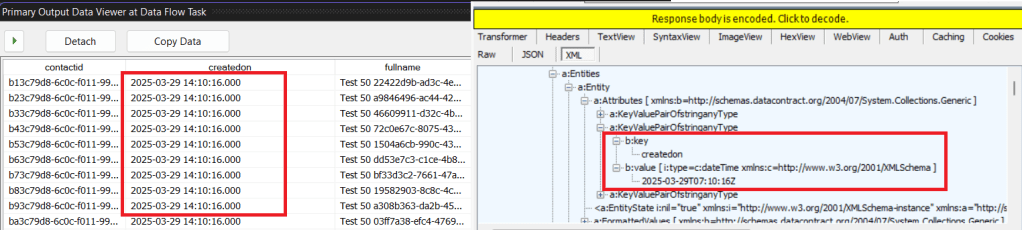
CreatedOn is set as IWST (UTC+7) on the result
Summary
In short, here is the flowchart on how KingswaySoft processes the Output Timezone:
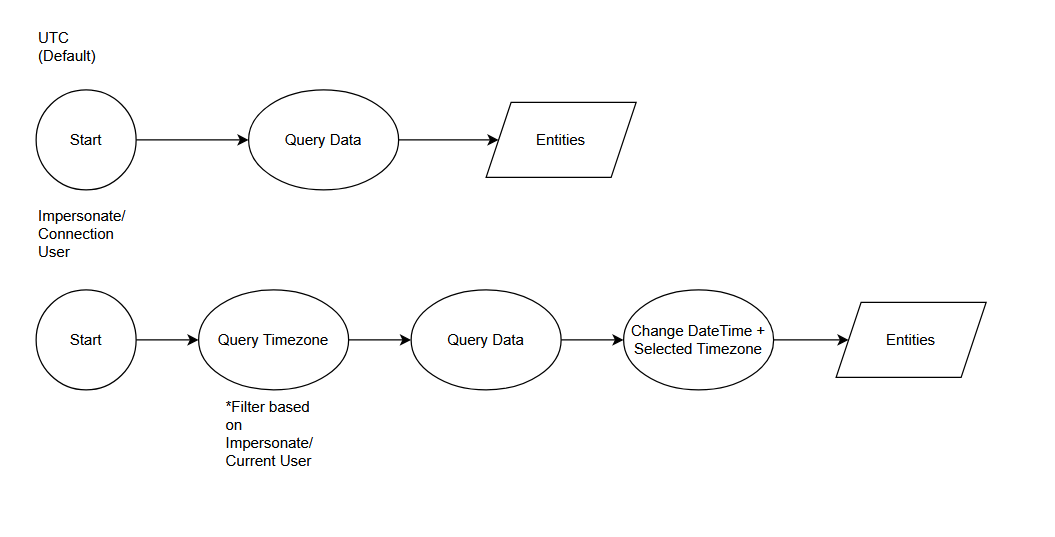
Summary on how KingswaySoft Dynamics CRM Source - Output Timezone works
Happy CRM-ing! 😎
Leave a comment
Your comment is sent privately to the author and isn't published on the site.