dynamics-crm , powerplatform , tips
Dataverse: Using Or Condition in multiple QueryExpression.LinkEntities

Quick tips for those who want to retrieve data using QueryExpression, join it with multiple tables, and filter it using OR condition based on LinkEntities. To simplify the explanation, let me show the SQL Query that we want to achieve for the scenario:
SELECT contact.firstname, contact.lastname
FROM contact LEFT JOIN contact AS contact2 ON contact.parentcustomerid = contact2.contactid
LEFT JOIN account ON contact.parentcustomerid = account.accountid
WHERE contact.statecode = 0
AND (contact2.jobtitle = 'Demo Query' OR account.msdyn_workorderinstructions= 'Demo Query')
Based on the above query, I want to retrieve the Contact that has a Parent Contact with a Job Title of "Demo Query" OR the Contact that has a Parent Account with Work Order Instructions of "Demo Query".
Based on the above code, I created the below code and got the error:
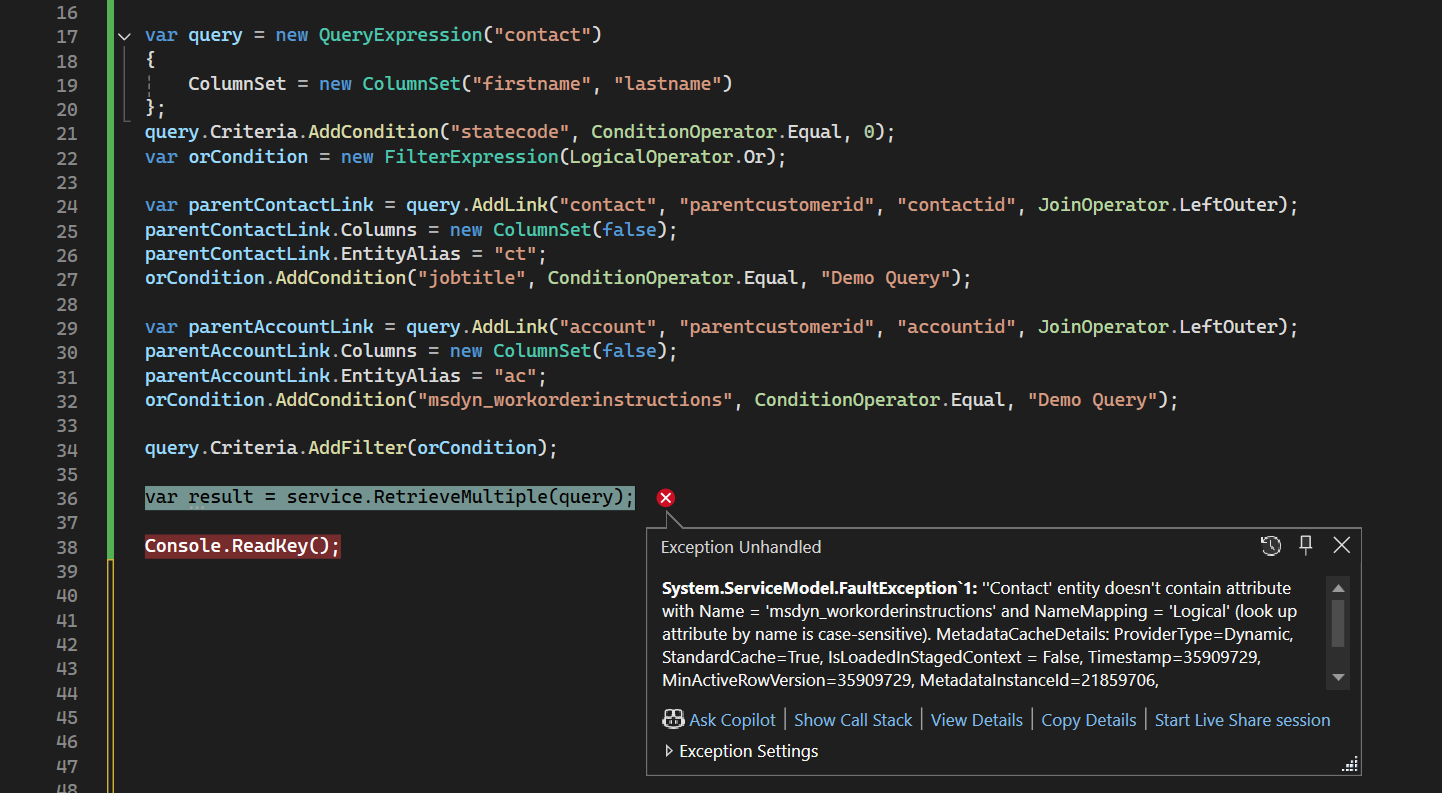
Error Query
The above query failed as the system tried to apply the OR conditions in the main entity/table (instead of searching Parent Contact.JobTitle = "Demo Query" and Parent Account.WorkOrderInstructions = "Demo Query", it goes to Contact.JobTitle = "Demo Query" and Contact.WorkOrderInstructions = "Demo Query"). Because the table contact doesn't have msdyn_workorderinstructions, hence we get the error ''Contact' entity doesn't contain attribute with Name = 'msdyn_workorderinstructions' and NameMapping = 'Logical' (look up attribute by name is case-sensitive). MetadataCacheDetails: ProviderType=Dynamic, StandardCache=True, IsLoadedInStagedContext = False, Timestamp=35909729, MinActiveRowVersion=35909729, MetadataInstanceId=21859706, LastUpdated=2025-01-11 04:44:16.057, OrgId=8c72927b-eb26-4ebc-9d78-6fcef92001cd'".
If we inspect the query using SQL 4 CDS by Mark Carrington > Convert to FetchXml, we can see that we need to generate the below query:
<!--
Created from query:

SELECT contact.firstname, contact.lastname
FROM contact LEFT JOIN contact AS contact2 ON contact.parentcustomerid = contact2.contactid
LEFT JOIN account ON contact.parentcustomerid = account.accountid
WHERE contact.statecode = 0
AND (contact2.jobtitle = 'Demo Query' OR account.msdyn_workorderinstructions = 'Demo Query')

-->

<fetch xmlns:generator='MarkMpn.SQL4CDS'>
  <entity name='contact'>
    <attribute name='firstname' />
    <attribute name='lastname' />
    <link-entity name='contact' to='parentcustomerid' from='contactid' alias='contact2' link-type='outer' />
    <link-entity name='account' to='parentcustomerid' from='accountid' alias='account' link-type='outer' />
    <filter>
      <condition attribute='statecode' operator='eq' value='0' />
      <filter type='or'>
        <condition attribute='jobtitle' entityname='contact2' operator='eq' value='Demo Query' />
        <condition attribute='msdyn_workorderinstructions' entityname='account' operator='eq' value='Demo Query' />
      </filter>
    </filter>
  </entity>
</fetch>
If you look further, we can see in lines 22 - 23 that there is an attribute named "entityname" that needs to be filled in with the LinkEntity.LogicalName(if you are adding EntityAlias, then you need to replace it with EntityAlias).
So, to fix the above code, we need to change the code like this:
var query = new QueryExpression("contact")
{
    ColumnSet = new ColumnSet("firstname", "lastname")
};
query.Criteria.AddCondition("statecode", ConditionOperator.Equal, 0);
var orCondition = new FilterExpression(LogicalOperator.Or);

var parentContactLink = query.AddLink("contact", "parentcustomerid", "contactid", JoinOperator.LeftOuter);
parentContactLink.Columns = new ColumnSet(false);
parentContactLink.EntityAlias = "ct";
//orCondition.AddCondition("jobtitle", ConditionOperator.Equal, "Demo Query");
orCondition.AddCondition(new ConditionExpression("jobtitle", ConditionOperator.Equal, "Demo Query") { EntityName = "ct" });

var parentAccountLink = query.AddLink("account", "parentcustomerid", "accountid", JoinOperator.LeftOuter);
parentAccountLink.Columns = new ColumnSet(false);
parentAccountLink.EntityAlias = "ac";
//orCondition.AddCondition("msdyn_workorderinstructions", ConditionOperator.Equal, "Demo Query");
orCondition.AddCondition(new ConditionExpression("msdyn_workorderinstructions", ConditionOperator.Equal, "Demo Query") { EntityName = "ac"});

query.Criteria.AddFilter(orCondition);

var result = service.RetrieveMultiple(query);
And here is the proof that we getting the correct data!
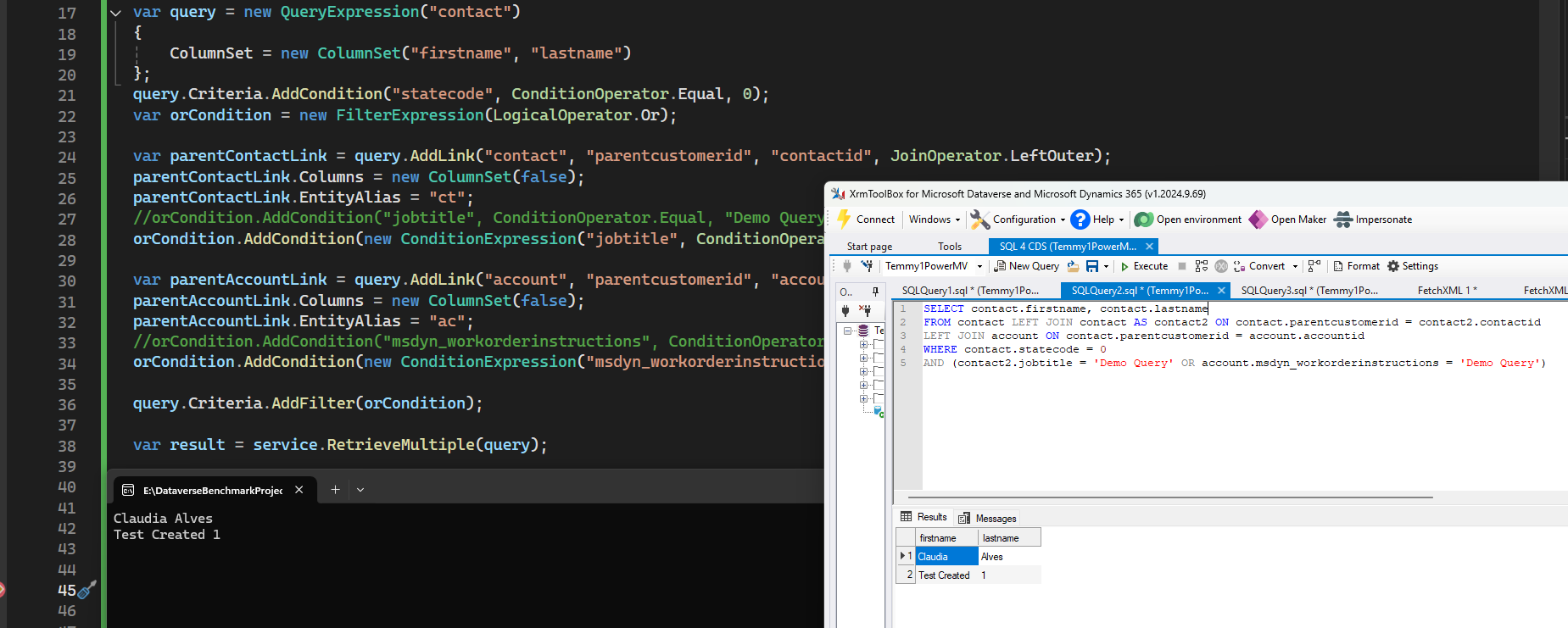
Result
Happy CRM-ing! 🚀😎
Leave a comment
Your comment is sent privately to the author and isn't published on the site.