dynamics-crm , Javascript , powerplatform , tips
Xrm.Utility.getEntityMetadata to get the localized label

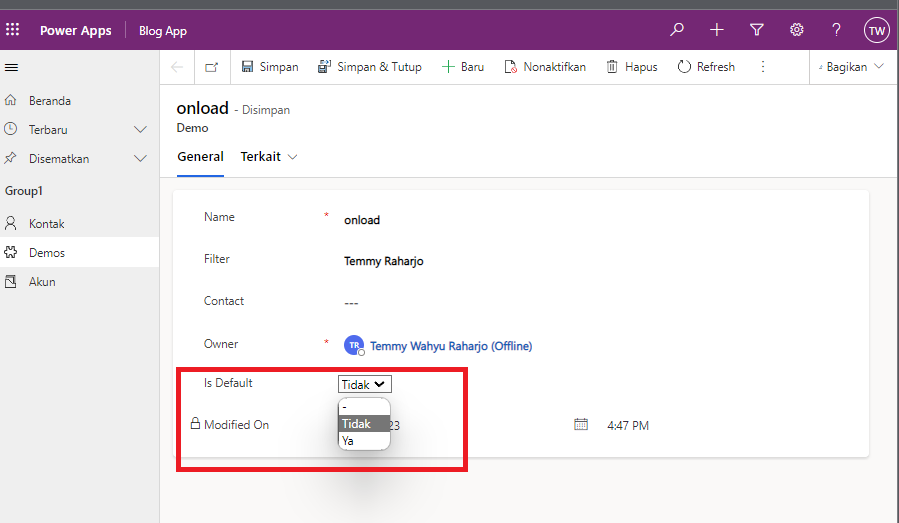
I got a request to basically create PCF for Two OptionSet (boolean) with the main purpose is to keep Yes, No, and Null/Empty values. If you get the requirement, making it is not hard. But, usually in the project, we also need to support multi-languages. There's an article from Carl de Souza that explaining about how to use "EntityDefinitions WebAPI. But for me, that solution is too complicated. Then I found Xrm.Utility.getEntityMetadata andInogic have a deeper explanation of how to use it here. In today's blog post, we will not learn how to create the PCF step by step. But, I'll reveal the code logic and show you the result.
Install More Language
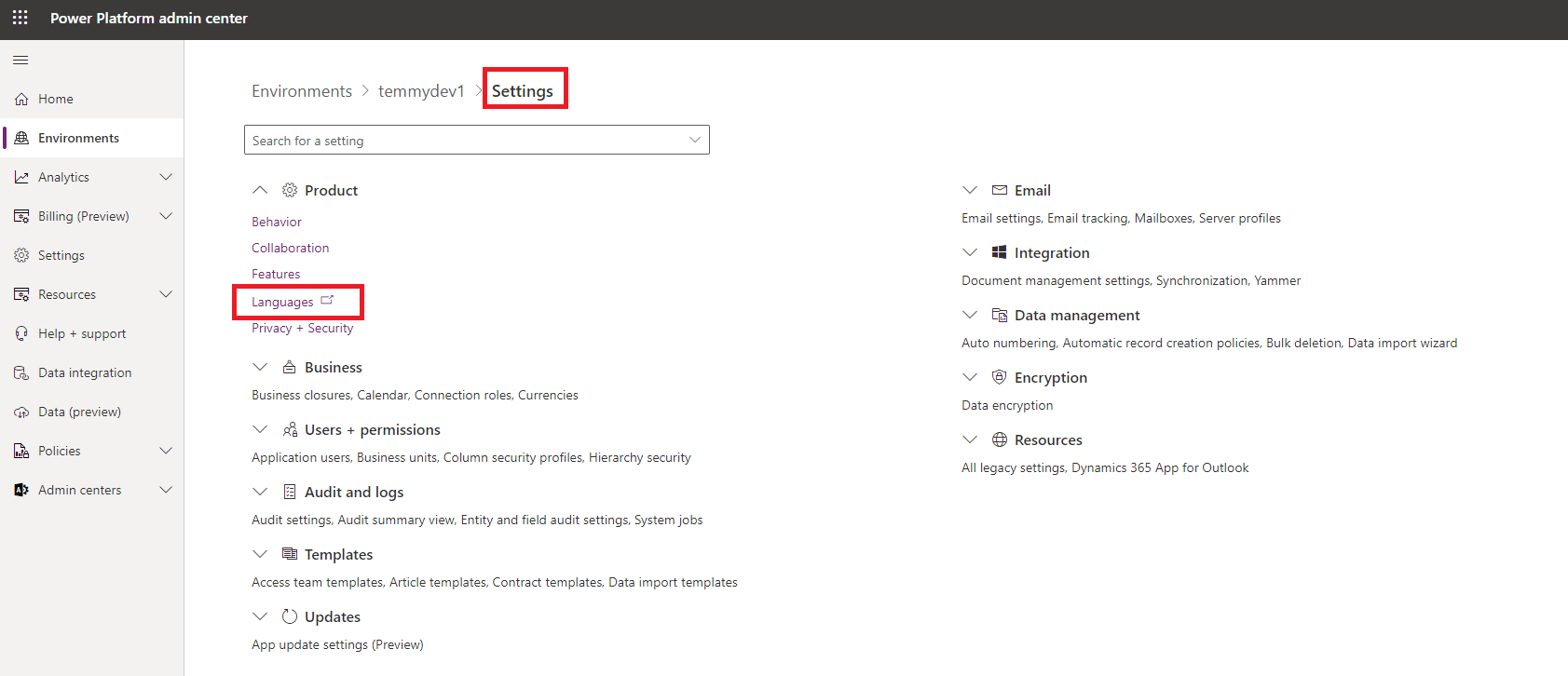
Go to admin.powerplatform.com > Environments > select the environment that you want > Settings > Languages:
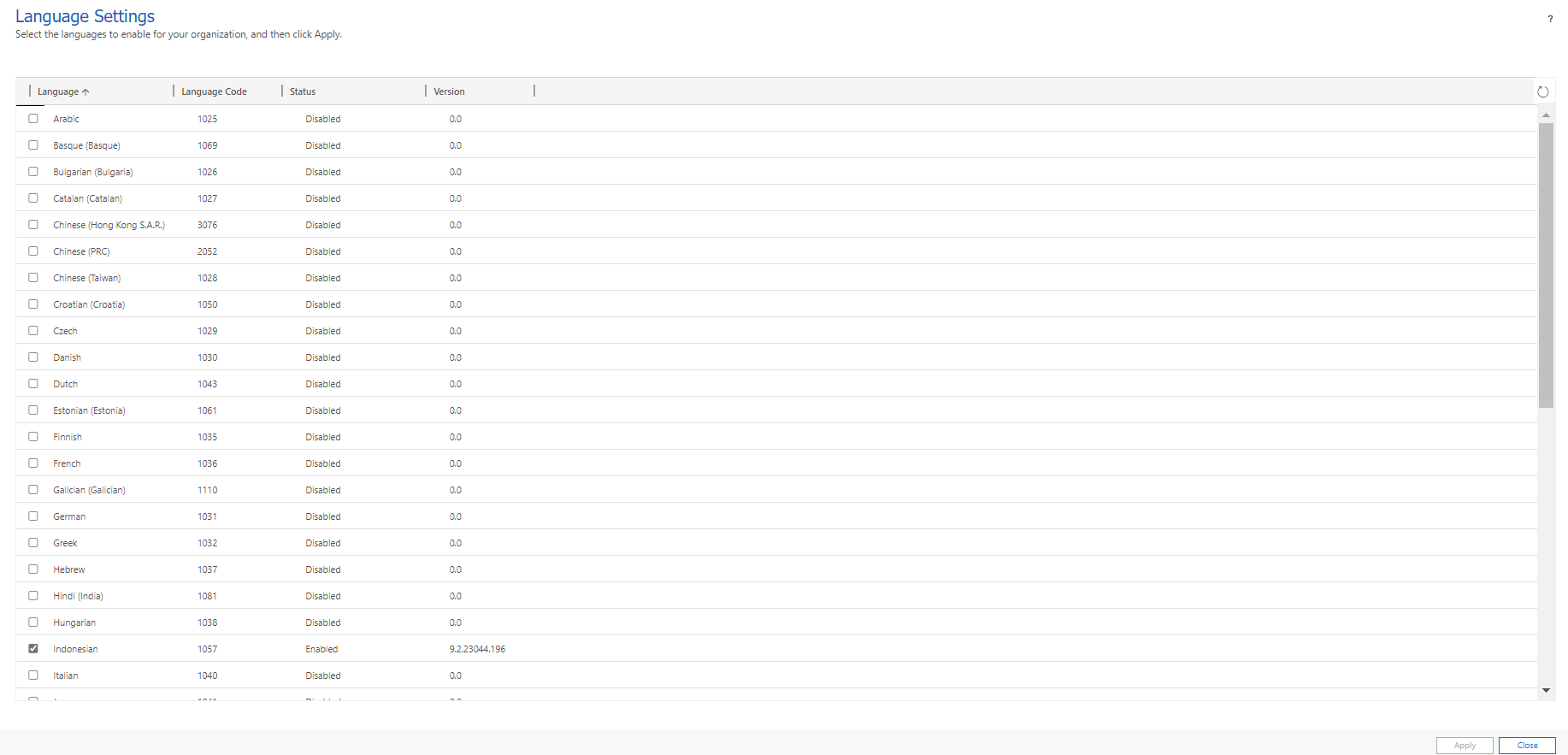
Once you click the Languages, the system will open a new tab and you can select the language that you want (I'm installing Indonesian):
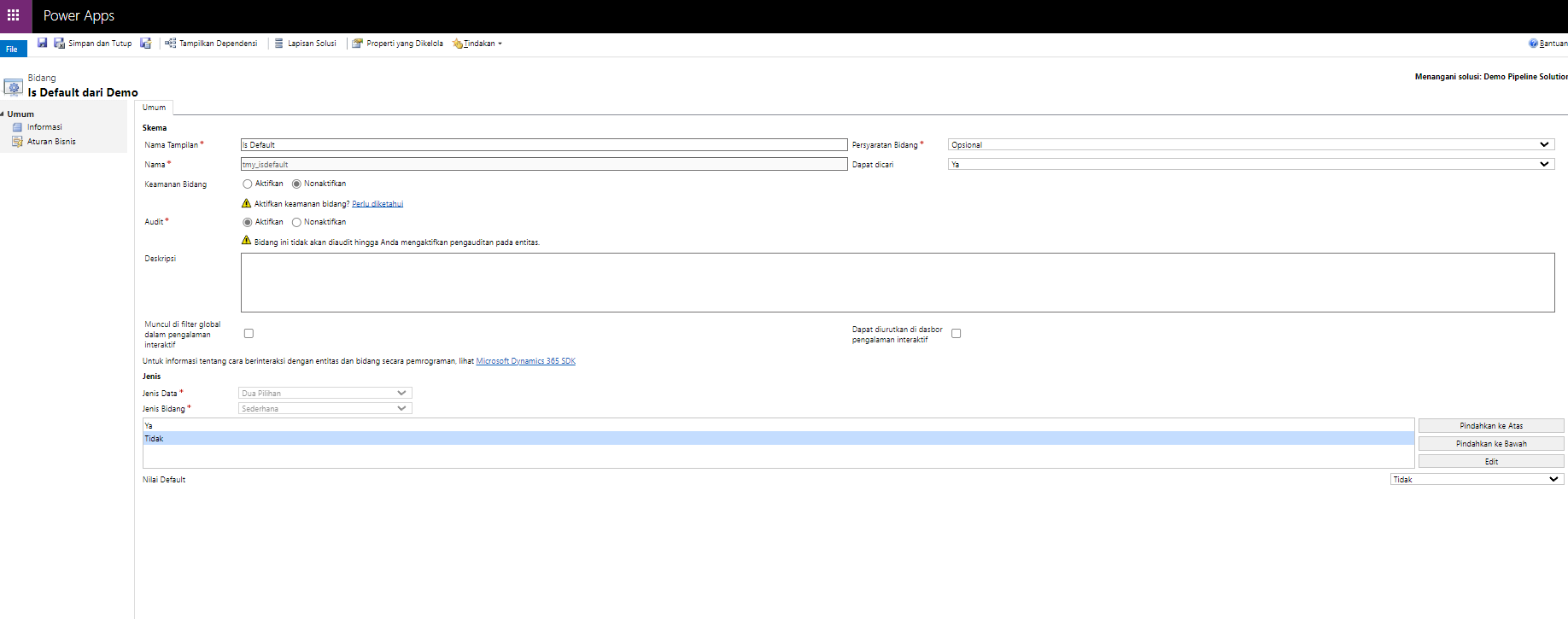
After you click Apply, it will install the language. Next, we need to "translate" the attribute that we want to set. For our demo today, I will just translate Two Option attribute (you need to change your personal language > then open the attribute to translate):
PCF Code
As you know when creating PCF, we need to set up several things. For today's demo, because I'm not yet familiar with React, I'll just use the normal Javascript.
ControlManifest.Input.xml:
<?xml version="1.0" encoding="utf-8"?>
<manifest>
  <control namespace="dev" constructor="TwoOptionSetJs" version="0.0.1"
    display-name-key="TwoOptionSetJs" description-key="TwoOptionSetJs description"
    control-type="standard">
    <!--external-service-usage
    node declares whether this 3rd party PCF control is using external service or not, if yes, this
    control will be considered as premium and please also add the external domain it is using.
    If it is not using any external service, please set the enabled="false" and DO NOT add any domain
    below. The "enabled" will be false by default.
    Example1:
      <external-service-usage enabled="true">
        <domain>www.Microsoft.com</domain>
      </external-service-usage>
    Example2:
      <external-service-usage enabled="false">
      </external-service-usage>
    -->
    <external-service-usage enabled="false">
      <!--UNCOMMENT
      TO ADD EXTERNAL DOMAINS
      <domain></domain>
      <domain></domain>
      -->
    </external-service-usage>
    <!-- property node identifies a specific, configurable piece of data that the control expects
    from CDS -->
   <property name="booleanProperty" display-name-key="Boolean Property"
      description-key="Boolean" of-type="TwoOptions" usage="bound" required="true" />
    <!--
      Property node's of-type attribute can be of-type-group attribute.
      Example:
      <type-group name="numbers">
        <type>Whole.None</type>
        <type>Currency</type>
        <type>FP</type>
        <type>Decimal</type>
      </type-group>
      <property name="sampleProperty" display-name-key="Property_Display_Key"
    description-key="Property_Desc_Key" of-type-group="numbers" usage="bound" required="true" />
    -->
    <resources>
      <code path="index.ts" order="1" />
      <!-- UNCOMMENT TO ADD MORE RESOURCES
      <css path="css/TwoOptionSetJs.css" order="1" />
      <resx path="strings/TwoOptionSetJs.1033.resx" version="1.0.0" />
      -->
    </resources>
    <feature-usage>
      <uses-feature name="Utility" required="true" />
      <uses-feature name="WebAPI" required="true" />
    </feature-usage>
    <!-- UNCOMMENT TO ENABLE THE SPECIFIED API
    <feature-usage>
      <uses-feature name="Device.captureAudio" required="true" />
      <uses-feature name="Device.captureImage" required="true" />
      <uses-feature name="Device.captureVideo" required="true" />
      <uses-feature name="Device.getBarcodeValue" required="true" />
      <uses-feature name="Device.getCurrentPosition" required="true" />
      <uses-feature name="Device.pickFile" required="true" />
      <uses-feature name="Utility" required="true" />
      <uses-feature name="WebAPI" required="true" />
    </feature-usage>
    -->
  </control>
</manifest>
ManifestTypes.d.ts:
/*
*This is auto generated from the ControlManifest.Input.xml file
*/
// Define IInputs and IOutputs Type. They should match with ControlManifest.
export interface IInputs {
    booleanProperty: ComponentFramework.PropertyTypes.TwoOptionsProperty;
}
export interface IOutputs {
    booleanProperty?: boolean;
}
index.ts:
import { IInputs, IOutputs } from "./generated/ManifestTypes";
interface IOptionSet {
    text: string;
    value: string;
}
class MultiCheckBox {
    constructor(
        private container: HTMLDivElement,
        private options: IOptionSet[],
        private currentValue: boolean | undefined,
        private onChangeEvent: (event: Event) => void) {
    }
    render(): HTMLSelectElement {
        const mainDiv = document.createElement('div');
        mainDiv.className = 'mainDiv';
        const ctrl = document.createElement('select');
        ctrl.id = 'dev_select';
        ctrl.onchange = this.onChangeEvent;
        let defaultIndex = 0;
        this.options.forEach((item, index) => {
            const optCtrl = document.createElement('option');
            optCtrl.value = item.value;
            optCtrl.text = item.text;
            if (this.currentValue !== undefined && item.value !== '' && this.currentValue === !!JSON.parse(item.value)) {
                defaultIndex = index;
            }
            ctrl.appendChild(optCtrl);
        });
        ctrl.selectedIndex = defaultIndex;
        return ctrl;
    }
    updateView(value: boolean | undefined): void {
        this.currentValue = value;
        let defaultIndex = 0;
        this.options.forEach((item, index) => {
            if (this.currentValue !== undefined && item.value !== '' && this.currentValue === !!JSON.parse(item.value)) {
                defaultIndex = index;
            }
        });
        // @ts-ignore
        const ctrl = this.container.getElementById('dev_select') as HTMLSelectElement;
        ctrl.selectedIndex = defaultIndex;
    }
}
export class TwoOptionSetJs implements ComponentFramework.StandardControl<IInputs, IOutputs> {
    private _container: HTMLDivElement;
    private _notifyOutputChanged: () => void;
    private _options: IOptionSet[] = [];
    private _currentValue: boolean | undefined = undefined;
    private _control: MultiCheckBox;
    /**
     * Empty constructor.
     */
    constructor() {
    }
    /**
     * Used to initialize the control instance. Controls can kick off remote server calls and other initialization actions here.
     * Data-set values are not initialized here, use updateView.
     * @param context The entire property bag available to control via Context Object; It contains values as set up by the customizer mapped to property names defined in the manifest, as well as utility functions.
     * @param notifyOutputChanged A callback method to alert the framework that the control has new outputs ready to be retrieved asynchronously.
     * @param state A piece of data that persists in one session for a single user. Can be set at any point in a controls life cycle by calling 'setControlState' in the Mode interface.
     * @param container If a control is marked control-type='standard', it will receive an empty div element within which it can render its content.
     */
    public async init(context: ComponentFramework.Context<IInputs>, notifyOutputChanged: () => void,
        state: ComponentFramework.Dictionary, container: HTMLDivElement): Promise<void> {
        // Add control initialization code
        this._notifyOutputChanged = notifyOutputChanged;
        const mainAttribute = context.parameters.booleanProperty?.attributes?.LogicalName || '';
        this._currentValue = context.parameters.booleanProperty?.raw;
        // @ts-ignore - this is a hack to get the component to render
        const entityTypeName = context?.page?.entityTypeName;
        const metadata = await context.utils.getEntityMetadata(entityTypeName, [mainAttribute]);
        const options = metadata.Attributes.getByName(mainAttribute).OptionSet;
        this._options.push({ text: '-', value: '' });
        this._options.push(options[0]);
        this._options.push(options[1]);
        this._control = new MultiCheckBox(this._container, this._options, this._currentValue, (event: Event) => {
            const target = event.target as HTMLSelectElement;
            const value = target.value;
            this._currentValue = value === '' ? undefined : !!JSON.parse(value);
            this._notifyOutputChanged();
        });
        const ctrl = this._control.render();
        container.appendChild(ctrl);
    }
    /**
     * Called when any value in the property bag has changed. This includes field values, data-sets, global values such as container height and width, offline status, control metadata values such as label, visible, etc.
     * @param context The entire property bag available to control via Context Object; It contains values as set up by the customizer mapped to names defined in the manifest, as well as utility functions
     */
    public updateView(context: ComponentFramework.Context<IInputs>): void {
        this._control.updateView(context.parameters.booleanProperty?.raw);
    }
    /**
     * It is called by the framework prior to a control receiving new data.
     * @returns an object based on nomenclature defined in manifest, expecting object[s] for property marked as “bound” or “output”
     */
    public getOutputs(): IOutputs {
        return { booleanProperty: this._currentValue };
    }
    /**
     * Called when the control is to be removed from the DOM tree. Controls should use this call for cleanup.
     * i.e. cancelling any pending remote calls, removing listeners, etc.
     */
    public destroy(): void {
        // Add code to cleanup control if necessary
    }
}
As you can see in the above code. The main logic of the code is on the index.ts file. On lines 78-102, you can see that we are doing the initialization of the control itself. There you can see that we are calling await context.utils.getEntityMetadata(entityTypeName, [mainAttribute]) which is the metadata that we need for the entity. When we call that one, the system automatically will get the current label for the option set without the need to check the current personal settings. We just use the API and the API will give the correct label.
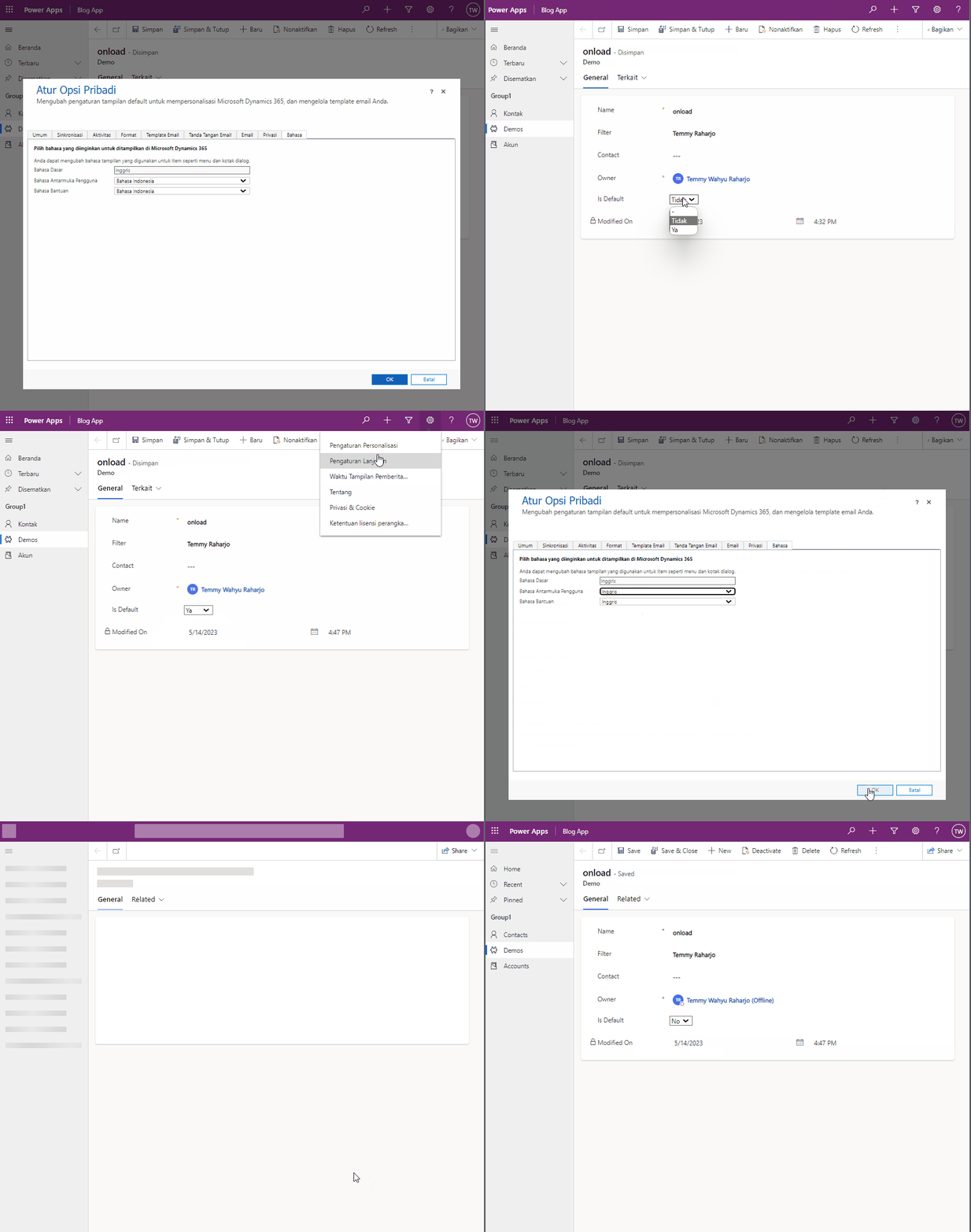
Demo:
Happy CRM-ing!
Leave a comment
Your comment is sent privately to the author and isn't published on the site.