Dynamics CRM Plugin Development: Pre-Operation vs Post-Operation Plugin Customization!

If you are a Dynamic CRM Developer, you need to know the importance of Dynamic CRM Plugin's stages. We know there are 4 stages for the DynamicCRM Plugin Stage (3 we can custom, and 1 is the Dynamic CRM main operation):
- Pre-validation (outside the database transaction): avoid Update, Create, or Delete in this stage. Good only for the validating process.
- Pre Operation (inside the database transaction): before the main operation process.
- Main Operation: we can't customize it here.
- Post Operation: after the main operation process.
Because of this behavior, usually I don't use the Pre Validation stage because actually I can move my validation logic into the Pre Operation process. So for the standardization process for each Entity, I only will use 2 plugin steps: PreOperation and PostOperation (Sync/Async).
Difference Between Pre vs Post
I saw a lot of developers misunderstand the PreOperation and PostOperation stage. In the company where I work, a lot of the code is assigned in the PostOperation stage which causes a lot of unnecessary processes behind it (will trigger multiple saving processes).
For example, we have a custom on Order Entity in PostOperation (assume we only have PostOperation Stage on Order's Plugin Step):
// Total Calculation
var totalAmount = GetTotalOrderFromDetail(orderId);
var order = new Entity("order", orderId);
order["totalamount"] = new Money(totalAmount);
_service.Update(order);

// Update IsPaid
var balance = GetBalance(orderId);
if (totalAmount == balance) {
    var update = new Entity("order", orderId);
    update["new_ispaid"] = true;
    _service.Update(update);
}
The above code will result in 2 saving cycles:
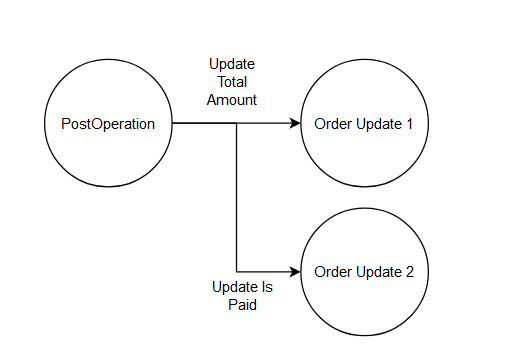
2 cycles of update
If you change it into stage PreOperation the code will look like this:
var entity = (Entity)context.InputParameters["Target"];

// Total Calculation
var totalAmount = GetTotalOrderFromDetail(orderId);
entity["totalamount"] = new Money(totalAmount);

// Update IsPaid
var balance = GetBalance(orderId);
if (totalAmount == balance) {
    entity["new_ispaid"] = true;
}
These changes will make CRM only process one time saving only. If you want to see the diagram it will be:
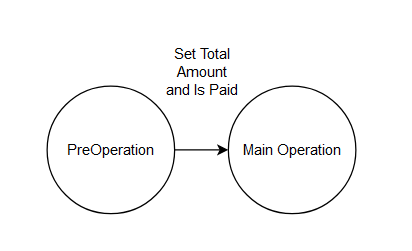
Ideal fixing
Based on the above, we are not calling any Service.Update means that we let the System process the update through the Target object.
Problem
// Total Calculation
var totalAmount = GetTotalOrderFromDetail(orderId);
var order = new Entity("order", orderId);
order["totalamount"] = new Money(totalAmount);

// Update IsPaid
var balance = GetBalance(orderId);
if (totalAmount == balance) {
    order["new_ispaid"] = true;
}

//Saving only 1 time
_service.Update(update);
If you are creating a new plugin, it will be easier if you have this mindset. But if you are refactoring an existing project, it will be harder to move from PostOperation to PreOperation because we need to check many things. That's why in this example, you can consider this fixing to eliminate unnecessary processes.
With these changes, of course, you will spend another extra process (1 process extra, but better compared to the original):
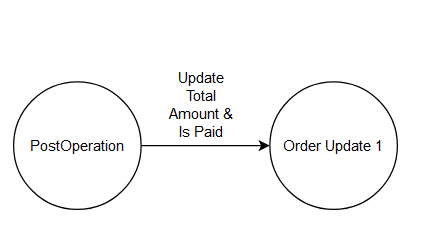
Eliminate 1 update cycle
Leave a comment
Your comment is sent privately to the author and isn't published on the site.