Architecture , C# , Clean Code , dynamics-crm , powerplatform
General Tips on Dynamics CRM Plugin Development

On my blog, one of the most viewed posts is Dynamics CRM Plugin Development: Pre-Operation vs Post-Operation. This makes me realize that I need to create another blog post about plugin development, in general, to let you know the dos and don'ts in plugin development (in a general way). The concepts of this blog post are a combination of my experience and taken from a code-reviewed document that Microsoft did on the company I currently working on.
Utilized PreImage and PostImage for Retrieving the Main Entity
Microsoft suggests we make use of PreImage and PostImage instead of retrieving using the service.Retrieve(pluginExecutionContext.PrimaryEntityName, pluginExecutionContext.PrimaryEntityId, new ColumnSet("attribute1")).
The explanation for it is simple. If you keep retrieving your main entity in the code, it will waste resources and lead to performance issues.
Avoid ColumnSet(true) and Set NoLock = True
The common thing that we do as developers is we tend to retrieve more compared to the data that we need. The second one is if you retrieve inside the plugin, we tend to forget to set NoLockto false if the data that we want to retrieve is not important (dirty read). If you want to boost the performance try to retrieve the attributes that you only need + set the NoLockas true.
You can read about NoLockmore:
Make Your Plugin Assembly + Step Simple
Microsoft recommended avoiding registering multiple assemblies / multiple plugin steps for the same entity (table). The rule is the same with Workflow, the more you have Workflows that are registered in the same Entity, the more it will be slowing down + complex to check if you have a bug.
These are my recommendations for creating plugin steps:
using Microsoft.Xrm.Sdk;
using System;
namespace Demo.Plugins
{
    public class PreCreateOperation : IPlugin
    {
        public void Execute(IServiceProvider serviceProvider)
        {
            //Your business Logic
        }
    }
    public class PostCreateOperation : IPlugin
    {
        public void Execute(IServiceProvider serviceProvider)
        {
            //Your business Logic
        }
    }
    public class PostCreateOperationAsync : IPlugin
    {
        public void Execute(IServiceProvider serviceProvider)
        {
            //Your business Logic
        }
    }
}
I was never a fan of combining plugin messages and making a switch statement to differentiate between Create, Update, or Delete. I'll make sure I differentiate the plugin step to make clear what the plugin step is for it.
Set Filtering Attributes on Update Message
Filtering Attributes have the same function as the Workflow Record fields change. It defines that your plugin will only be called if the system finds the attributes that you defined being changed (in the Update Message). Because we filter the attributes that can call the plugin, it will improve the execution time.
But for me, I'll choose this approach to reduce multiple plugin steps (set Filtering Attributes to all attributes):
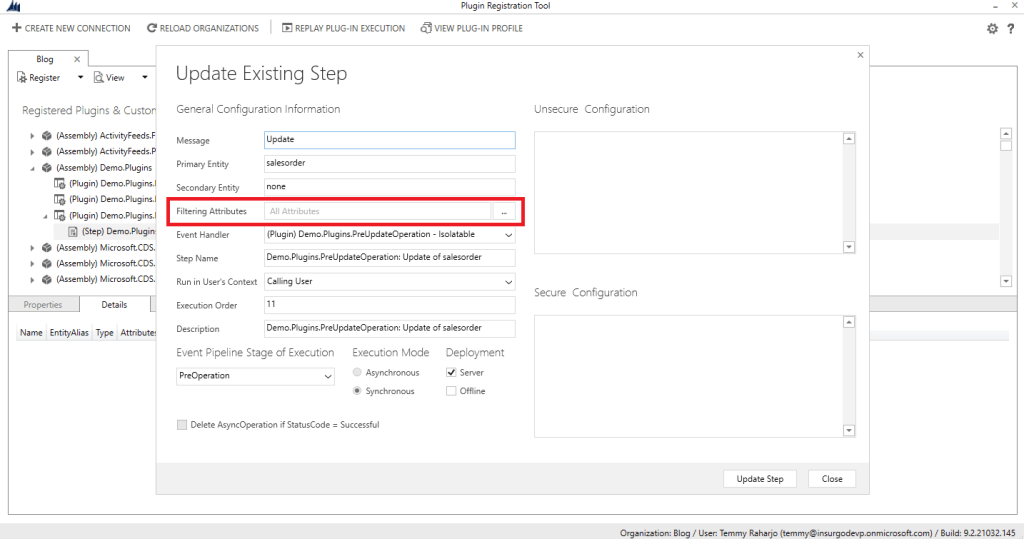
Here is the sample code of the plugin:
public void Execute(IServiceProvider serviceProvider)
{
    var context = (IPluginExecutionContext)
        serviceProvider.GetService(typeof(IPluginExecutionContext));

    var target = (Entity)context.InputParameters["Target"];
    if (target.Contains("totalamount") || target.Contains("totaldiscountamount"))
    {
        OnPriceChange(serviceProvider);
    }
    if (target.Contains("accountid"))
    {
        OnAccountChange(serviceProvider);
    }
}
Instead of relying on Filtering Attributes, I will check on the inputTarget.Contains("attribute") to determine if the business logic needs to be run or not.
The idea of the above approach is to make developers easier to expand the business logic without needing to change the plugin steps configuration every time the code is added. But in case you want more strict and get better performance, you can combine both ways.
Avoid Make Use of pluginExecutionContext.Depth
So many times I saw developers make use of pluginExecutionContext.Depth. The pluginExecutionContext.Depth is data that you can track from the plugin to know the number of the depth of the current execution. Usually, they use pluginExecutionContext.Depth to avoid the infinite process error and that is okay. But if you want to analyze deeper, it is a sign that you have missing business logic to avoid this kind of error.
public void Execute(IServiceProvider serviceProvider)
{
    var context = (IPluginExecutionContext)
        serviceProvider.GetService(typeof(IPluginExecutionContext));
    if (context.Depth == 2) return;
    ValidateOrder(serviceProvider);
}
My recommendation for this is to make use of pluginExecutionContext.SharedVariablesto give some flag and return it. Here is a sample of the code before you call the service. Update method:
private void UpdateOrder(IServiceProvider serviceProvider)
{
    var context = (IPluginExecutionContext)
        serviceProvider.GetService(typeof(IPluginExecutionContext));
    var serviceFactory = (IOrganizationServiceFactory)serviceProvider.GetService(typeof(IOrganizationServiceFactory));
    var service = serviceFactory.CreateOrganizationService(context.UserId);
    var target = (Entity)context.InputParameters["Target"];
    context.SharedVariables["update-flag"] = true;
    var updateEntity = new Entity(target.LogicalName, target.Id);
    updateEntity["new_ordernumber"] = "RANDOM";
    updateEntity["new_qty"] = 2;
    updateEntity["new_total"] = new Money(2000);
    service.Update(updateEntity);
}
Then there is the code to check whether you need to avoid calling the plugin again if you detect there is the flag that you pass:
public void Execute(IServiceProvider serviceProvider)
{
    var context = (IPluginExecutionContext)
        serviceProvider.GetService(typeof(IPluginExecutionContext));
    if (context.SharedVariables.ContainsKey("update-flag")) return;
    UpdateOrder(serviceProvider);
}
Because I just want to check whether the flag exists in the SharedVariables or not, using pluginExecutionContext.SharedVariables.ContainsKey is valid in this scenario.
You can check some ideas of pluginExecutionContext.SharedVariables in here.
Don't Use The Same Object To Update!
This is a big no, no! If you ever retrieve one entity in your code and use it to update. You will instill a bad habit for you, and your friends in the organization. Updating a record using retrieved results also will make your audit history grow faster.
public void Execute(IServiceProvider serviceProvider)
{
    var context = (IPluginExecutionContext)
        serviceProvider.GetService(typeof(IPluginExecutionContext));
    var serviceFactory = (IOrganizationServiceFactory)serviceProvider.GetService(typeof(IOrganizationServiceFactory));
    var service = serviceFactory.CreateOrganizationService(context.UserId);
    var target = (Entity)context.InputParameters["Target"];
    var childRef = target.GetAttributeValue<EntityReference>("new_childid");
    var childData = service.Retrieve(childRef.LogicalName, childRef.Id, new ColumnSet("new_qty", "new_total", "new_name"));
    childData["new_description"] = "just testing delete";
    //Never do this! A big no!
    service.Update(childData);
}
Summary
All of the topics above are just small portions of the things that I can explain to you at the moment. Most of the issues that I always get done (in my work) related to Dynamics CRM are about performance issues. And it leads to the answer: how we design our plugin.
I have a very simple approach when designing the plugin. As you can guess, you will know the common paradigm that we need to apply when we create the plugins. Those paradigms are:
- KISS(Keep It Simple Stupid)
- SoC(Separation of Concern)
- etc
To achieve that, we can apply TDD (Test Driven Development) to validate those paradigms above. You can check the series of TDD on Dynamics CRM Plugin development here:
- Dynamics CRM CE: TDD Plugin Development in Action – Part 1
- Dynamics CRM CE: TDD Plugin Development in Action – Part 2
What do you think?
Leave a comment
Your comment is sent privately to the author and isn't published on the site.