C# , dynamics-crm , powerplatform , tips
Dynamics CRM: Use OrganizationServiceContext (LINQ) to Retrieve Data + Tips

I have quite a long journey to hands-on Dynamics CRM (around six years and still counting), and I have a confession to make. I never use OrganizationServiceContext! This class will allow you to retrieve Dynamics CRM data using the infamous LINQ (Language-Integrated Query) which is more convenient compared to FetchXml/QueryExpression/QueryAttribute.
The first thing that we must be aware, all the queries that we will run against OrganizationServiceContext, will be converted to QueryExpressionbased on this official documentation. So, you need to know that there are limitations like the groupby, aggregate, last, and a limited where(right is a column, left only accept value) based on this documentation.
Generated The OrganizationServiceContext
There are multiple ways to generate the necessary classes (it's the same thing if we want to use early-bound classes that you can check on here). Or you always can go to our favorite XrmToolBoxand download either Albanian Early Bound or Early Bound Generator by Daryl LaBar.
Once the files are generated, you can use them on your project.
Initialize OrganizationServiceContext
To start retrieving your data, you only need to pass the IOrganizationServiceto the OrganizationServiceContext:
var context = new CrmServiceContext(service);
Here is the sample of the queries I wrote:
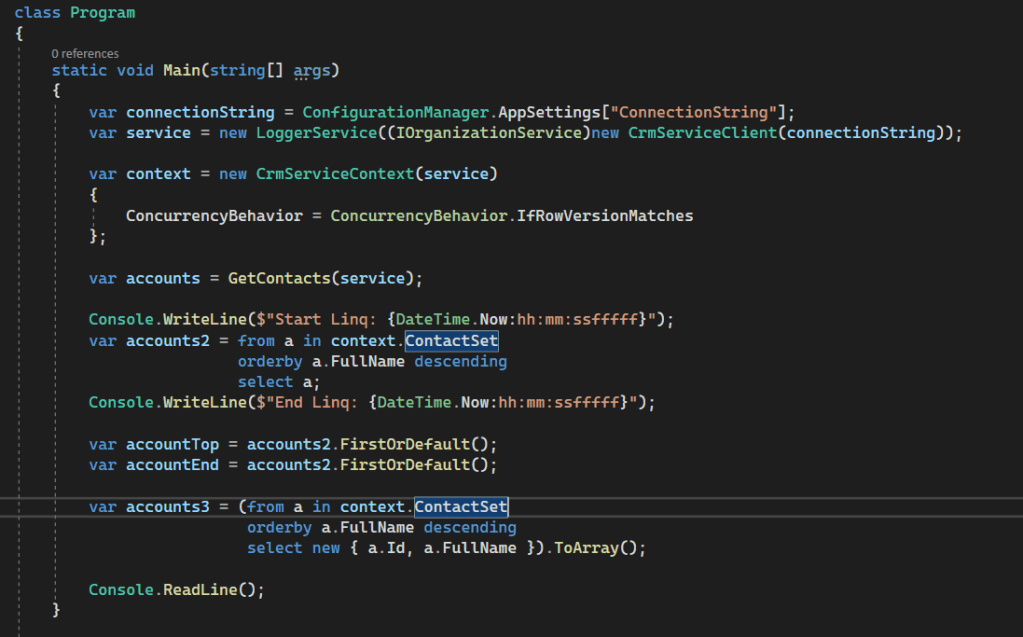 Sample Queries
You can check for all the samples of retrieving using the query here.
Small Mistakes That Lead to Performance Issues
When we query using Linq, we tend to select the entity itself. But, when we do this, we actually retrieve all columns and it will degrade the performance. So the better way to select is using this way:
Console.WriteLine("account2");
var accounts2 = (from a in context.ContactSet			 orderby a.FullName descending			 select a).ToArray();

Console.WriteLine("account3");
var accounts3 = (from a in context.ContactSet			 orderby a.FullName descending			 select new { a.Id, a.FullName }).ToArray();
The result can be seen below:
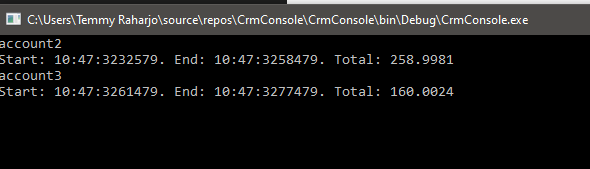 account3 has more better performance
The second tip is to always ToArray() or ToList() in the query once you want to get the data. If we are not executing it directly, then when we re-access the query, it will take data from the database again instead of in the memory data.
To prove this behavior, I made a simple OrganizationServicedecorator:
public class LoggerService : IOrganizationService
{public IOrganizationService Service { get; }
public LoggerService(IOrganizationService service){	Service = service;}
public EntityCollection RetrieveMultiple(QueryBase query){	var start = DateTime.Now;	var result = Service.RetrieveMultiple(query);	var end = DateTime.Now;
	Console.WriteLine($"Start: {start:hh:mm:ssfffff}. End: {end:hh:mm:ssfffff}. Total: {(end - start).TotalMilliseconds}");
	return result;}
public OrganizationResponse Execute(OrganizationRequest request){	var start = DateTime.Now;	var result = Service.Execute(request);	var end = DateTime.Now;
	Console.WriteLine($"Start: {start:hh:mm:ssfffff}. End: {end:hh:mm:ssfffff}. Total: {(end - start).TotalMilliseconds}");
	return result;}
#region Not Being Usedpublic void Associate(string entityName, Guid entityId, Microsoft.Xrm.Sdk.Relationship relationship, EntityReferenceCollection relatedEntities){	throw new NotImplementedException();}
public Guid Create(Microsoft.Xrm.Sdk.Entity entity){	throw new NotImplementedException();}
public void Delete(string entityName, Guid id){	throw new NotImplementedException();}
public void Disassociate(string entityName, Guid entityId, Microsoft.Xrm.Sdk.Relationship relationship, EntityReferenceCollection relatedEntities){	throw new NotImplementedException();}
public Microsoft.Xrm.Sdk.Entity Retrieve(string entityName, Guid id, ColumnSet columnSet){	throw new NotImplementedException();}
public void Update(Microsoft.Xrm.Sdk.Entity entity){	throw new NotImplementedException();}#endregion
}
Then this is the sample code to prove it:
var connectionString = ConfigurationManager.AppSettings["ConnectionString"];
var service = new LoggerService((IOrganizationService)new CrmServiceClient(connectionString));

var context = new CrmServiceContext(service);

Console.WriteLine("start query account2");
var accounts2 = from a in context.ContactSet			 orderby a.FullName descending			 select a;
Console.WriteLine("end query account2");

var accountTop = accounts2.FirstOrDefault();
var accountEnd = accounts2.FirstOrDefault();

Console.ReadLine();
Here is the result:
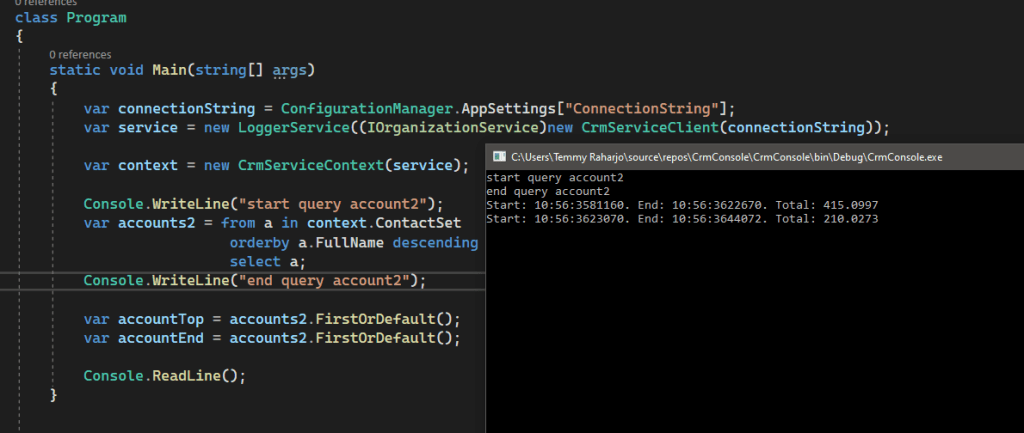 If we are not use ToArray() or ToList(), called FirstOrDefault() will only execute it to database
Here is the proof that it will only execute the query 1 time if we call ToArray() or ToList():
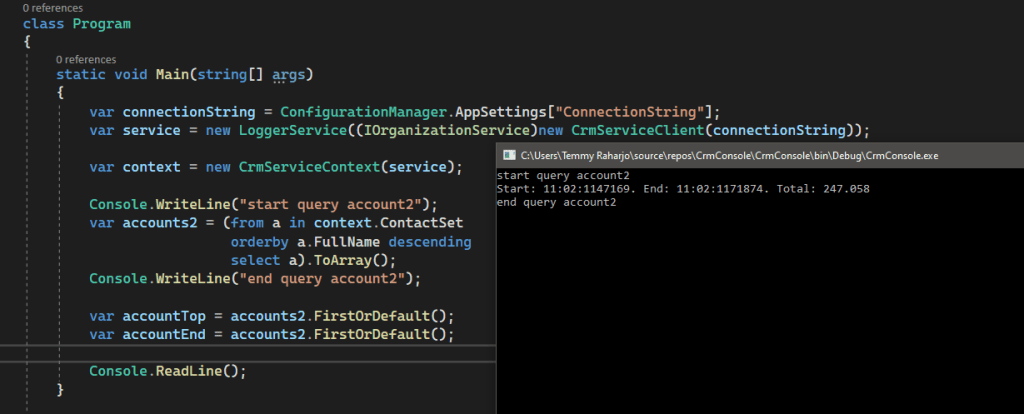 Execute 1 time only!
What do you think?
Leave a comment
Your comment is sent privately to the author and isn't published on the site.