dynamics-crm , powerautomate , powerplatform , tips
Dynamics CRM Tips: Strategy For Fail-Proof Data Model

The rise of JSON(JavaScript Object Notion) is so massive and unstoppable. Just last week, on Twitter, I saw this:
https://twitter.com/JamesNK/status/1389331192713945091?s=20
JSON format made it possible to do dynamics coding and hassle-free. On the other hand, how we (in the Dynamics CRM world), rely on the persistent data model and of course, the implementation of the managed solution makes it hard to change if we already deployed it into the production environment (The best practice of it is using the managed solution. I don't want to make war in this area. 😂). So how can we make our data model more fail-proof? Of course, the answer is: that we can implement JSON also in our environment.
Common Scenario
A lot of the common scenarios that I encountered were implementations of Status changes (can be: Reserve, Cancel, etc) on a Custom Table (entity). Many people achieve this scenario using a boolean attribute like the below picture:
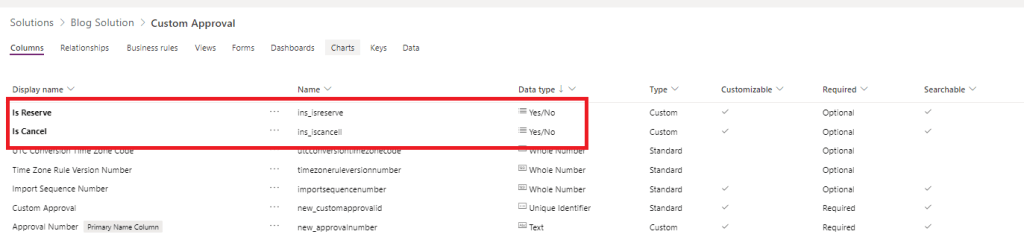 Instead of creating multiple boolean fields, using single-text is more recommended
Then in the plugin/workflow/flow, they will check on that field changes to trigger the next action.
I like to create a single line of text data type as a trigger point (for example we named it Operation). For a simple scenario like the above, we just need to set Operation="Reserve" to trigger the Reserve Action. And of course, as the old saying said to not reinvent the wheels! Don't forget to change the Status/Status Reason columns to the value that we need rather than creating other attributes to store.
For the more complex scenario, sometimes we do not just need an Actionstring. We also want to pass more value that maybe we take from another process result. For example, we want to pass multiple values like this:
{
    "operation": "Approve",
    "TotalAmount": 1000,
    "Approver": "Manager"
}
We can use JSON format text and in our backend, we can consume this JSON text via Custom Workflow/Plugin/Flow. Here is a sample of code on how to consume it:
public class JsonModel
    {
        public string Operation { get; set; }
        public decimal TotalAmount { get; set; }
        public string Approver { get; set; }
    }

    public class SampleBusiness : OperationBase<Entity>
    {
        public SampleBusiness(ITransactionContext<Entity> context) : base(context)
        {
        }

        protected override void HandleExecute()
        {
            var operation = Get<string>("new_operation") ?? "";
            if (string.IsNullOrEmpty(operation)) return;
            // Convert the string to JSON Model data type
            var jsonModel = operation.FromJson<JsonModel>();
            if (jsonModel.Operation == "Approve")
            {
                DoApprove();
            }
            // Other business logic..
        }
    }
For using JSON in the plugin, we can serialize/deserialize it using this method at this link. For the Microsoft Flow, of course, we can use the OOB function using Parse JSON Action that you can see the sample in here.
The Benefit
Like I said before saving some of the data (especially related to the programming stuff) using JSON format will help us a lot if someday the implementation needs to change. We just change the JSON format and it is done (of course the action also needs to be re-adjusted).
Summary
If you have a scenario whereby you want to save the value in JSON format, you can try this PCF JSON Form. For more details on how to use it, you can check the GitHub project at this link.
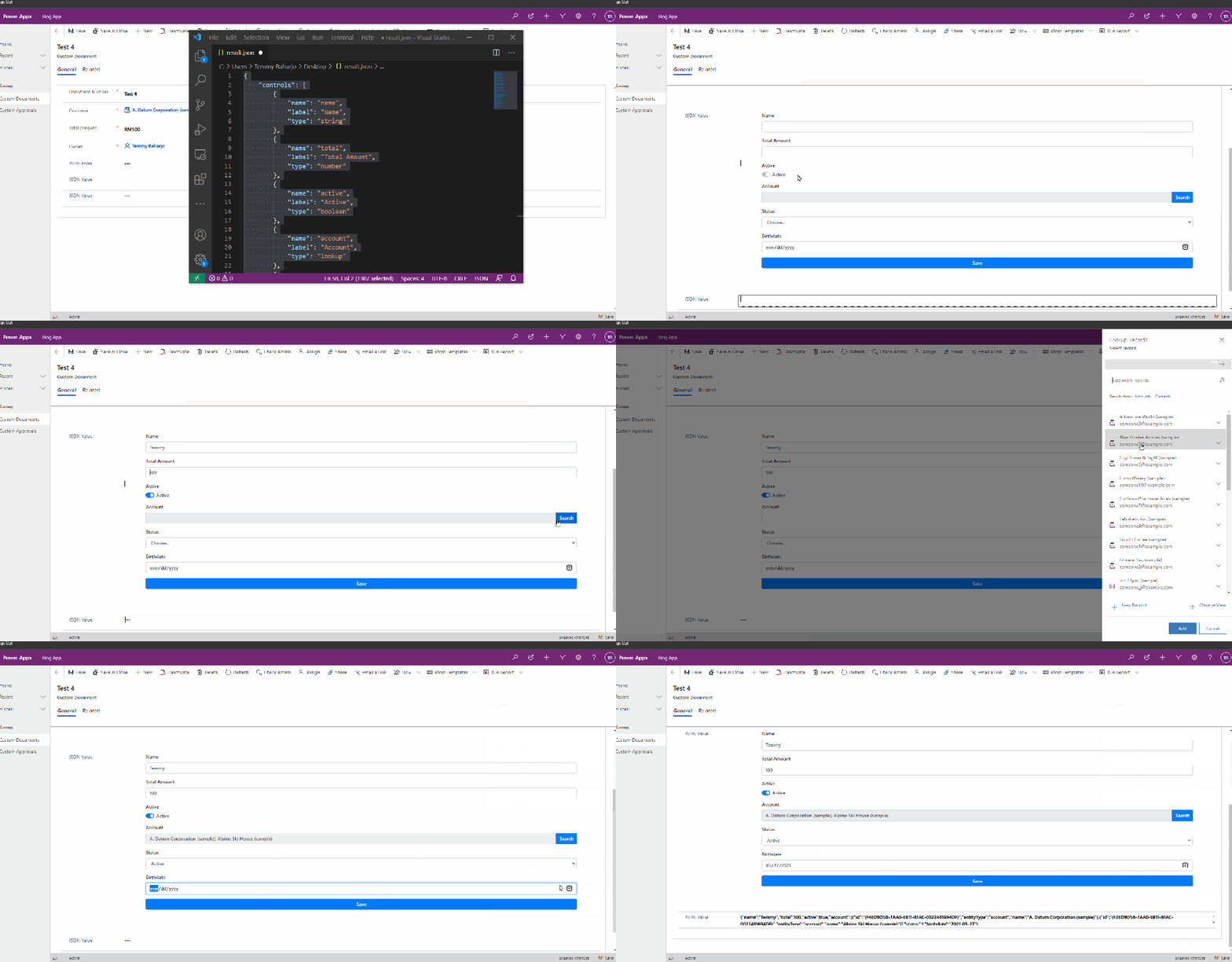 PCF Form demo
If you also want to try to implement the Dynamics CRM plugin framework that already has the functions to serialize and deserialize the JSON format, you can check Niam.Xrm.Framework in here.
What do you think?
Leave a comment
Your comment is sent privately to the author and isn't published on the site.