C# , dynamics-crm , tips
Dynamics CRM Plugin Development - Merging Assemblies: Why I choose ILRepack than ILMerge?

Do you ever need to merge multiple assemblies (DLLs) to deploy it in your Dynamics 365 Organization? Whatever the answer, I will tell you the background of why you should consider it. All of us must understand, as a programmer, we do some repetitive operations. Eg: general validation logic if the user in position "A", don't allow it to do any CRUD. Or you just want to make use of JSON Serializer in Newtonsoft. If you did not make/use a library for it, most likely you violate the DRY (Don't Repeat Yourself) principle. It will cause you lots of problems in the future. But that is another topic. :)
Whenever someone asked about merging third-party assemblies in our beloved Dynamics Community Forum, there was only one answer to it: ILMerge. First, I don't hate ILMerge. But there must be some explanation of why you choose ILMerge over others if there is an alternative to it (ILRepack). Here is my reason why I chose ILRepack.
For the demonstration, I will show you the solution that we will merge:
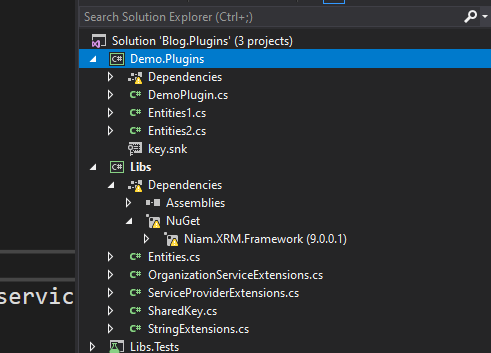 Solutions that we will merge: Demo.Plugins, Libs, Niam.Xrm.Framework
There are Project, Lib, and third-party assembly Niam.Xrm.Framework that we will merge.
Here is the original size of the assemblies in the bin folder:
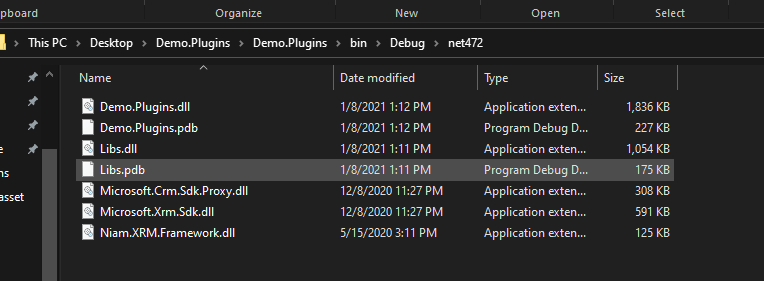 The original size of the DLLs
If you have ILRepack.exe, here is the command:
ILRepack.exe /keyfile:key.snk /parallel /out:D:\ILRepack\Result\Demo.Plugins.ILRepack.dll Niam.XRM.Framework.dll Demo.Plugins.dll Libs.dll
If you have ILMerge.exe, here is the command:
ILMerge.exe /keyfile:key.snk /out:D:\ILMerge\Result\Demo.Plugins.ILMerge.dll Niam.XRM.Framework.dll Demo.Plugins.dll Libs.dll
This is the result of the ILRepack and ILMerge side by side:
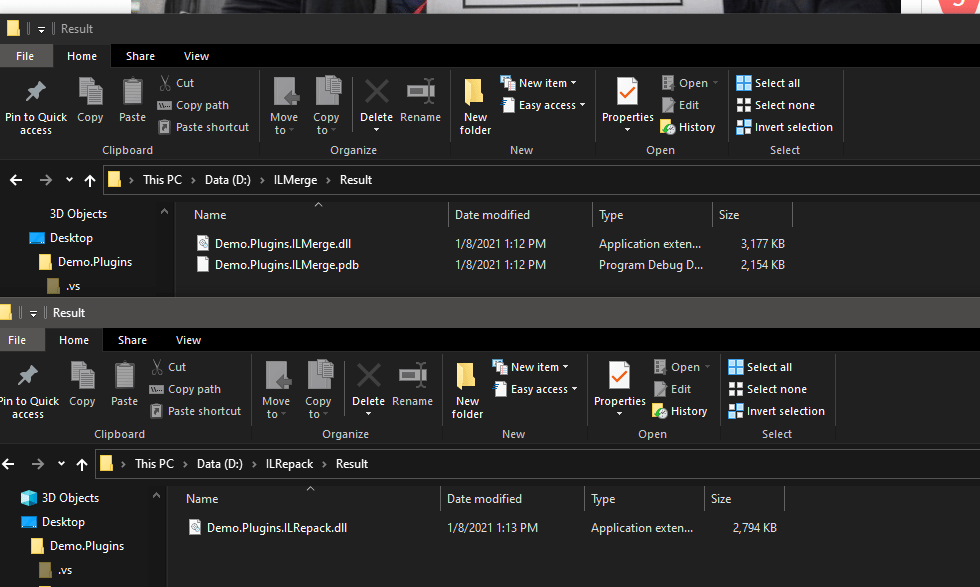 The result after merging. ILRepack size more smaller compare to ILMerge.
Summary
As you can see, ILRepack result (2.794 KB) wins (in size) compared to ILMerge result(3.177 KB).
Leave a comment
Your comment is sent privately to the author and isn't published on the site.