C# , dynamics-crm , tips
Dynamics CRM Plugin: Caching using Azure Redis Cache

One of the most common questions that we as Developers face is about caching the data. On the previous version (on-premise) of Dynamics, when we get a task to cache some data, we will use MemoryCacheclass. But in the cloud version, because we can't directly access the Server, the possible way to use it is through an in-memory data store such as Azure Redis Cache.
The idea of using cache data is to make the system performance increase. The data that has not really changed a lot we can put into the cache, so we don't need to retrieve it from a database/any other data storing system. But of course, before we implement caching, we must know first the performance before vs the after.
Setup The Azure Cache for Redis
I following this article here to set up the Redis Cache in Azure. But the steps are:
From Azure Portal (azure.portal.com) > Create a resource > Databases > Azure Cache for Redis
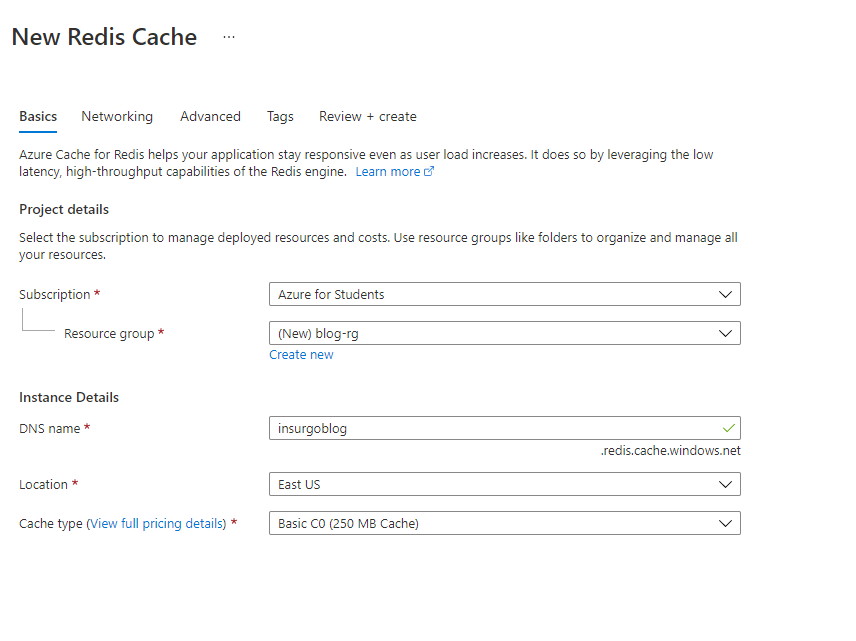 Create Parameters
Select Subscription> Select Resource Group (You can create a new Resource Group also here) > Set the Name (DNS name)> Pick the location > Choose the Cache Type> Create.
Remember, the Location + Cache Type will also affect the performance of your caching result. In this tutorial, I choose the cheapest one which is Basic C0 (250 MB Cache).
Wait until the resource is created, go to Access Key > Primary > Copy the Primary connection string > paste in Notepad.
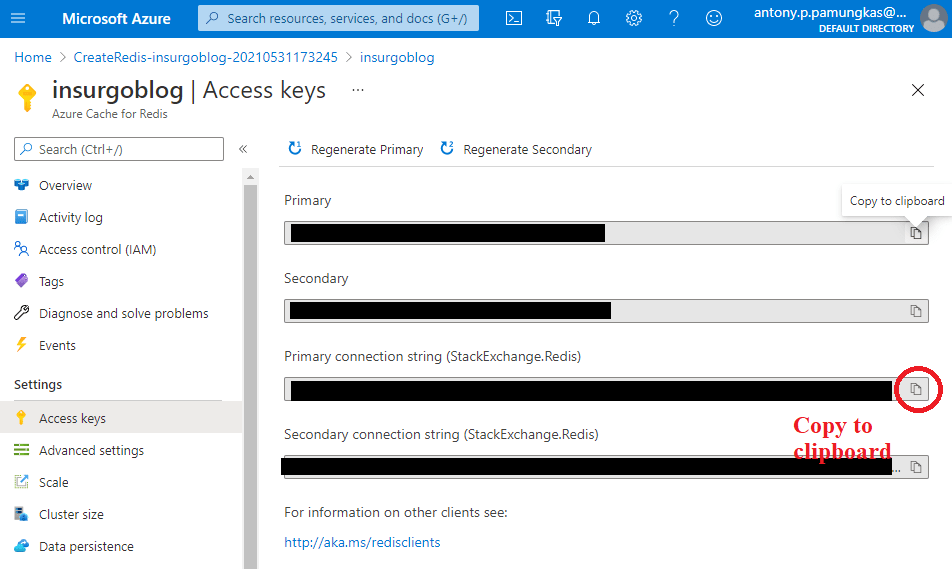 Copy the primary connection string
The value that you paste in the notepad will be used as the connection string. Here is the sample of the connection string:
"<cache-name>.redis.cache.windows.net,abortConnect=false,ssl=true,allowAdmin=true,password=<access-key>"
From here, the Azure Redis Cache is ready to use!
Setup The Plugin Project
Open your existing plugin project > Manage Nuget Packages > install StackExchange.Redis.
Then, here is the sample code that I run in my demonstration (I just retrieve some data and parse it into the JSON string):
using Demo.Entities;
using Microsoft.Xrm.Sdk;
using Microsoft.Xrm.Sdk.Query;
using Niam.XRM.Framework;
using Niam.XRM.Framework.Data;
using Niam.XRM.Framework.Interfaces.Plugin;
using Niam.XRM.Framework.Plugin;
using StackExchange.Redis;
using System;
using System.Linq;
namespace Bootcamp.Plugins.Business
{
    public class GetOrAddRedisCache : OperationBase<new_order>
    {
        public class CacheModel
        {
            public Guid Id { get; set; }
            public string Name { get; set; }
        }
        public GetOrAddRedisCache(ITransactionContext<new_order> context) : base(context)
        {
        }
        protected override void HandleExecute()
        {
            var db = Connection.GetDatabase();
            var key = "demo-azure-redis-cache";
            var result = LogFunc(() => db.StringGet(key));
            if (string.IsNullOrEmpty(result))
            {
                result = LogFunc(() =>
                {
                    var temp = GetCustomOrders()
                        .Select(order => new CacheModel
                        {
                            Id = order.Id,
                            Name = order.Get(e => e.new_ordernumber)
                        }).ToJson();
                    db.StringSet(key, temp);
                    return temp;
                });
            }
            throw new InvalidPluginExecutionException(result);
        }
        private new_order[] GetCustomOrders()
        {
            var query = new QueryExpression(new_order.EntityLogicalName)
            {
                ColumnSet = new ColumnSet<new_order>(e => e.Id, e => e.new_ordernumber),
                NoLock = true
            };
            var result = Service.RetrieveMultiple(query);
            return result.Entities?.Select(e => e.ToEntity<new_order>()).ToArray();
        }
        private static readonly Lazy<ConnectionMultiplexer> LazyConnection = CreateConnection();
        public static ConnectionMultiplexer Connection => LazyConnection.Value;
        private static Lazy<ConnectionMultiplexer> CreateConnection()
        {
            var cacheConnection = "<cache-name>.redis.cache.windows.net,abortConnect=false,ssl=true,allowAdmin=true,password=<access-key>";
            return new Lazy<ConnectionMultiplexer>(() => ConnectionMultiplexer.Connect(cacheConnection));
        }
        public string LogFunc(Func<string> func)
        {
            var start = DateTime.Now;
            var result = func.Invoke();
            var end = DateTime.Now;
            Context.Trace(
                $"Start: {start}. End: {end}. Total Seconds: {(end - start).TotalSeconds}. Result: {result}.");
            return result;
        }
    }
}
Replace the cacheConnection with the connection string in your notepad. And remember, you can put this connection string into the plugin unsecure-config instead of hardcode it this way.
From the code above, we use db.StringGetto get the cache and db.StringSet to set the cache. Then all the function being wrapped in LogFuncmethod to allow me to analyze the result manually.
Deploy The Plugin
To deploy it to your Dynamics CRM Environment because we got a dependency on the third-party libs (StackExchange.Redis), we must merge the assemblies.
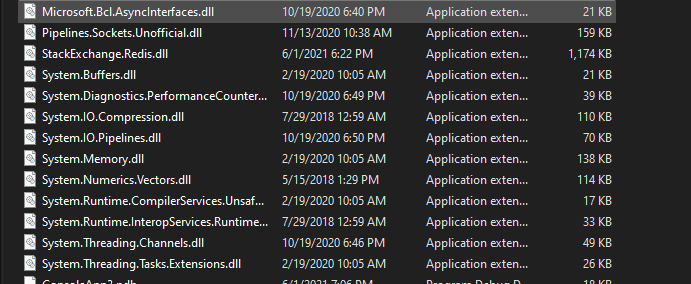 StackExchange.Redis dependency assemblies
To merge the assemblies, you need to use ILMerge(ILRepack got a bug). To merge it you need to merge using this command:
ILMerge.exe /keyfile:<key>.snk /out:D:\ILMerge\Result\<plugin>.dll
<plugin>.dll Microsoft.Bcl.AsyncInterfaces.dll Pipelines.Sockets.Unofficial.dll StackExchange.Redis.dll System.Buffers.dll System.Diagnostics.PerformanceCounter.dll System.IO.Compression.dll System.IO.Pipelines.dll System.Memory.dll System.Numerics.Vectors.dll System.Runtime.CompilerServices.Unsafe.dll System.Runtime.InteropServices.RuntimeInformation.dll System.Threading.Channels.dll System.Threading.Tasks.Extensions.dll
After you merge it, you can deploy the plugin DLL.
Summary
Here is the result based on my manual testing:
| Description | First Try | Second Try | Third Try |
|---|---|---|---|
| Retrieve | 0.0313177 | 0 | 0.046942 |
| Cache Result | 0.2343758 | 0.2343858 | 0.2188167 |
Result in second
So based on this testing what do you need to keep in mind:
- Don't do pre-mature caching. Pre-mature justifying without the result will lead to the wrong result.
- The result above will vary depending on the Location + Cache Type
- The average of getting cache using Redis in this sample is 0.2 seconds
What do you think?
Leave a comment
Your comment is sent privately to the author and isn't published on the site.