dynamics-crm , powerplatform , tips
Dataverse: Let's Try Elastic Table (Preview)

Hi Folks! This time, we will learn about Elastic Table. Before we begin,I need to credit the great Mark Carrington for his blog post (about Elastic Table too) that you can read here. Elastic Table is the new way to store data in Azure Cosmos DB for heavier workloads with unstructured or semi-structured (NoSQL) data models. If you are interested in reading the details, here is the official documentation about the elastic table.
Prepare The Metadata
In the previous blog post, I learned about the benchmark framework (BenchmarkDotNet), so I will also give a bit of benchmark to give you an idea about the comparison between a normal table and an elastic table.
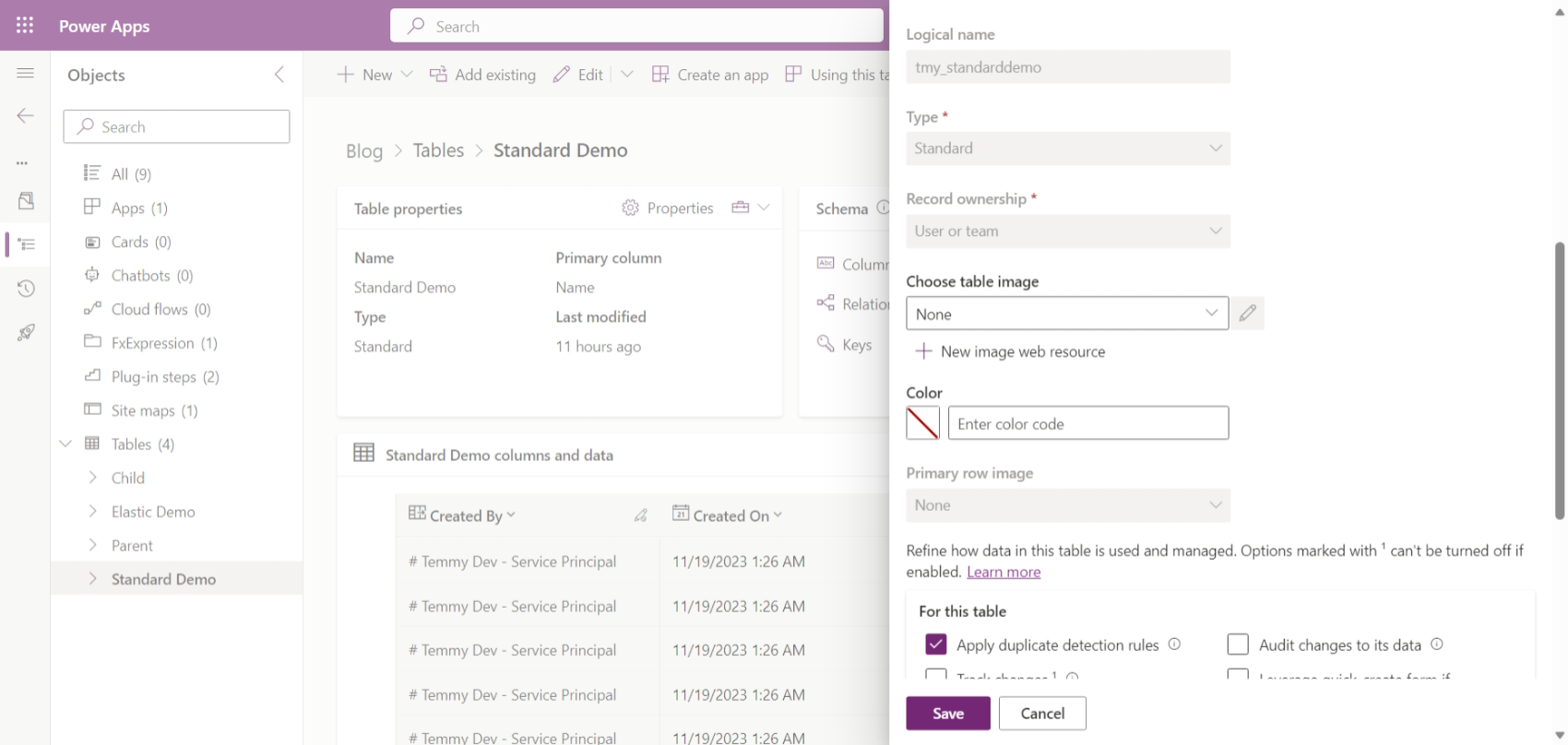
First, here is the normal table that I prepared:
Below is the elastic table that I created:
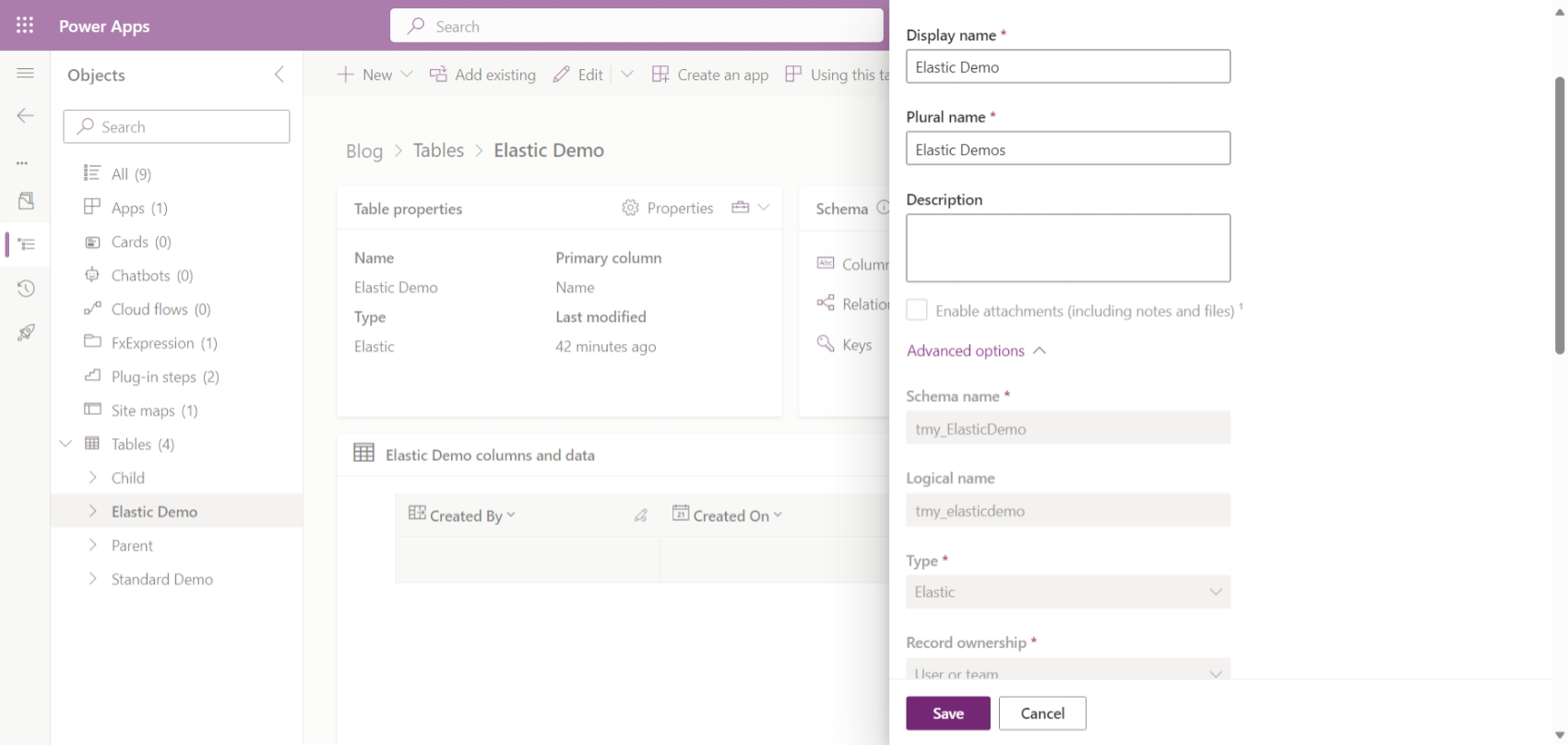
For your information, for both tables, I just created the table with the primary field (tmy_name - string).
Benchmark result
For the benchmark tests, I'm using the methods that Mark Carrington used in his blog post (DRY - Don't Repeat Yourself please 😎). So, here is the code that I'm using:
using BenchmarkDotNet.Attributes;
using BenchmarkDotNet.Running;
using DataverseClient;
using Microsoft.Extensions.DependencyInjection;
using Microsoft.PowerPlatform.Dataverse.Client;
using Microsoft.Xrm.Sdk;
using Microsoft.Xrm.Sdk.Messages;
using Microsoft.Xrm.Sdk.Query;
BenchmarkRunner.Run<ElasticNormalCreatePerformance>();
Console.ReadKey();
[MemoryDiagnoser]
[Orderer(BenchmarkDotNet.Order.SummaryOrderPolicy.FastestToSlowest)]
[SimpleJob(launchCount: 1, warmupCount: 0)]
public class ElasticNormalCreatePerformance
{
    public IOrganizationService GetService()
    {
        var builder = Helper.CreateHostBuilder().Build();
        var serviceProvider = builder.Services;
        return serviceProvider.GetRequiredService<ServiceClient>();
    }
    [Benchmark]
    public void CreateNormal()
    {
        var service = GetService();
        for (int i = 0; i < 50; i++)
        {
            var row = new Entity("tmy_standarddemo")
            {
                ["tmy_name"] = $"DEMO-{i}"
            };
            service.Create(row);
        }
    }
    [Benchmark]
    public void CreateExecuteMultipleReqNormal()
    {
        var service = GetService();
        var multiple = new ExecuteMultipleRequest
        {
            Settings = new ExecuteMultipleSettings
            {
                ContinueOnError = false,
                ReturnResponses = true,
            },
            Requests = new OrganizationRequestCollection()
        };
        for (int i = 0; i < 50; i++)
        {
            var row = new Entity("tmy_standarddemo")
            {
                ["tmy_name"] = $"DEMO-{i}"
            };
            multiple.Requests.Add(new CreateRequest { Target = row });
        }
        service.Execute(multiple);
    }
    [Benchmark]
    public void CreateMultipleReqNormal()
    {
        var service = GetService();
        var collection = new EntityCollection { EntityName = "tmy_standarddemo" };
        for (int i = 0; i < 50; i++)
        {
            var row = new Entity("tmy_standarddemo")
            {
                ["tmy_name"] = $"DEMO-{i}"
            };
            collection.Entities.Add(row);
        }
        service.Execute(new CreateMultipleRequest { Targets = collection });
    }
    [Benchmark]
    public void CreateElastic()
    {
        var service = GetService();
        for (int i = 0; i < 50; i++)
        {
            var row = new Entity("tmy_elasticdemo")
            {
                ["tmy_name"] = $"DEMO-{i}",
                ["partitionid"] = "blog"
            };
            service.Create(row);
        }
    }
    [Benchmark]
    public void CreateExecuteMultipleReqElastic()
    {
        var service = GetService();
        var multiple = new ExecuteMultipleRequest
        {
            Settings = new ExecuteMultipleSettings
            {
                ContinueOnError = false,
                ReturnResponses = true,
            },
            Requests = new OrganizationRequestCollection()
        };
        for (int i = 0; i < 50; i++)
        {
            var row = new Entity("tmy_elasticdemo")
            {
                ["tmy_name"] = $"DEMO-{i}",
                ["partitionid"] = "blog"
            };
            multiple.Requests.Add(new CreateRequest { Target = row });
        }
        service.Execute(multiple);
    }
    [Benchmark]
    public void CreateMultipleReqElastic()
    {
        var service = GetService();
        var collection = new EntityCollection { EntityName = "tmy_elasticdemo" };
        for (int i = 0; i < 50; i++)
        {
            var row = new Entity("tmy_elasticdemo")
            {
                ["tmy_name"] = $"DEMO-{i}",
                ["partitionid"] = "blog"
            };
            collection.Entities.Add(row);
        }
        service.Execute(new CreateMultipleRequest { Targets = collection });
    }
}
The below table is the result for Create:
| Method | Mean | Error | StdDev | Gen0 | Allocated |
|---|---|---|---|---|---|
| CreateMultipleReqNormal | 1.930 s | 0.0374 s | 0.0559 s | - | 814.77 KB |
| CreateMultipleReqElastic | 2.013 s | 0.0392 s | 0.0687 s | - | 911.07 KB |
| CreateExecuteMultipleReqNormal | 2.620 s | 0.0543 s | 0.1532 s | - | 999.97 KB |
| CreateExecuteMultipleReqElastic | 3.659 s | 0.0728 s | 0.1866 s | - | 1040.45 KB |
| CreateNormal | 15.473 s | 0.2800 s | 0.3926 s | 1000.0000 | 4188.24 KB |
| CreateElastic | 16.353 s | 0.3257 s | 0.4459 s | 1000.0000 | 4161.41 KB |
The Create Result
Please also consider the results can be affected by Plugins, the total number of rows, etc. But, for this testing, I'm using 0 plugins and also deleting the tables (starting from 0).
I also created the below code to test simple reads (just to read 5k records):
using BenchmarkDotNet.Attributes;
using BenchmarkDotNet.Running;
using DataverseClient;
using Microsoft.Extensions.DependencyInjection;
using Microsoft.PowerPlatform.Dataverse.Client;
using Microsoft.Xrm.Sdk;
using Microsoft.Xrm.Sdk.Messages;
using Microsoft.Xrm.Sdk.Query;
BenchmarkRunner.Run<ElasticNormalReadPerformance>();
Console.ReadKey();
[MemoryDiagnoser]
[Orderer(BenchmarkDotNet.Order.SummaryOrderPolicy.FastestToSlowest)]
[SimpleJob(launchCount: 1, warmupCount: 0)]
public class ElasticNormalReadPerformance
{
    public IOrganizationService GetService()
    {
        var builder = Helper.CreateHostBuilder().Build();
        var serviceProvider = builder.Services;
        return serviceProvider.GetRequiredService<ServiceClient>();
    }
    [Benchmark]
    public void ReadNormal()
    {
        var service = GetService();
        var query = new QueryExpression("tmy_standarddemo")
        {
            ColumnSet = new ColumnSet("tmy_name")
        };
        // Retrieve 5k records only
        service.RetrieveMultiple(query);
    }
    [Benchmark]
    public void ReadElastics()
    {
        var service = GetService();
        var query = new RetrieveMultipleRequest
        {
            Query = new QueryExpression("tmy_elasticdemo")
            {
                ColumnSet = new ColumnSet("tmy_name")
            },
            ["partitionId"] = "blog"
        };
        // Retrieve 5k records only
        service.Execute(query);
    }
}
Here is the result:
| Method | Mean | Error | StdDev | Gen0 | Gen1 | Allocated |
|---|---|---|---|---|---|---|
| ReadElastics | 1.556 s | 0.0308 s | 0.0355 s | - | - | 2.75 MB |
| ReadNormal | 2.148 s | 0.0425 s | 0.0436 s | 2000.0000 | 1000.0000 | 18.1 MB |
The Read Result
Others
As I don't know what should I put for this section, let's put it as Others 🤣. Again, in the Mark Carrington blog post, Jim Daly posted about the PowerApps sample code to query the elastic table. So, let's try it!
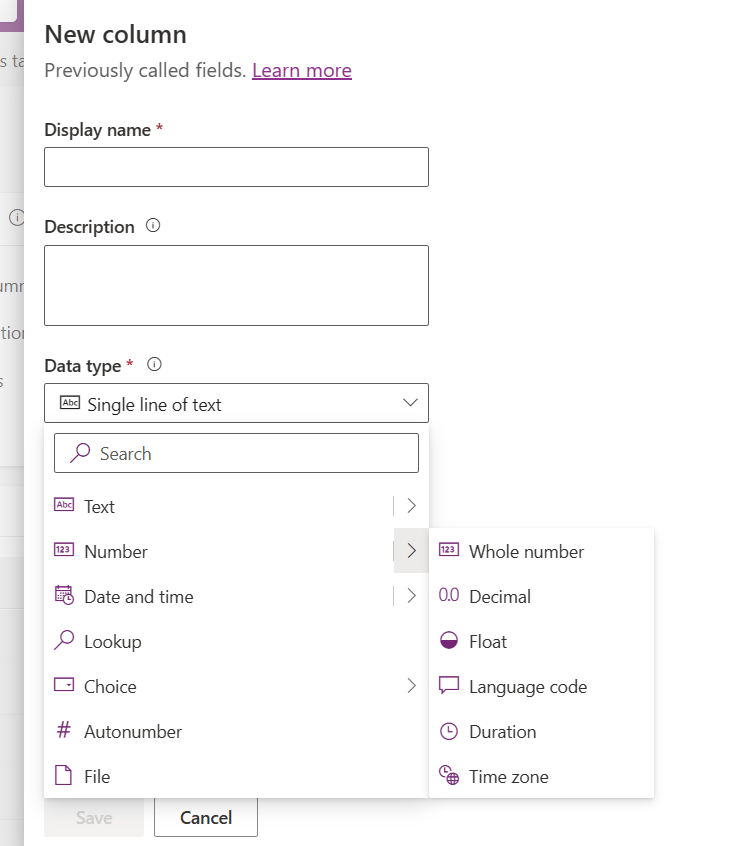
First, we need to create those "structured" columns that we need. Then, for the "unstructured" columns, we can define it via JSON column. Here is the data type that we can define:
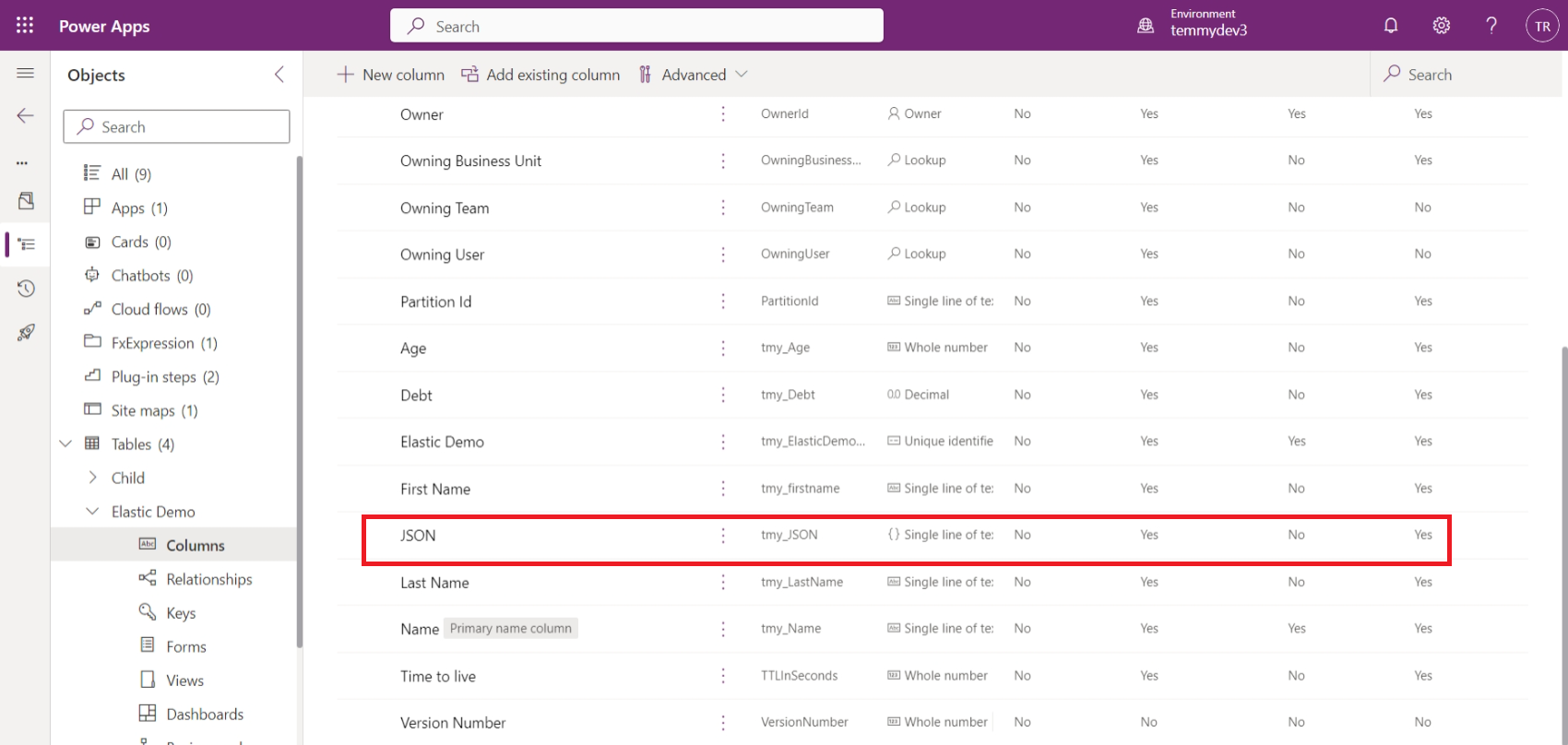
For the demo, I added several columns:
Then I created this record and tested the query using ExecuteCosmosSqlQuery (the base code I took from the PowerApps sample and modified a bit based on my needs):
using Microsoft.Extensions.DependencyInjection;
using Microsoft.PowerPlatform.Dataverse.Client;
using Microsoft.Xrm.Sdk;
using Microsoft.Xrm.Sdk.Messages;
using Microsoft.Xrm.Sdk.Query;
using Newtonsoft.Json;
var builder = Helper.CreateHostBuilder().Build();
var serviceProvider = builder.Services;
var service1 = serviceProvider.GetRequiredService<ServiceClient>();
var row = new Entity("tmy_elasticdemo")
{
    ["tmy_name"] = $"DEMO-MANUAL2",
    ["tmy_firstname"] = "Temmy",
    ["tmy_lastname"] = "Raharjo",
    ["tmy_age"] = 32,
    ["tmy_debt"] = 2000.5m,
    ["partitionid"] = "demo",
    ["tmy_json"] = JsonConvert.SerializeObject(new JsonModel { ParentName = "Liap Kien Tjing", Salary = 2000})
};
service1.Create(row);
var query = "select e.props.tmy_name, e.props.tmy_firstname, e.props.tmy_lastname, e.props.tmy_age, e.props.tmy_debt, e.props.tmy_json " +
    "from e where e.props.tmy_age > 30 and e.props.tmy_debt > 100 and e.props.tmy_json.Salary > 1000 ";
var queryCosmos = ExecuteCosmosSqlQuery(service1, query, "tmy_elasticdemo", "demo");
Console.ReadKey();
ExecuteCosmosSqlQueryResponse ExecuteCosmosSqlQuery(
            IOrganizationService service,
            string query,
            string entityLogicalName,
            string partitionId,
            long pageSize = 100,
            string? pagingCookie = null)
{
    // Using OrganizationRequest because SDK doesn't yet have ExecuteCosmosSqlQueryRequest class
    OrganizationRequest request = new("ExecuteCosmosSqlQuery")
    {
        Parameters = {
                    {"QueryText", query },
                    {"EntityLogicalName", entityLogicalName },
                    {"PageSize", pageSize },
                    {"PagingCookie", pagingCookie },
                    {"PartitionId", partitionId }
                }
    };
    OrganizationResponse response = service.Execute(request);
    // ExecuteCosmosSqlQuery returns an Entity
    Entity resultEntity = (Entity)response.Results["Result"];
    // Get the known properties of the entity returned
    resultEntity.TryGetAttributeValue("PagingCookie", out pagingCookie);
    resultEntity.TryGetAttributeValue("HasMore", out bool hasMore);
    resultEntity.TryGetAttributeValue("Result", out string result);
    // Return the response with a custom ExecuteCosmosSqlQueryResponse class
    // ExecuteCosmosSqlQueryResponse is not in the SDK.
    return new ExecuteCosmosSqlQueryResponse
    {
        PagingCookie = pagingCookie,
        HasMore = hasMore,
        Result = result
    };
}
public class JsonModel
{
    public string ParentName { get; set; }
    public decimal Salary { get; set; }
}
public class ExecuteCosmosSqlQueryResponse : Entity
{
    [AttributeLogicalName("PagingCookie")]
    public string? PagingCookie
    {
        get => GetAttributeValue<string?>("PagingCookie");
        set => SetAttributeValue("PagingCookie", value);
    }
    [AttributeLogicalName("HasMore")]
    public bool HasMore
    {
        get => GetAttributeValue<bool>("HasMore");
        set => SetAttributeValue("HasMore", value);
    }
    [AttributeLogicalName("Result")]
    public string? Result
    {
        get => GetAttributeValue<string?>("Result");
        set => SetAttributeValue("Result", value);
    }
}
Here is the result:
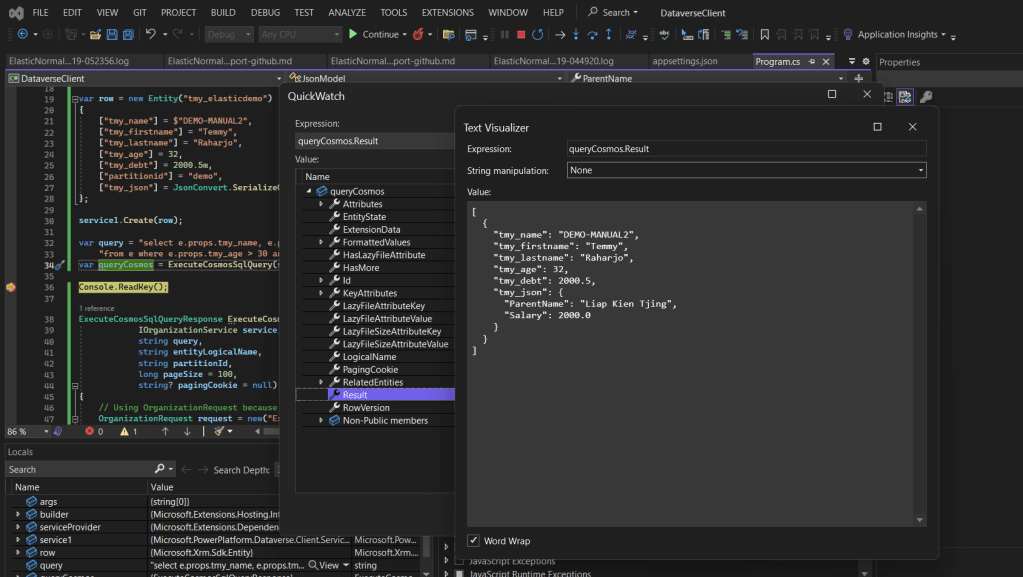
As you can see, the result is a string JSON.
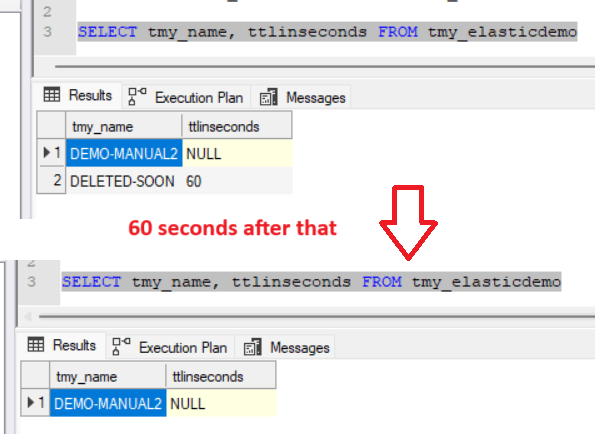
We also have an additional feature to auto-delete using the ttlinsecondsattribute that you can read here. For this purpose, I created this record:
var row = new Entity("tmy_elasticdemo")
{
    ["tmy_name"] = $"DELETED-SOON",
    ["tmy_firstname"] = "Temmy",
    ["tmy_lastname"] = "Raharjo",
    ["tmy_age"] = 32,
    ["tmy_debt"] = 2000.5m,
    ["partitionid"] = "demo",
    ["tmy_json"] = JsonConvert.SerializeObject(new JsonModel { ParentName = "Liap Kien Tjing", Salary = 2000}),
    ["ttlinseconds"] = 60
};
service1.Create(row);
Below is the query using SQL4CDS (after creating and also 60 seconds later):
Summary
The combination of querying data using KQL (similar to SQL query) and auto-delete will help in lots of scenarios. I can see lots of scenarios for example where the data structure keeps changing, we can use this kind of table. Also, the auto-delete feature can be used if we want to implement an expiry feature.
Happy CRM-ing!
Leave a comment
Your comment is sent privately to the author and isn't published on the site.