.NET , dynamics-crm , powerplatform , tips
Dataverse: Create ServiceClient Strategy

I just realized creating ServiceClient is an expensive operation (I found one blog post that confirmed this problem even though this was an article from 2017). During one of the API call tests, almost half of the time was wasted on the creation of ServiceClient. Before, I always thought we needed to use one ServiceClient per scope (assuming you will create the ServiceClient based on the App User). So, in this blog post, we will compare the "cache" vs the new instance of ServiceClient per call.
Benchmark Code
To prove this, I have 3 Dataverse connection strings:
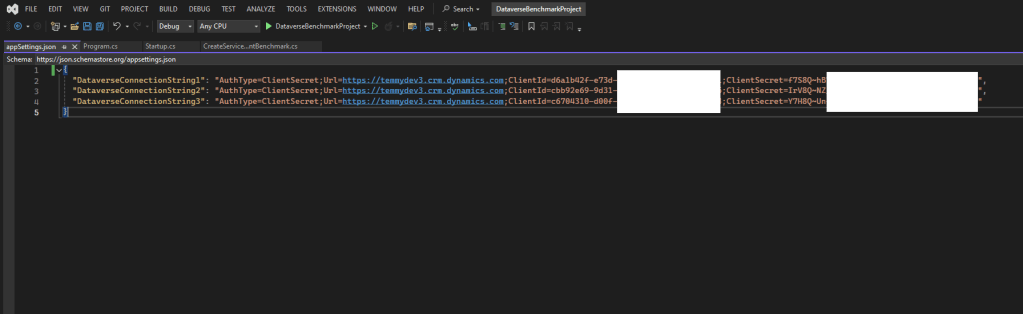
Connection Strings
In the below code, you can see the Startup and also connection logic:
using Microsoft.Extensions.Configuration;
using Microsoft.Extensions.DependencyInjection;
using Microsoft.Extensions.Hosting;
using Microsoft.PowerPlatform.Dataverse.Client;

namespace DataverseBenchmarkProject;

public static class Startup
{
    public static IHost GetApplicationHost()
    {
        var hostBuilder = new HostBuilder()
            .ConfigureAppConfiguration(builder => builder.SetBasePath(Directory.GetCurrentDirectory())
                .AddJsonFile("appSettings.json", optional: false, reloadOnChange: true))
            .ConfigureServices((context, services) =>
            {
                var connectionStrings = context.Configuration.AsEnumerable().Where(e => e.Key.Contains("DataverseConnectionString")).Select(e => e.Value).ToArray();
                services.AddSingleton(new ConnectionString(connectionStrings));
            });

        return hostBuilder.Build();
    }
}

public record ConnectionString(string[] ConnectionStrings);

public class XrmConnection
{
    private static readonly object _lock = new();
    public XrmConnection(ConnectionString connectionString)
    {
        Connections = connectionString.ConnectionStrings.Select(e => new Connection { ConnectionString = e }).ToArray();
    }
    public static Connection[] Connections { get; private set; }

    public string GetConnectionString()
    {
        lock (_lock)
        {
            var minValue = Connections.Min(e => e.Counter);
            var index = -1;
            for (int i = 0; i < Connections.Length; i++)
            {
                if (Connections[i].Counter != minValue) continue;
                index = i;
                break;
            }
            Connections[index].Counter++;

            return Connections[index].ConnectionString;
        }
    }

    public ServiceClient GetServiceClient()
    {
        lock (_lock)
        {
            var minValue = Connections.Min(e => e.Counter);
            var index = -1;
            for (int i = 0; i < Connections.Length; i++)
            {
                if (Connections[i].Counter != minValue) continue;
                index = i;
                break;
            }

            return Connections[index].GetServiceClient();
        }
    }
}

public class Connection
{
    public Connection()
    {
        Counter = 0;
        ExpiredOn = DateTime.MinValue;
    }

    public string ConnectionString { get; set; }
    public int Counter { get; set; }
    public DateTime? ExpiredOn { get; set; }

    private static ServiceClient? _serviceClient = null;
    public ServiceClient GetServiceClient()
    {
        Counter += 1;
        if (ExpiredOn.GetValueOrDefault() <= DateTime.UtcNow)
        {
            // https://learn.microsoft.com/en-us/entra/identity-platform/access-tokens
            ExpiredOn = DateTime.UtcNow.AddMinutes(45);
            _serviceClient = new ServiceClient(ConnectionString);

            Console.WriteLine($"New ServiceClient created. Counter: {Counter}. ExpiredOn: {ExpiredOn}");
        }
        return _serviceClient;
    }
}
Basically for the Startup.cs, we just need to retrieve the connection string information. Then, we will create an XrmConnection instance where it will contain an array of Connection.
In the Connection class, we will keep the ConnectionString, Counter, and also ExpiredOn. Based on this article, the access token from the Microsoft identity platform will be valid for an average of 75 minutes:
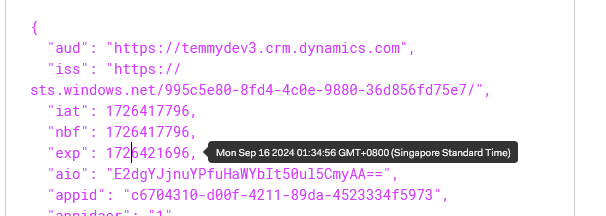
Validate token expiry is around 1 hour based on my manual test
So, assuming, 75 minutes is the average, I set the code to always renew in 45 minutes since ServiceClient was created (GetServiceClient method).
And the below is the benchmark code:
using BenchmarkDotNet.Attributes;
using BenchmarkDotNet.Configs;
using Microsoft.Crm.Sdk.Messages;
using Microsoft.Extensions.DependencyInjection;
using Microsoft.PowerPlatform.Dataverse.Client;
using Microsoft.Xrm.Sdk;

namespace DataverseBenchmarkProject;

[MemoryDiagnoser]
[Config(typeof(Config))]
[Orderer(BenchmarkDotNet.Order.SummaryOrderPolicy.FastestToSlowest)]
[SimpleJob(launchCount: 1, warmupCount: 0)]
public class CreateServiceClientBenchmark
{
    private class Config : ManualConfig
    {
        public Config()
        {
            SummaryStyle = DefaultConfig.Instance.SummaryStyle
                .WithTimeUnit(Perfolizer.Horology.TimeUnit.Millisecond);
        }
    }

    public CreateServiceClientBenchmark()
    {
        var connectionStrings = Startup.GetApplicationHost().Services.GetService<ConnectionString>()!;
        _xrmConnection1 = new XrmConnection(connectionStrings);
        _xrmConnection2 = new XrmConnection(connectionStrings);
    }

    private readonly XrmConnection _xrmConnection1;
    [Benchmark]
    public void BenchmarkCacheServiceClient()
    {
        var serviceClient = _xrmConnection1.GetServiceClient();
    }

    [Benchmark]
    public void BenchmarkCacheServiceClientWithExecuteWhoAmI()
    {
        var serviceClient = _xrmConnection1.GetServiceClient();
        ExecuteWhoAmI(serviceClient);
    }

    private readonly XrmConnection _xrmConnection2;
    [Benchmark]
    public void BenchmarkCreateServiceClient()
    {
        var serviceClient = new ServiceClient(_xrmConnection2.GetConnectionString());
    }

    [Benchmark]
    public void BenchmarkCreateServiceClientWithExecuteWhoAmI()
    {
        var serviceClient = new ServiceClient(_xrmConnection2.GetConnectionString());
        ExecuteWhoAmI(serviceClient);
    }

    private void ExecuteWhoAmI(IOrganizationService service)
    {
        var res = (WhoAmIResponse)service.Execute(new WhoAmIRequest());
        Console.WriteLine($"{DateTime.Now} - User ID: {res.UserId}. Business Unit: {res.BusinessUnitId}. Org Id: {res.OrganizationId}..");
    }
}
Here is the result of the benchmark:
BenchmarkDotNet v0.14.0, Windows 11 (10.0.22631.4112/23H2/2023Update/SunValley3)
AMD Ryzen 5 5600G with Radeon Graphics, 1 CPU, 12 logical and 6 physical cores
.NET SDK 8.0.300
  [Host]     : .NET 8.0.5 (8.0.524.21615), X64 RyuJIT AVX2
  Job-XGXBQS : .NET 8.0.5 (8.0.524.21615), X64 RyuJIT AVX2

LaunchCount=1  WarmupCount=0
| Method | Mean | Error | StdDev | Median | Allocated |
|---|---|---|---|---|---|
| BenchmarkCacheServiceClient | 0.0106 ms | 0.0017 ms | 0.0050 ms | 0.0087 ms | 1.03 KB |
| BenchmarkCacheServiceClientWithExecuteWhoAmI | 266.0957 ms | 2.1683 ms | 1.8106 ms | 265.9349 ms | 66.95 KB |
| BenchmarkCreateServiceClient | 445.6186 ms | 10.8126 ms | 31.8811 ms | 442.6206 ms | 374.58 KB |
| BenchmarkCreateServiceClientWithExecuteWhoAmI | 1,456.1922 ms | 27.9466 ms | 34.3210 ms | 1,458.3642 ms | 489.63 KB |
In the above results, you can see the comparison between cached (aka Singleton) vs always creating ServiceClient (0.0106 ms vs 445.6186 ms). Then, I also added the differences when we need to call WhoAmIRequestso you know that the ServiceClient is a valid object.
Hope you learn something and happy CRM-ing!
Leave a comment
Your comment is sent privately to the author and isn't published on the site.