C# , Clean Code , dynamics-crm , powerautomate , powerplatform , tips
Create Dataverse Record and Set SharedVariable From PowerAutomate

In Dataverse, we can add several additional parameters when we request something that you can check in this documentation. And from all the optional parameters provided, my favorite is the "Tag" parameter that allows us to pass SharedVariableto the Plugin. In the documentation above, you can see how we can pass those parameters using a WebAPI request. But when dealing with PowerAutomate, there is no easy option to implement it (if you want to use WebAPI call in PowerAutomate, you can follow this link). This blog post will teach you to make an alternative way to implement this using CustomAPI(I tried to make it as general as possible by looking at the implementation of this PowerApps Sample).
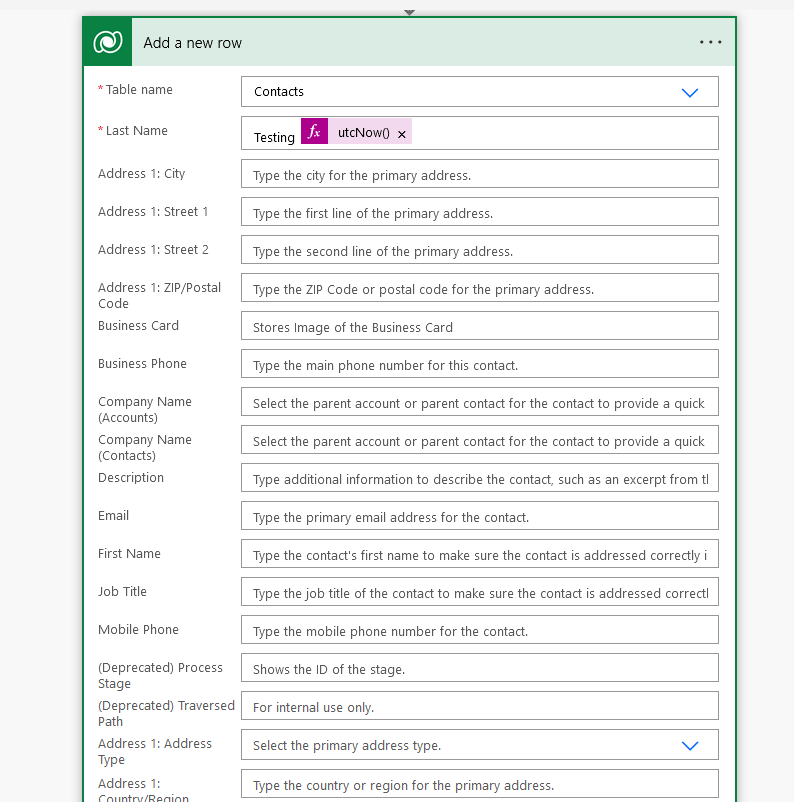 No way to add SharedVariable from the "Add a new row" action in PowerAutomate
Create Custom API Definition
First, we need to create a Custom API that you can follow in the below picture (I'm using David Rivard: XrmToolBoxPlugin - Custom API Manager):
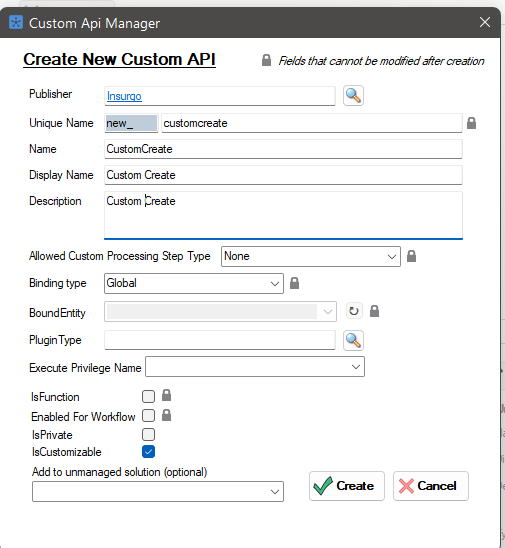 Create Custom API
For the input, we will have two parameters:
- CustomCreateEntityParameter: JSON Entity string (Required)
- CustomCreateAdditionalParameter: JSON string object defines the optional parameters that we can pass (Optional). For today's demonstration, I only will set the Tag parameter.
For the output, we will set a string parameter named CustomCreateResultParameterthat will return the GUID of the created entity.
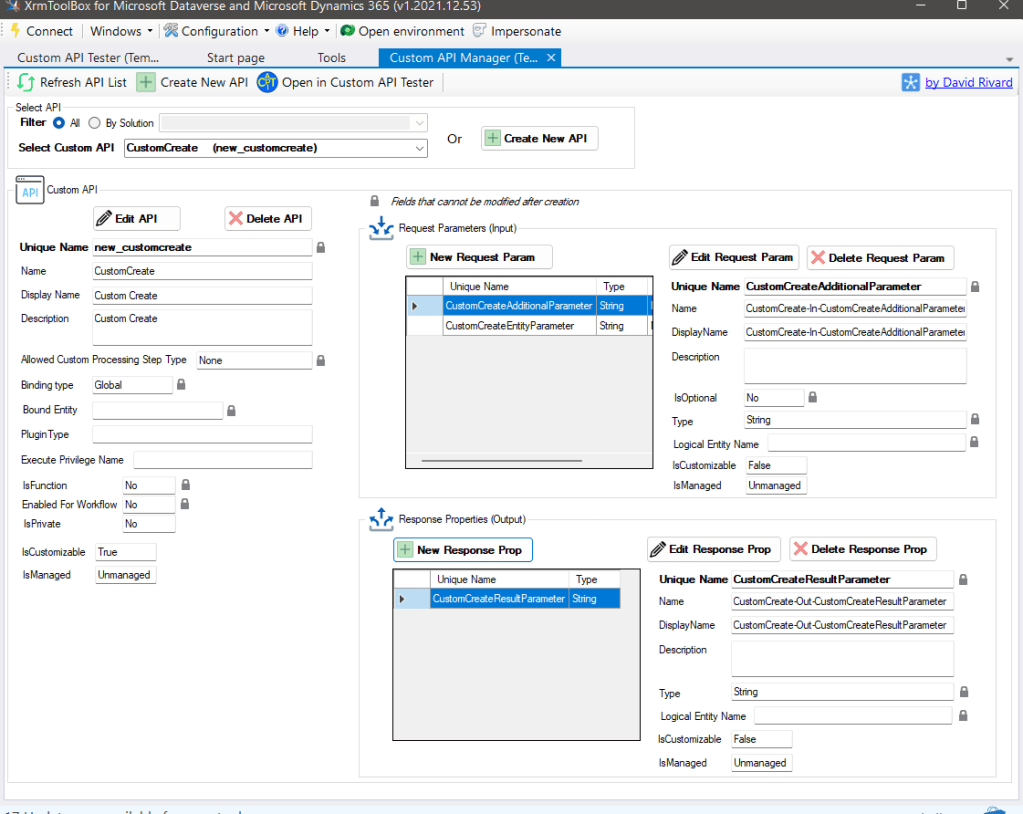 Add the In-Out parameters
Plugin Code
The next step is to consume all those parameters in the code:
using Microsoft.Xrm.Sdk;
using Microsoft.Xrm.Sdk.Messages;
using System;
using System.IO;
using System.Runtime.Serialization.Json;
using System.Text;

namespace DemoPlugin
{
    public class CustomCreateAction : IPlugin
    {
        public class AdditionalParameters
        {
            public string Tag { get; set; }
        }

        public void Execute(IServiceProvider serviceProvider)
        {
            var pluginExecutionContext = (IPluginExecutionContext)serviceProvider.GetService(typeof(IPluginExecutionContext));
            IOrganizationServiceFactory serviceFactory = (IOrganizationServiceFactory)serviceProvider.GetService(typeof(IOrganizationServiceFactory));
            IOrganizationService service = serviceFactory.CreateOrganizationService(pluginExecutionContext.UserId);

            var entityJsonParam = pluginExecutionContext.InputParameters["CustomCreateEntityParameter"]?.ToString();

            if (string.IsNullOrEmpty(entityJsonParam)) throw new NullReferenceException(nameof(entityJsonParam));

            var additionalParam = pluginExecutionContext.InputParameters["CustomCreateAdditionalParameter"]?.ToString();

            var entity = entityJsonParam.Deserialize<Entity>();
            var param = additionalParam.Deserialize<AdditionalParameters>() ?? new AdditionalParameters();

            var createRequest = new CreateRequest
            {
                Target = entity
            };

            if (!string.IsNullOrEmpty(param.Tag))
            {
                createRequest["tag"] = param.Tag;
            }

            var result = (CreateResponse)service.Execute(createRequest);

            pluginExecutionContext.OutputParameters["CustomCreateResultParameter"] = result.id;
        }
    }

    public static class StringExtensions
    {
        public static TObject Deserialize<TObject>(this string text)
        {
            if (string.IsNullOrEmpty(text)) return default;

            using (MemoryStream ms = new MemoryStream(Encoding.Default.GetBytes(text)))
            {
                var serializer = new DataContractJsonSerializer(typeof(TObject));

                return (TObject)serializer.ReadObject(ms);
            }
        }
    }
}
To make the implementation generic, DataContractJsonSerializer will be used to allow us to Deserialize the JSON string to the Entity object easily. The last piece of the code is to set the Entity to the CreateRequestwith the additional parameters that we defined.
Register The Plugin
Build the project > go to your Plugin Registration Tools and register the assembly.
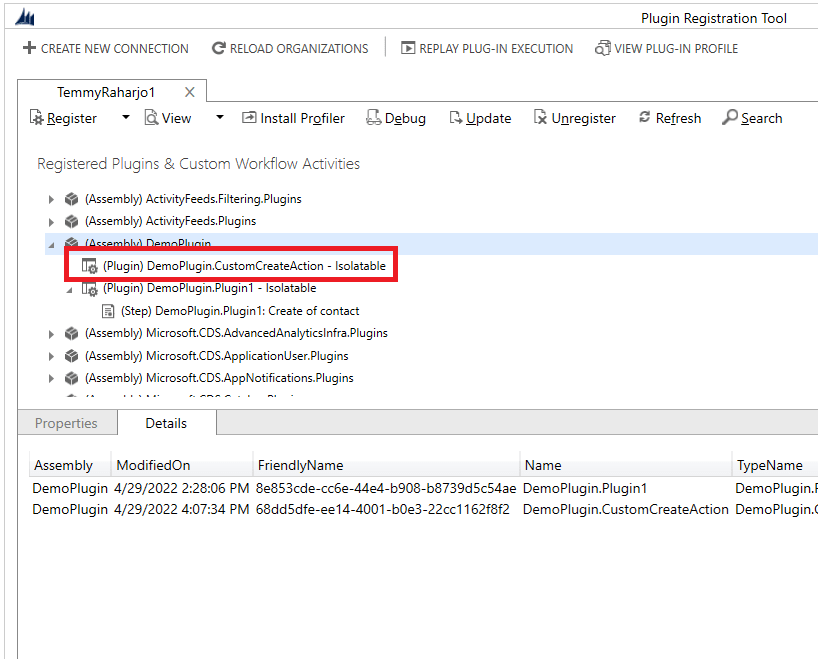 Register the plugin
Set The Custom API to The Plugin
Open back your Custom API Manager, and set the Custom API to the correct Plugin:
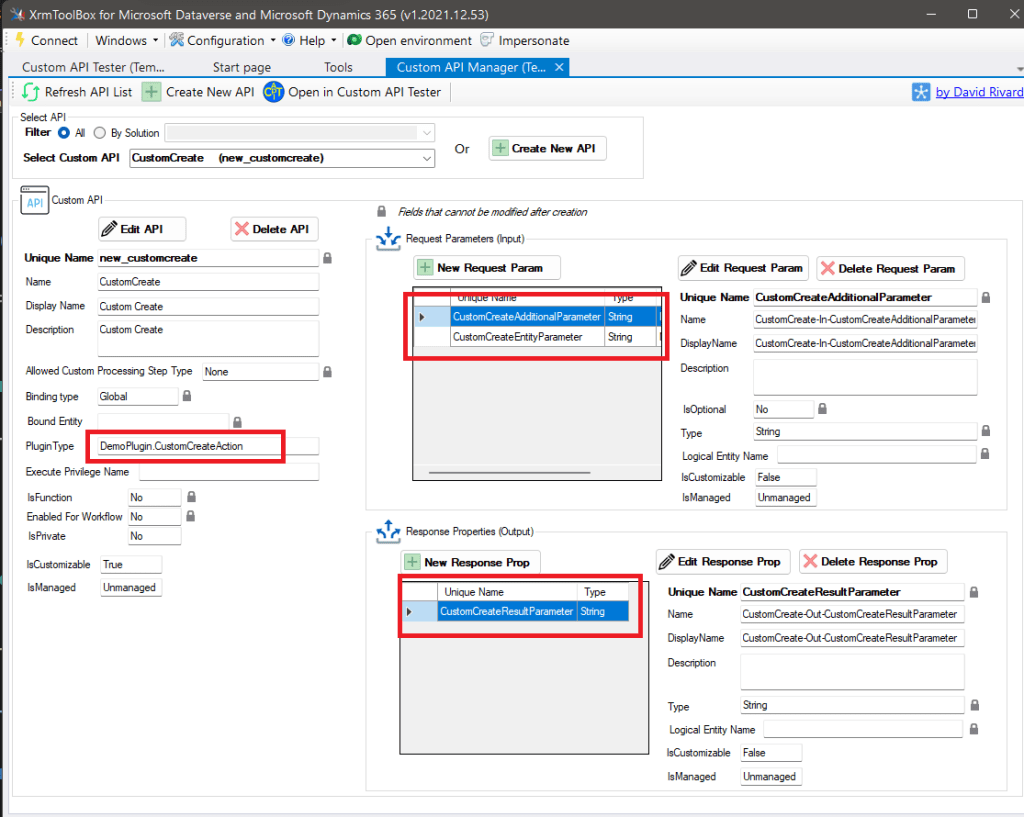 Set the Plugin Type
Prepare The Demo
For the demonstration purpose, we will create a Contact. To prove that the code above works, I made a simple Plugin that will be registered on Contact's Create Message:
using Microsoft.Xrm.Sdk;
using System;

namespace DemoPlugin
{
    public class Plugin1 : IPlugin
    {
        public void Execute(IServiceProvider serviceProvider)
        {
            var context = (IPluginExecutionContext)
                serviceProvider.GetService(typeof(IPluginExecutionContext));

            if (context.SharedVariables.ContainsKey("tag") &&
                bool.Parse(context.SharedVariables["tag"].ToString()))
            {
                return;
            }

            var target = context.InputParameters["Target"] as Entity;
            if (target == null) return;

            target["address3_composite"] = "From Plugin";
        }
    }
}
If the Tag's being passed (boolean value), it will skip setting address3_compositeattribute.
Testing on the Custom API Tester by Jonas Rapp:
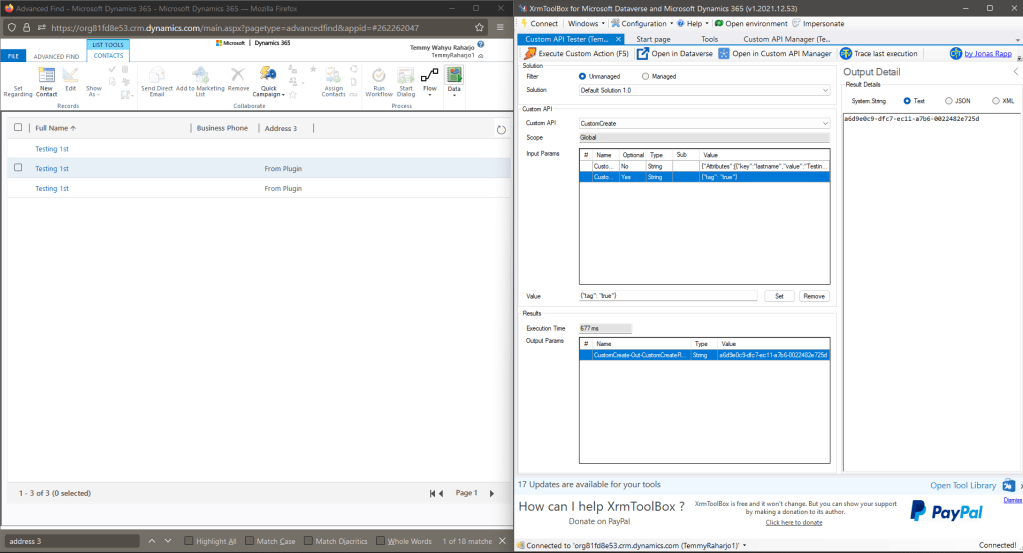 Testing using Custom API Tester by Jonas Rapp
Sample of the Contact's JSON string:
{"Attributes": [	{		"key": "lastname",		"value": "Testing 1st"	}],"LogicalName": "contact"
}
Last, to call it in Power Automate, you can call using "Perform an unbound action" like the below picture:
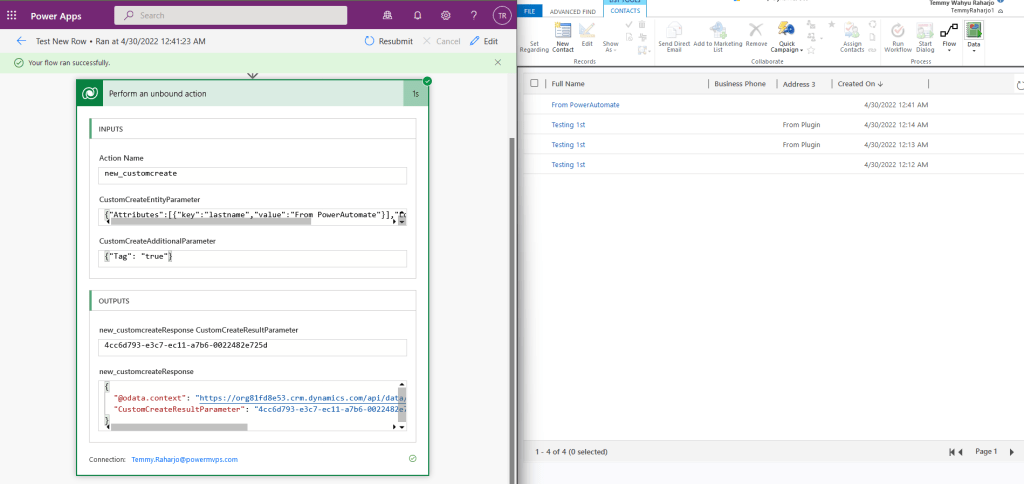 Result
Happy CRM-ing!
Leave a comment
Your comment is sent privately to the author and isn't published on the site.