C# , dynamics-crm , powerplatform , tips
Dataverse: UpsertRequest vs Custom API. Which one is faster?

For those who don't know, we already have UpsertRequestfor so long (I learned how to use it correctly in this blog post that you can read here). UpsertRequestis a feature where we can request Dataverse to create or update the data based on columns that we are defined. In particular, we need to create Alternative Key (or Key) and set those key(s) when calling the UpsertRequest. But, I wonder if we created the Custom API that mimics the same functionality. Which one is faster?
Custom API - Upsert
First, I created the below Custom API Code:
using System;
using System.Linq;
using Microsoft.Xrm.Sdk;
using Microsoft.Xrm.Sdk.Extensions;
using Microsoft.Xrm.Sdk.Query;
using Newtonsoft.Json;
namespace BlogPackage
{
    public class UpsertApi : PluginBase
    {
        public class AlternativeAttribute
        {
            public string AttributeName { get; set; }
            public string AttributeValue { get; set; }
        }
        public class ResultModel
        {
            public bool IsRecordCreated { get; set; }
            public Guid Id { get; set; }
        }
        public const string InputEntityName = "Entity";
        public const string InputAlternativeKeyName = "AlternativeKey";
        public const string OutputName = "Result";
        public UpsertApi() : base(typeof(UpsertApi))
        {
        }
        protected override void ExecuteDataversePlugin(ILocalPluginContext localPluginContext)
        {
            var entity = localPluginContext.PluginExecutionContext.InputParameterOrDefault<Entity>(InputEntityName) ??
                         throw new ArgumentNullException(InputEntityName);
            var alternativeKey =
                localPluginContext.PluginExecutionContext.InputParameterOrDefault<string>(InputAlternativeKeyName) ??
                throw new ArgumentNullException(InputAlternativeKeyName);
            var alternativeData = JsonConvert.DeserializeObject<AlternativeAttribute[]>(alternativeKey);
            var existing = GetExisting(localPluginContext.InitiatingUserService, entity, alternativeData);
            if (existing != null)
            {
                entity.Id = existing.Id;
                localPluginContext.InitiatingUserService.Update(entity);
                localPluginContext.PluginExecutionContext.OutputParameters[OutputName] = JsonConvert.SerializeObject(
                    new ResultModel
                    {
                        Id = existing.Id,
                        IsRecordCreated = false
                    });
                return;
            }
            var id = localPluginContext.InitiatingUserService.Create(entity);
            localPluginContext.PluginExecutionContext.OutputParameters[OutputName] = JsonConvert.SerializeObject(
                new ResultModel
                {
                    Id = id,
                    IsRecordCreated = true
                });
        }
        private Entity GetExisting(IOrganizationService service, Entity entity, AlternativeAttribute[] alternativeData)
        {
            var query = new QueryExpression(entity.LogicalName)
            {
                ColumnSet = new ColumnSet(false),
                NoLock = true
            };
            foreach (var attribute in alternativeData)
            {
                query.Criteria.AddCondition(attribute.AttributeName, ConditionOperator.Equal, attribute.AttributeValue);
            }
            var result = service.RetrieveMultiple(query);
            return result.Entities.FirstOrDefault();
        }
    }
}
In the above code, you can see that we will query the data in Dataverse based on the Attribute column(s) + value(s) that we are defined. If no data, we will create the record. Else, we will update the data.
Once we created the code, I defined the below Custom API (like usual, I'm using XRMToolBox - Dataverse Custom API Manager by David Rivard):
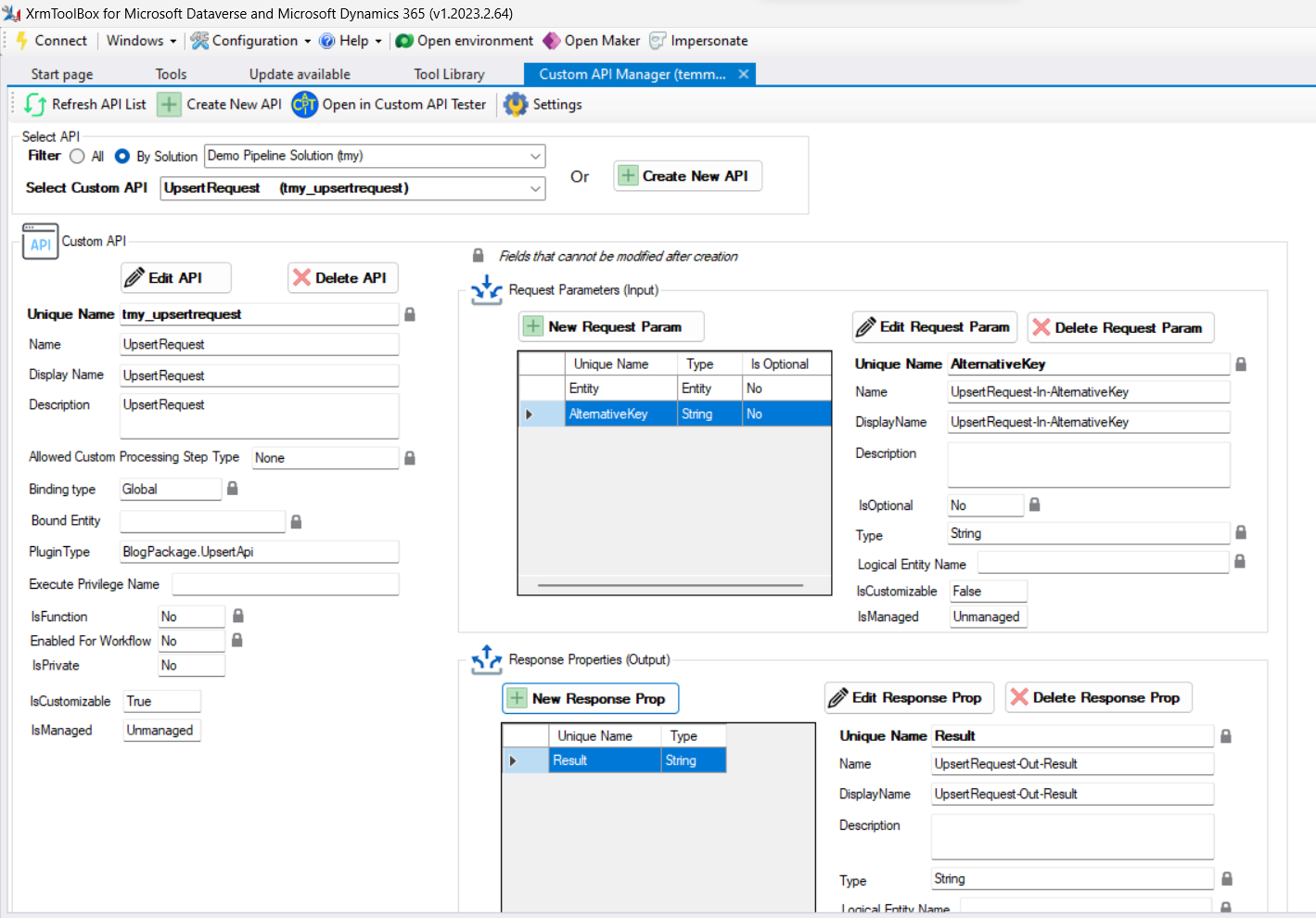
For calling the execution, I created the below exe (using Dataverse Service Client):
using DataverseClient;
using Microsoft.Extensions.DependencyInjection;
using Microsoft.PowerPlatform.Dataverse.Client;
using Microsoft.Xrm.Sdk;
using Newtonsoft.Json;
var builder = Helper.CreateHostBuilder().Build();
var serviceProvider = builder.Services;
var service = serviceProvider.GetRequiredService<IOrganizationServiceAsync2>();
// Created
Execute("Temmy", "Raharjo");
// Updated
Execute("Temmy", "Raharjo");
// Created
Execute("Lusia", "Febriani");
// Updated
Execute("Lusia", "Febriani");
// Created
Execute("Jeanetta", "Clarisse Raharjo");
// Updated
Execute("Jeanetta", "Clarisse Raharjo");
// Created
Execute("Jeremiah", "Dillon Raharjo");
// Updated
Execute("Jeremiah", "Dillon Raharjo");
Console.ReadKey();
void Execute(string firstName, string lastName)
{
    var req = new OrganizationRequest("tmy_upsertrequest");
    var entity = new Entity("tmy_upsertdemo");
    entity["tmy_firstname"] = firstName;
    entity["tmy_lastname"] = lastName;
    req.Parameters["Entity"] = entity;
    var attributes = JsonConvert.SerializeObject(new[]
    {
        new AlternativeAttribute { AttributeName = "tmy_firstname", AttributeValue = firstName },
        new AlternativeAttribute { AttributeName = "tmy_lastname", AttributeValue = lastName },
    });
    req.Parameters["AlternativeKey"] = attributes;
    var now = DateTime.Now;
    var result = service.Execute(req);
    var end = DateTime.Now;
    var model = JsonConvert.DeserializeObject<ResultModel>(result.Results["Result"].ToString());
    Console.WriteLine($"Total seconds: {(end - now).TotalSeconds}. IsCreated: {model.IsRecordCreated}. Id: {model.Id}");
}
public class AlternativeAttribute
{
    public string AttributeName { get; set; }
    public string AttributeValue { get; set; }
}
public class ResultModel
{
    public bool IsRecordCreated { get; set; }
    public Guid Id { get; set; }
}
And here is the result for the Custom API:
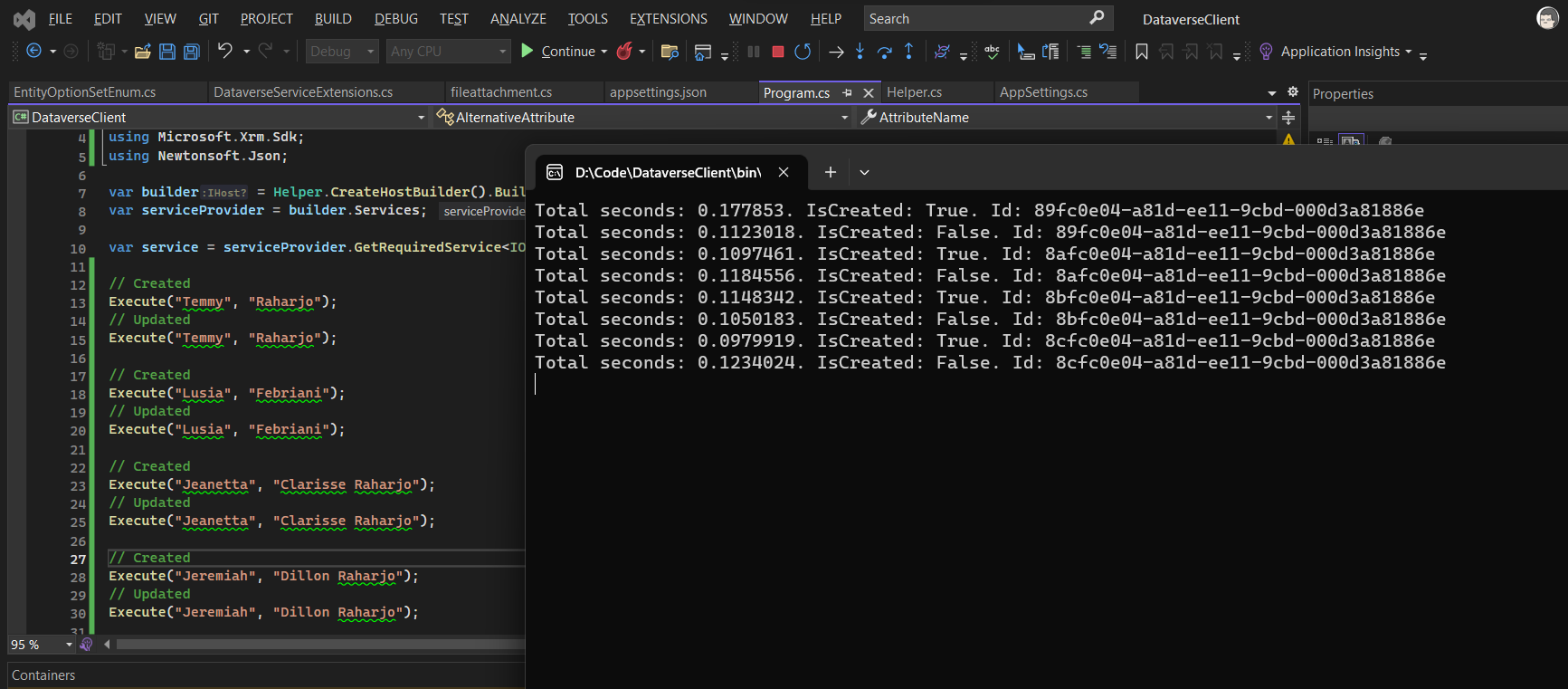
UpsertRequest
Next, for using UpsertRequestwe need to define first the Key (on the previous demo - Custom API, this key not yet exists):
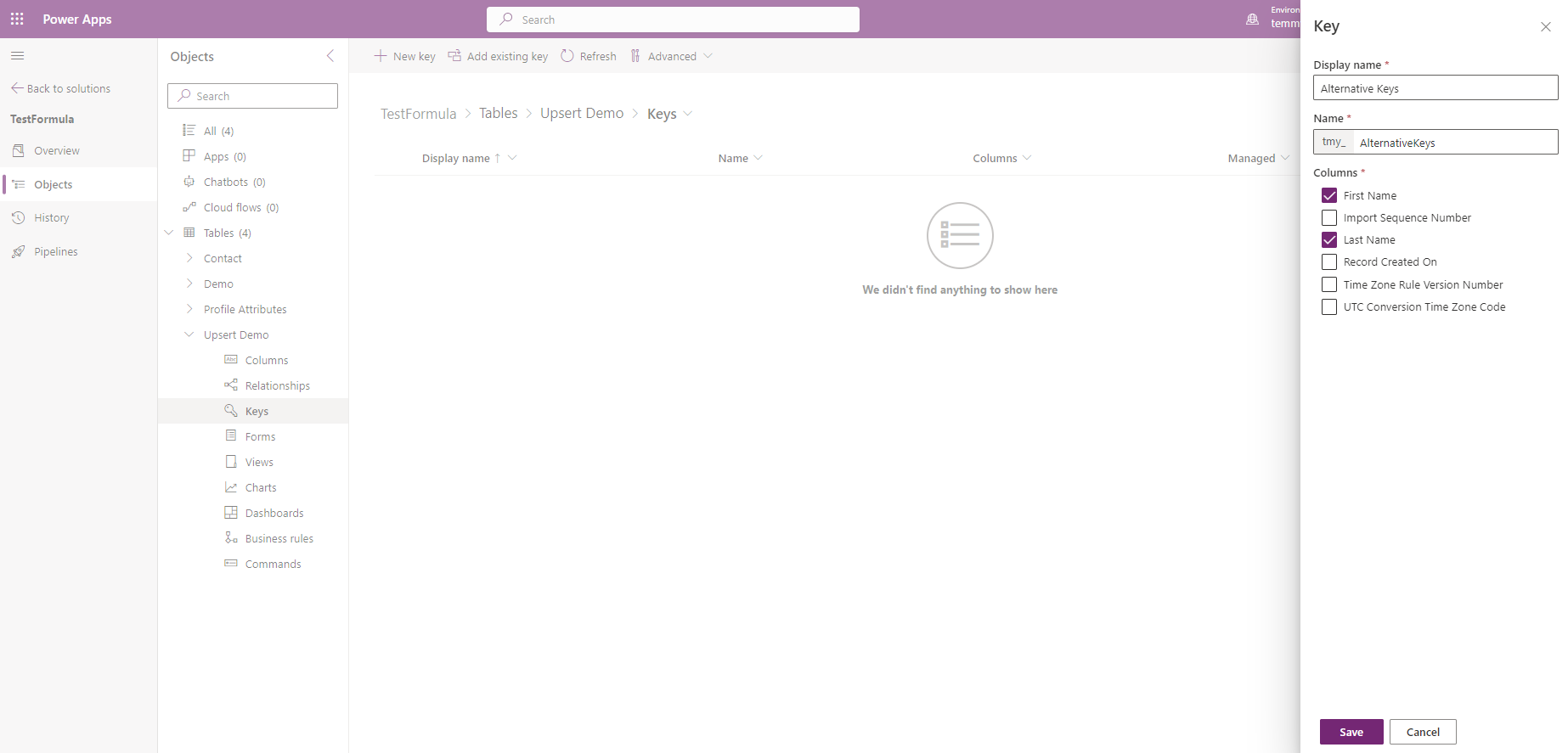
Once you click Save > you need to publish all the customizations and make sure your key is ready.
Then, for calling the UpsertRequest we can use the below code:
using DataverseClient;
using Microsoft.Extensions.DependencyInjection;
using Microsoft.PowerPlatform.Dataverse.Client;
using Microsoft.Xrm.Sdk;
using Microsoft.Xrm.Sdk.Messages;
using Newtonsoft.Json;
var builder = Helper.CreateHostBuilder().Build();
var serviceProvider = builder.Services;
var service = serviceProvider.GetRequiredService<IOrganizationServiceAsync2>();
// Created
UpsertRequest("Temmy", "Raharjo");
// Updated
UpsertRequest("Temmy", "Raharjo");
// Created
UpsertRequest("Lusia", "Febriani");
// Updated
UpsertRequest("Lusia", "Febriani");
// Created
UpsertRequest("Jeanetta", "Clarisse Raharjo");
// Updated
UpsertRequest("Jeanetta", "Clarisse Raharjo");
// Created
UpsertRequest("Jeremiah", "Dillon Raharjo");
// Updated
UpsertRequest("Jeremiah", "Dillon Raharjo");
Console.ReadKey();
void UpsertRequest(string firstName, string lastName)
{
    var entity = new Entity("tmy_upsertdemo");
    entity["tmy_firstname"] = firstName;
    entity["tmy_lastname"] = lastName;
    entity.KeyAttributes.Add("tmy_firstname", firstName);
    entity.KeyAttributes.Add("tmy_lastname", lastName);
    var req = new UpsertRequest { Target = entity };
    var now = DateTime.Now;
    var result = (UpsertResponse)service.Execute(req);
    var end = DateTime.Now;
    Console.WriteLine($"Total seconds: {(end - now).TotalSeconds}. IsCreated: {result.RecordCreated}. Id: {result.Target.Id}");
}
void Execute(string firstName, string lastName)
{
    var req = new OrganizationRequest("tmy_upsertrequest");
    var entity = new Entity("tmy_upsertdemo");
    entity["tmy_firstname"] = firstName;
    entity["tmy_lastname"] = lastName;
    req.Parameters["Entity"] = entity;
    var attributes = JsonConvert.SerializeObject(new[]
    {
        new AlternativeAttribute { AttributeName = "tmy_firstname", AttributeValue = firstName },
        new AlternativeAttribute { AttributeName = "tmy_lastname", AttributeValue = lastName },
    });
    req.Parameters["AlternativeKey"] = attributes;
    var now = DateTime.Now;
    var result = service.Execute(req);
    var end = DateTime.Now;
    var model = JsonConvert.DeserializeObject<ResultModel>(result.Results["Result"].ToString());
    Console.WriteLine($"Total seconds: {(end - now).TotalSeconds}. IsCreated: {model.IsRecordCreated}. Id: {model.Id}");
}
public class AlternativeAttribute
{
    public string AttributeName { get; set; }
    public string AttributeValue { get; set; }
}
public class ResultModel
{
    public bool IsRecordCreated { get; set; }
    public Guid Id { get; set; }
}
And here is the result:
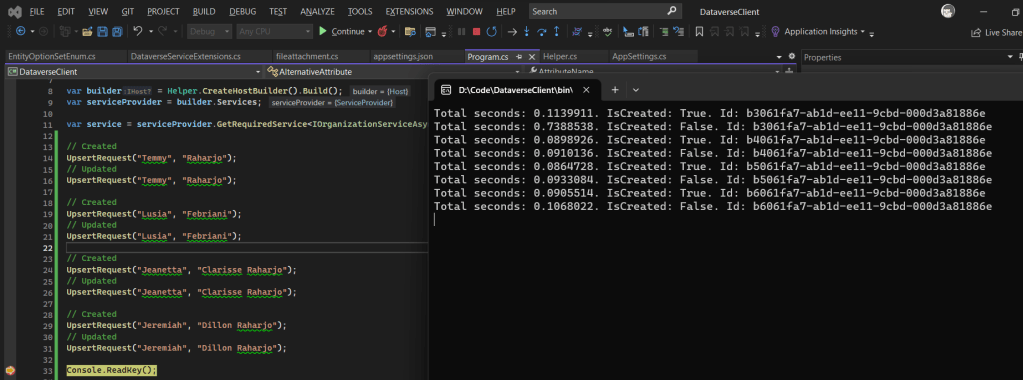
As you can see in the above result. The winner is UpsertRequest (the first two execution same with Custom API, but the others are totally different) because I believe when we create the key, in behind we actually create SQL Index that makes it faster to retrieve the data (with very minimum code that we need to apply). Hence using UpsertRequest will be a better approach especially if you are creating batch execution and need consistency.
Happy CRM-ing!
Leave a comment
Your comment is sent privately to the author and isn't published on the site.