Azure , dynamics-crm , Javascript , powerplatform , typescript
Azure-MSAL: Implement loginRedirect In Angular+Call CRM Action

In this blog post, we learn how to display CRM data in SPA (Vue.js). For that purpose, we are using @azure/msal-browser and calling the loginPopup method whereby as you can see in the demonstration section, it will pop up a form to do the login process. Today, we will learn how to use the loginRedirect method and handle it in Angular. The difference between loginRedirect and loginPopup is just how the system will open the login form. The loginRedirect will redirect the form, while the loginPopup will pop up the login form.
Note: When this blog post is published, even if there is @azure/msal-angular NPM package, we can't use this one because this package uses RxJs version 6, while the Angular version that I'm using needs RxJs version 7 explain in this ticket.
For setting up the Azure Active Directory and how to give permission to your Dynamics CRM environment, you can refer to this blog post.
Only the thing that you need to remember, you need to change the Redirect URIs to the correct URL that you provided.
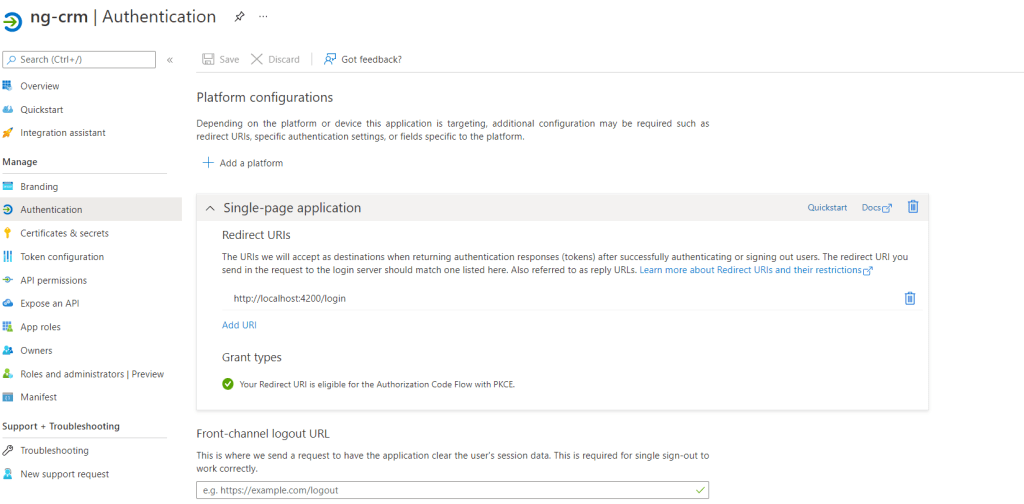 Setup Redirect URIs
The Code
For the login component, here is the source code (to simplify, I put some of the classes in the same place):
import {Component} from '@angular/core';
import {PublicClientApplication} from "@azure/msal-browser";
import {getLoginRequest, getMsalConfig} from "../helper/config";
import {environment} from "../../environments/environment";
import {User} from "../models/user";
import {Router} from "@angular/router";
import {AuthenticationService} from "../services";

@Component({
  selector: 'app-login',
  templateUrl: './login.component.html',
  styleUrls: ['./login.component.css']
})
export class LoginComponent {
  private userAgentApp = new PublicClientApplication(getMsalConfig());

  constructor(private router: Router, private authenticationService: AuthenticationService) {
    this.userAgentApp.handleRedirectPromise().then(loginResponse => {
      if (!loginResponse) return;
      this.acquireTokenSilently(loginResponse?.account?.homeAccountId || '');
    }).catch(error => console.log(error));
  }

  async signIn() {
    this.userAgentApp.loginRedirect(getLoginRequest());
    return false;
  }

  signIn2() {
    this.userAgentApp.loginPopup(getLoginRequest()).then(result => {
      this.acquireTokenSilently(result.account?.homeAccountId || '');
    })
  }

  acquireTokenSilently(homeAccountId: string) {
    const account = this.userAgentApp.getAccountByHomeId(homeAccountId);
    this.userAgentApp.acquireTokenSilent({
      scopes: [`${environment.baseurl}.default`],
      account: account || undefined
    }).then(acquireTokenResult => {
      const data: User = {
        homeAccountId: account?.homeAccountId || '',
        accessToken: acquireTokenResult.accessToken,
        accessTokenExpiresOn: acquireTokenResult.expiresOn || undefined,
        preferredName: account?.username || ''
      }
      this.authenticationService.login(data);
      this.router.navigate(['/home'], {queryParams: {action: 'loginSuccess'}});
    });
  }
}
I created AuthenticationService to be responsible for store+access the token:
import { Injectable } from '@angular/core';
import { BehaviorSubject, Observable } from 'rxjs';

import { User } from '../models/user';
import {environment} from "../../environments/environment";

@Injectable({ providedIn: 'root' })
export class AuthenticationService {
  private currentUserSubject: BehaviorSubject<User>;
  public currentUser: Observable<User>;

  constructor() {
    const item = localStorage.getItem(environment.sessionStorageName);
    const user = item ? JSON.parse(item) as User : {} as User;
    this.currentUserSubject = new BehaviorSubject<User>(user);
    this.currentUser = this.currentUserSubject.asObservable();
  }

  public get currentUserValue(): User {
    return this.currentUserSubject.value;
  }

  login(user: User){
    localStorage.setItem(environment.sessionStorageName, JSON.stringify(user));
    this.currentUserSubject.next(user);
  }

  logout() {
    // remove user from local storage and set current user to null
    localStorage.removeItem(environment.sessionStorageName);
    this.currentUserSubject.next({} as User);
  }
}
Then the last part, is how we demo-ing the result. For the simple scenario, I will just call WhoAmIrequest (you can take a look at Nishant post here), and here is how we do it:
import {Component, OnInit} from '@angular/core';
import {environment} from "../../environments/environment";
import {HttpClient, HttpHeaders} from "@angular/common/http";
import {AuthenticationService} from "../services";

@Component({
  selector: 'app-home',
  templateUrl: './home.component.html',
  styleUrls: ['./home.component.css']
})
export class HomeComponent implements OnInit {
  url: string = `${environment.baseurl}api/data/v9.2/WhoAmI`;

  data: { BusinessUnitId: string; OrganizationId: string; UserId: string; } = {
    BusinessUnitId: '',
    OrganizationId: '',
    UserId: ''
  };

  constructor(private httpClient: HttpClient, private authService: AuthenticationService) {
  }

  ngOnInit(): void {
    console.log(this.url);
  }

  whoAmI() {
    const headers = new HttpHeaders({
      'Authorization': `Bearer ${this.authService.currentUserValue.accessToken}`
    });
    this.httpClient
      .get<{ BusinessUnitId: string; OrganizationId: string; UserId: string; }>
      (this.url, {headers: headers}).subscribe(data => {
      this.data = data;
    });
  }
}
Here is the screenshot for my environment.ts:
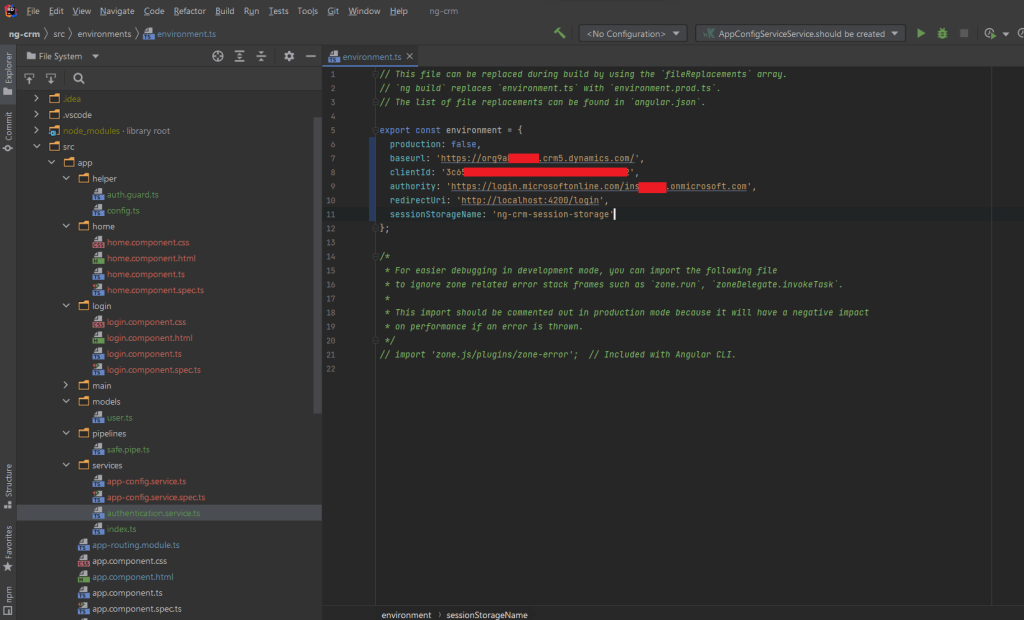 Environment.ts
Demo:
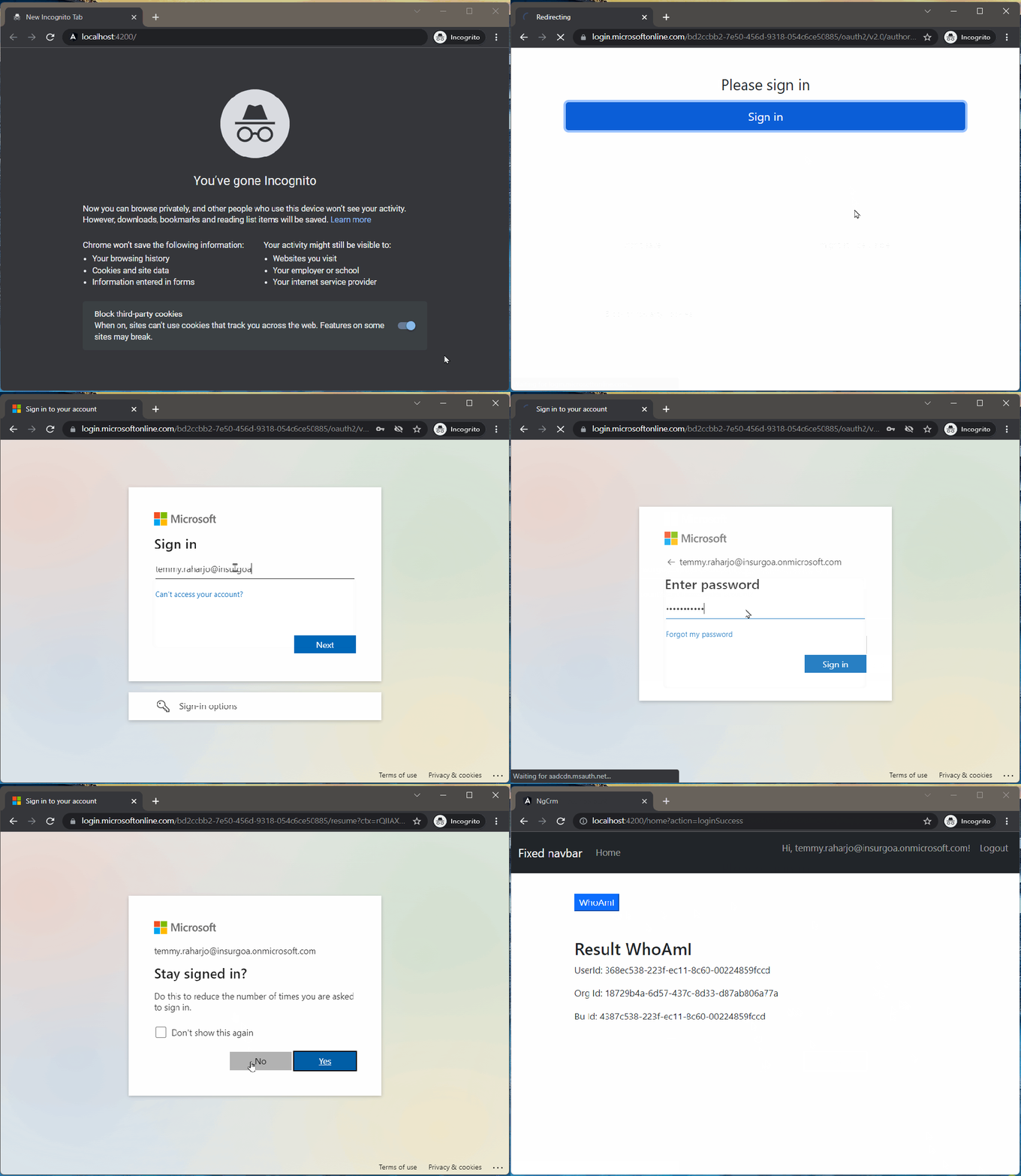 Demo time
Happy CRM-ing!
Leave a comment
Your comment is sent privately to the author and isn't published on the site.